
README file from
GithubTech001 Theme
Overview
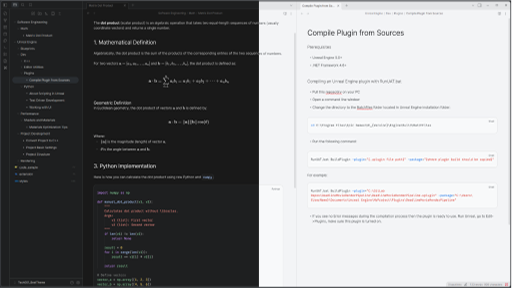
Tech001 is a modern theme designed for developers, technical writers, and minimalists. It pairs a VS Code-style editor with the clean, focus-driven aesthetics of Google's latest design systems — a low-glare Deep Dark mode and a crisp, high-contrast Light mode.
Whether you are writing documentation in the Deep Dark mode (inspired by Gemini / AI Studio) or drafting articles in the Crisp Light mode, Tech001 wraps every panel in a floating card and keeps your content at center stage.
Key Features
Design & UI
- Dual Personality:
- Dark Mode: Deep gray backgrounds, warm gold headings,
VS Code Dark+syntax colors, and cool "Gemini" blue accents. Low-glare for long night sessions. - Light Mode: Warm off-white surfaces, high-contrast near-black headings,
VS Code Light+syntax colors, and a muted Google-docs blue accent. Professional and crisp.
- Dark Mode: Deep gray backgrounds, warm gold headings,
- Floating-Card Workspace: The left and right sidebars, the editor pane(s), and the vault switcher become rounded cards on a recessed backdrop, with an even gap around every panel instead of full-bleed panes meeting at bare edges.
- VS Code Style Editor Tabs: Flat, square tabs sit flush against each other; the active tab takes the editor color with a thin accent line on top and merges into the note body.
- Distraction-Free Chrome: Transparent titlebar and a hidden Obsidian Sync status-bar icon keep the window frame quiet.
Developer Experience
- Clean File Tree: Minimalist dot markers for notes, tightened row padding, and a re-aligned collapse arrow so the hover / active highlight wraps the whole row — arrow, icon, and name together. The Outline pane gets the same alignment fix.
- VS Code Style Syntax:
Dark+andLight+syntax palettes in the editor / Live Preview view, tuned for readability in both light and dark modes. - Framed Code Blocks: Bordered, rounded code blocks in both Reading and Live Preview modes, with the language flair and copy button restyled like a docs site.
Typography & Layout
- Editor-Style Centering: Content sits in a centered column (max 1100px) while the scrollbar stays pinned to the far right edge.
- Visual Hierarchy:
- Headings are light-weight and high-contrast (warm gold in dark, near-black in light).
- Body text in dark mode is slightly muted to reduce eye strain; light mode stays near-black for print-like contrast.
- Bold text pops out clearly.
- Pill Shapes & Soft Cards: Rounded corners on callouts, blockquotes, code blocks, checkboxes, and every panel.
- Polished Details: Custom rounded checkboxes, doc-style callouts and blockquotes, borderless tables with a header fill, larger math / LaTeX, and a Kanban-board padding fix.
Screenshots
Dark Mode (AI Studio Style)
Ideal for coding and late-night research.
Light Mode (Crisp Light)
Perfect for drafting and reviewing.
Installation
Method 1: Obsidian Community Store (Recommended)
- Open Settings > Appearance.
- Click Manage next to Themes.
- Search for "Tech001".
- Click Install and then Use.
Method 2: Manual Installation
- Download
theme.cssandmanifest.jsonfrom the Releases page. - Go to your vault folder:
.obsidian/themes/. - Create a folder named
Tech001. - Paste the files there.
- Select Tech001 in Obsidian Settings.
Recommended Settings
For the best experience, ensure the following settings are configured:
- Appearance > Base color scheme: Works great in both Dark and Light.
- Editor > Readable line length:
Off. The centered ~1100px content column only applies when this is disabled; with it on, Obsidian's own narrower measure takes over. - Show indentation guides: No action needed — the theme hides the vertical indent lines regardless of this setting.
- Font: The theme requests Inter for the interface and body text, falling back to your system sans-serif — install Inter for the intended look. Code uses a JetBrains Mono → Fira Code → SF Mono → Consolas stack; install JetBrains Mono for the exact monospace.
Support & Contributions
Found a bug? Have a suggestion? Please open an issue or submit a pull request!
If you like this theme, please give it a star ⭐ on GitHub!