
README file from
GithubMonoGray (极简灰白)
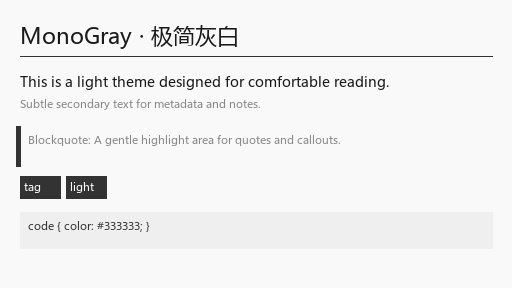
A minimalist monochrome light theme for Obsidian. Clean grayscale palette for distraction-free reading and writing.
Features
- Pure monochrome color scheme (
#f9f9f9background,#1a1a1atext) - Subtle gray accents for interactive elements
- Minimal visual noise — focus on your content
- Full Obsidian UI coverage
- Clean typography optimized for Chinese and English
Preview
Installation
Community Themes (Recommended)
- Open Obsidian Settings → Appearance → Themes
- Click "Manage" → Search for "MonoGray"
- Click "Install and use"
Manual Installation
- Download
manifest.jsonandtheme.cssfrom the latest release - Create a folder
MonoGrayin your vault's.obsidian/themes/ - Copy both files into the folder
- In Obsidian, go to Settings → Appearance → Themes and select "MonoGray"
License
MIT