
README file from
GithubNot an Obsidian product. N2O Paper is an independent theme. It is not made by, endorsed by, or affiliated with Obsidian.
A page, not a screen
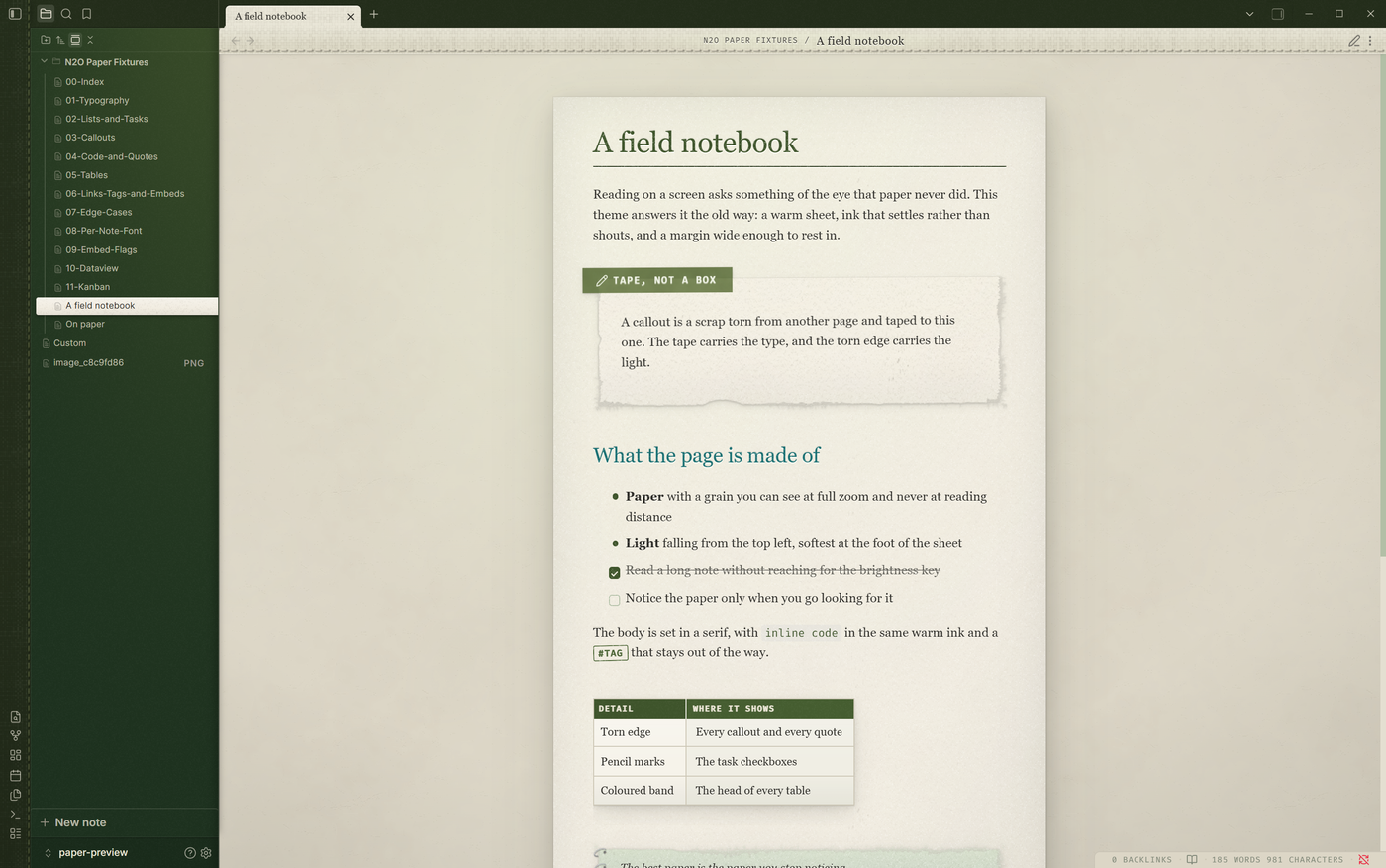
The window is a desk. The note is a sheet of cream stock resting on it, with a grain you can see at full zoom and never at reading distance, and a light that falls from the top left and softens at the foot of the page.
Install the settings plugin too
The theme looks the way it is meant to on its own. Every default below is the theme's own, and nothing else is needed to read with it.
The plugin is what makes it yours. A theme is CSS and cannot draw a settings tab, so the 110 controls are rendered by N2O Paper Settings, free and in the community plugin list. Install it and the palette, the fonts, the paper grain and the light, the callout style, the table style and every syntax colour become a dropdown, a slider or a colour swatch.
Search N2O Paper Settings in Settings, Community plugins, Browse. It will install this theme for you as well, so either one can come first.
The details we sweated
A callout is a scrap of paper taped to the sheet. The tape carries the type, in one of thirteen colours. The torn edge is a real tear, drawn as a nine slice mask so it never repeats the same way twice, and the shadow follows the tear rather than a rectangle.
Tasks are pencil marks. A checked box is drawn in pencil, and the line through the text is struck in the same hand. A nested list under a done task keeps its own ink.
Code sits on its own slip, syntax coloured, with no paper texture over it, because ink on a printed slab does not break the way ink on paper does.
Tables are cards, with a coloured header band, hairline rules and a quiet alternating tint. Dataview and Kanban get the same treatment: a board is a desk, each lane a sheet, each card a slip of paper.
Thirteen callouts
Every type Obsidian ships, each with its own tape colour and icon. The tape lands in a different place on each one, the tear along the bottom is drawn fresh every time, and the tint of the paper shifts with the type.
Three styles for the same thirteen. Taped scraps by default, full cards with a header band, or quiet callouts with no colour at all.
Quotes
A quote is a sheet with a coil binding down its left edge. Punched holes, a tinted page, and the binding grows with the quote rather than sitting as a stub beside one line. Nest them and each level gets its own sheet.
Seven palettes
One hue runs through the whole app: the title, the links, the table header, the sidebar and the light that falls across it. Five of the seven take exact colours from the traditional colours of Japan.
Forest, the theme's own, measured from two meadow photographs.
Ink, indigo dyeing: navy cloth, deep blue, a forget-me-not light.
Oxblood, a dark blood red with an ENJI glow on the sidebars.
Rose, rose in bloom, NAKABENI light on cream paper.
Sepia, a tea house: scorched tea, chestnut, amber, a celadon cup.
Graphite is pencil lead and Coal is sumi ink, both monochrome, with nothing coloured but the two fixed heading levels.
And Coal, sumi ink.
Pictures
A picture is an instant print laid on the sheet. Warm white frame paper with a grain of its own, deeper at the foot, a hairline edge, a faint sheen where the light catches it, and one corner lifting a little. That is the default and it costs nothing: write the embed and you get the print.
![[cabin.png]]
Everything past that is written after a pipe. Obsidian puts what follows the pipe into the picture's alt text, and the theme reads it.
The four things you can write
Every picture takes up to four pieces, in this order, each separated by a pipe:
![[ file | flags | caption | width ]]
You can leave any of them out. The order is what matters, not the count.
| What you write | What you get |
|---|---|
![[cabin.png]] |
the print, on the sheet |
![[cabin.png|400]] |
the print, 400px wide |
![[cabin.png|A cabin in the pines]] |
captioned in pen along the foot |
![[cabin.png|A cabin in the pines|400]] |
captioned, 400px wide |
![[cabin.png|left]] |
floated into the left margin |
![[cabin.png|aged|A cabin in the pines|400]] |
aged, captioned and sized, all three |
The flags
A flag is a single word in the flags position. Six of them do something:
| Flag | What it does |
|---|---|
left |
floats the picture into the left margin, the text wrapping past it |
right |
the same on the right |
round |
a round print, no frame and no caption, because there is no foot to write on |
aged |
one photo faded warm, with dust, fine scratches and a crease |
seamless |
for an embedded NOTE: no frame, no paperclip, the text flowing straight in |
torn |
for an embedded NOTE: a torn scrap of khaki |
left and right put the picture in the margin and let the text run past it.
round drops the frame altogether, so there is no foot and no caption.
Flags and a caption together
Put the flag first, the caption after it, a pipe between them:
![[cabin.png|aged|A cabin in the pines|340]]
This one needs the settings plugin. A theme is CSS, the caption it draws is the alt text itself, and CSS cannot take a word out of the middle of an attribute. The plugin splits the two apart for it. Without the plugin the flag and the caption still work on their own, just not together.
The pipe is what makes it unambiguous. A caption is free to contain a flag word:
![[seine.png|left|The left bank of the Seine|320]]
floats the picture and captions it "The left bank of the Seine", with the word
left left alone where it belongs.
Sizing, and the one thing that catches people
The width goes LAST, after its own pipe:
![[cabin.png|left|300]]     300px wide, in the left margin
![[cabin.png|left 300]]     left margin, and NO width
The second one looks like it should work and does not. left 300 is one piece
of text: the theme sees the word left in it and floats the picture, Obsidian
sees no width field at all and sets none.
Captions
The caption is written in pen across the foot of the print.
A bare file name is not a caption: .png, .jpg, .jpeg, .gif, .webp,
.svg, .avif and .bmp are recognised and left off, so a picture you never
captioned stays clean instead of being labelled with its own filename.
Embedded notes
A note embedded in another note is a sheet held on with a steel paperclip.
| What you write | What you get |
|---|---|
![[note]] |
the sheet, with the clip over its top edge |
![[note|seamless]] |
no frame and no clip, the text flowing straight in |
![[note|torn]] |
a torn scrap of khaki |
seamless, for a note that should read as part of the page:
torn, for one that should read as something slipped in:
Ageing everything
An aged print is faded warm and handled: dust, fine scratches, a crease with cracks running off it, worn pale edges and corners gone dark.
aged on one picture ages that one. The Aged photos switch under Paper in
the settings plugin ages every photo in the vault instead, and then captions
work normally on all of them without needing a flag at all.
The rest of the page
Nothing is left in Obsidian's default look.
Lists and tasks. Pencil checkboxes, a line struck in the same hand.
Tables, as cards with a coloured header band and hairline rules.
Links, tags and embeds. Tags are stamped, links take the palette's hue.
Dataview, given the same card treatment as a plain table.
Kanban. The board is a desk, each lane a sheet, each card a slip of paper.
Made to be read
Long reading was the whole point, so the type is set for it: a serif body at a measure of about seventy characters, headings that step down in colour rather than shout in size, and a page that holds its measure when you split the window or open it on a phone.
The palette is deliberately soft. Ink that settles rather than shouts, pale teals and warm greys, so an hour in a note is an hour your eyes can take.
Make it yours
All 110 controls live in N2O Paper Settings, free and in the community plugin list.
Nine sections, 110 controls: Looks (palette, sidebars, heading size, font set), Colours (every ink on the page, with live swatches), Typography, Layout, Paper (grain, light, drift, softbox), Components (callouts, tables, tasks, tags, embeds), Code (syntax colour by colour), Interface, and Advanced, the fine numbers behind the presets. Export writes what you changed to the clipboard, and Import puts it back.
Install
Settings > Appearance > Themes > Manage, then search for N2O Paper.
To install it by hand, download theme.css and manifest.json from the latest
release into <vault>/.obsidian/themes/N2O Paper/, then pick the theme in
Appearance.
Light only
N2O Paper is a light theme. In dark mode it applies nothing and Obsidian's own dark look shows, so there is no half painted page.
Licence
MIT. See LICENSE.md.