
README file from
GithubKXC Cipher Dark for Obsidian
A dark theme for Obsidian from the Korthcore design system.
Part of the KXC Themes multi-platform theme pack, which also covers VSCode, Windows Terminal, oh-my-posh, micro, and tmux.
Preview
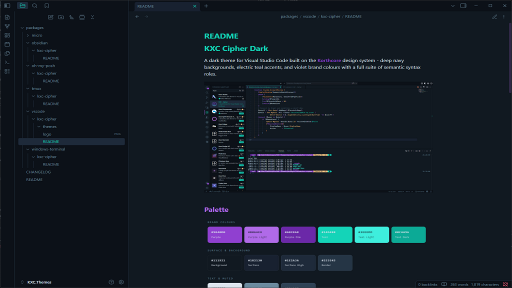
Palette
| Colour | Hex | Role |
|---|---|---|
| Teal | #14D4B8 |
Accent, links, H1, checkboxes |
| PurpleLight | #B06AE8 |
H2, tags, italic, keywords |
| Orange | #FFAB5E |
H3, functions, warnings |
| Blue | #82B4E8 |
H4, types, external links, info |
| Yellow | #FFCA85 |
H5, numbers, values |
| Red | #FF5E7A |
Errors, danger callouts |
| Purple | #9040D0 |
Badges, graph tags, embeds |
| Background | #111921 |
Primary editor background |
| BgDeep | #0C1118 |
Sidebar, title bar, code blocks |
| Surface | #182130 |
Panels, line highlight, modals |
| Foreground | #DDE5EE |
Primary text |
| Muted | #6B8A9E |
Secondary text, placeholders |
Install
From Obsidian Community Themes
- Open Settings > Appearance
- Under Themes, click Manage
- Search for KXC Cipher
- Click Install and use
Manual Install
- Download
manifest.jsonandtheme.cssfrom the latest release - Create a folder called
KXC Cipherinside your vault's.obsidian/themes/directory - Copy both files into that folder
- Open Settings > Appearance > Themes and select KXC Cipher
YourVault/
  .obsidian/
    themes/
      KXC Cipher/
        manifest.json
        theme.css
Features
- Full dark theme using the Korthcore Cipher colour palette
- Coloured headings (H1 through H6) for visual hierarchy
- Syntax highlighting for code blocks matching the VSCode theme
- Styled callouts (tip, info, warning, danger, example)
- Graph view node colours
- Tag styling with Purple accents
- Teal accent for links, checkboxes, and interactive elements
- PurpleLight scrollbar thumbs
Compatibility
- Obsidian v1.0.0 and later
- Dark mode only (Cipher Light planned for a future release)
Credits
Designed by Korthcore. Part of the KXC Cipher design system.