
README file from
GithubVaporwave Void - Obsidian Theme
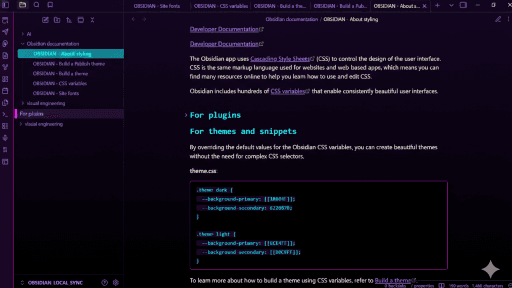
A high-contrast, high-vapor, glass-morphism theme for Obsidian (Dark Mode ONLY). Designed for deep work in the digital void.
⚠️ Important
This theme is designed EXCLUSIVELY for Dark Mode.
Please ensure Dark Mode is enabled in Settings > Appearance.
(Note: Using Light Mode will result in invisible text, as the neon variables are strictly bound to the dark theme class.)
Features
- Glass-Morphism: Translucent panes over a deep purple-to-black void gradient.
- Neon Hierarchy:
- H1: Hot Pink
- H2: Electric Cyan
- H3: Nuclear Purple
- H4: Neon Lime
- H5: Sunset Gold
- H6: Radical Red
- Cyber-Swatches: Custom neon styling for color inputs.
- Semantic Consistency: Full support for file explorer plugins and modal windows.
Installation
Manual Installation (Right Now)
- Download the
theme.cssandmanifest.jsonfiles from this repository. - Open your Obsidian Vault folder.
- Navigate to
.obsidian/themes/(you may need to enable "Show Hidden Files" on your OS). - Create a new folder named
Vaporwave Void. - Paste the files into that folder.
- Open Obsidian > Settings > Appearance and select Vaporwave Void.
Community Store (Coming Soon)
Once approved by the Obsidian team:
- Open Obsidian Settings > Appearance > Themes.
- Click "Manage".
- Search for "Vaporwave Void".
- Click "Install" and then "Use".
License
MIT License