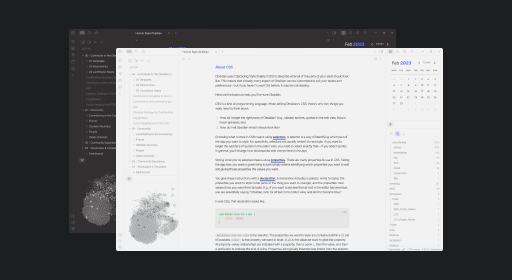
README file from
Github![]()
Installation
Obsidian
- Open the Settings window in Obsidian
- Go to the Appearance tab
- In the Themes section, click on the
Managebutton - Search for
Jotter - Click
Install and use - Enjoy !
Manual
- Download this repo.
- Copy the
theme.cssfile into your vault's/.obsidian/themesdirectory - Rename the file to
Jotter.css - Open the Settings in Obsidian
- Go to the Appearance tab
- In the Themes section, you can now select
Jotterto use as your theme! - Enjoy!
Features
- Style Settings support
- Optimization and design adjustments for Canvas core plugin, Kanban, Calendar and Dataview community plugins
Customization
Jotter is supported by the Style Settings plugin!
Meaning, you can customize your theme without having to get into the code part.
- 6 color themes
- 13 predefined accent colors
- Borderless interface
- Wrap file and folder titles in the explorer
- Hide note title in text editor
- Change headings colors
- Toggle heading styles (underlines, italics) for H2s, H3s, H5s and H6s
- Change bold and italic text colors
- Change bold and italic underline colors
- Toggle bold and italic texts underlines
- Custom internal and external links colors
Download Style Settings through the Community Plugins page in Obsidian to start customizing Jotter theme!
I will try to include more customization options in the future, so keep an eye out for updates!
Color Themes and Accent Colors
Some screenshots to showcase additional color themes and predefined accent colors. Pick and match as you please!
Jotter
Light theme + Ultramarine accent

Dark theme + Rust accent

Reporter
Light theme + Pumpkin accent

Dark theme + Mustard accent

Explorer
Light theme + Denim accent

Dark theme + Jade accent

Keeper
Light theme + Slate accent

Dark theme + Turquoise accent

Undercover
Light theme + Mauve accent

Dark theme + Bubblegum accent

Credits
Inspired by:
- Things - @colineckert
- Fusion - @zamsyt
- Sanctum - @jdanielmourao
- Yin and Yang - @chetachiezikeuzor
- Golden Topaz - @shaggyfeng
- Minimal - @kepano
Go check out everyone’s work and support them!
Changelog
v.0.2.0
Added the Interface menu in Style Settings.
New option to pick between bordered and borderless styles on the interface.
v.1.0.0
Big update for Jotter!
Additions to the Style Settings plugin:
- 5 additional color themes (including the Obsidian default theme)
- 12 predefined accent colors, and the ability to still color-pick your own accent color
- Display full file and folder titles in the explorer
Improvements:
- Calendar
- Default bold underline color is now set to the accent color
- Kanban checkboxes
- Code refractor
v.1.1.0
French translation added to Style Settings.
v.1.2.1
Obsidian default color theme removed temporarily. Fixed default color theme when Jotter is loaded without Style Settings.
v.1.23.0
Additions to the Style Settings plugin:
- Colorful tooltips
- Adjust headings sizes
- Active line highlight
Improvements:
- Fix text on accent for predefined "Bubblegum", "Turquoise", "Mustard", and "Pumpkin" colors
- Fix active navigation item color on dark color themes (used to pick the same background color as the "Jotter" color theme)
v. 1.3.0
Style Settings plugin:
- New "Editor" section where the active line highlight option has been moved
- Added the "Hide note title" option, to hide the note title in the text editor
- "Brick" accent color has been renamed to "Vermilion"
- New "Rust" accent color
- New style on H5s and H6s (uppercase) + option to disable said styling
- Obsidian default color theme has been re-added
General improvements:
- Interface
- File Explorer
- Lighter file names / Darker folder names
- Spacing between files
- Uppercase, smaller vault name
- Padding adjustments
- Side dock
- Header
- Re-added file name to the note header, which now is the only hover-able element of the header
- Removed unnecessary padding from hidden vault name (with Hider plugin)
- Changed headings default sizes (smaller)
- File Explorer
- Calendar
- Added padding and bottom border on days of the week
- Small color adjustments on additional color themes
- Adjustments on predefined color accents
- Added hsl values to avoid default accent color to pick through when dragging files or on text selection
- Adjustments on rgb colors (code, canvas, callouts) on certain color themes
- PDF export
- Fixed light colored text exports when in dark mode
v. 1.3.1
Patch on inline code pdf exports.
v. 1.31.0
Improvements on Dataview table styling
v. 1.31.1
Patch on header to show note title when creating a new note (+ header remains visible when changing title)
v. 1.32.0
Custom links colors have been added to the Style Settings option, following to a Github request!