
README file from
GithubGothic
Gothic is a clean, typography-focused Obsidian theme inspired by Typora's Gothic theme.
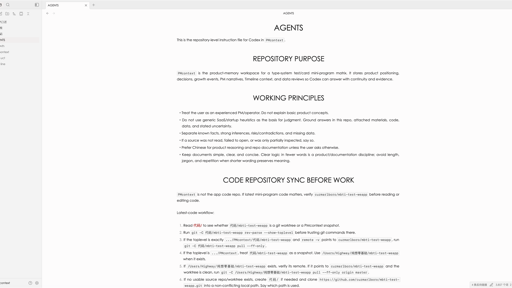
Gothic brings a quiet writing surface to Obsidian: a neutral page, centered uppercase headings, red links, generous line height, and a Century Gothic / TeX Gyre Adventor style font stack.
About Gothic
Screenshots
The light screenshot is optimized for the Obsidian Community theme directory at 512 x 288 pixels.
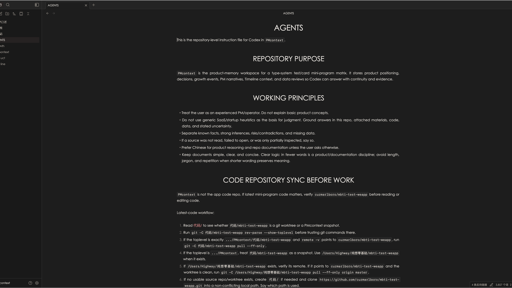
Gothic supports both light and dark modes, with the light mode designed as the primary experience.
Light mode
Dark mode
Installation
Community Directory
After approval, install Gothic from Settings -> Appearance -> Themes -> Manage in Obsidian.
Manual Installation
-
Download the latest release from the GitHub releases page.
-
Create a folder named
Gothicin your vault:YOUR_VAULT/.obsidian/themes/Gothic -
Place
manifest.jsonandtheme.cssinside that folder. -
Open Obsidian and choose Settings -> Appearance -> Themes -> Gothic.
Features
- Light-first reading and writing experience.
- Dark mode support for users who prefer a low-light workspace.
- Centered uppercase headings inspired by Typora Gothic.
- Red internal and external links.
- Wider readable line length for long-form notes.
- Generous paragraph spacing and line height.
- Slightly stronger link weight for better Chinese, Latin, and number alignment.
- Local-only theme CSS with no remote fonts, imports, images, or network calls.
- Built primarily with Obsidian CSS variables for better compatibility with future Obsidian versions.
Typography
Gothic uses a sans-serif font stack inspired by Typora's Gothic theme:
"TeX Gyre Adventor", "TeXGyreAdventor", "Century Gothic", "Didact Gothic", "Yu Gothic", "Avenir Next", "Segoe UI", sans-serif
For the closest visual match, install one of these fonts on your system:
- TeX Gyre Adventor
- Century Gothic
- Didact Gothic
If none of these fonts are available, Obsidian will automatically fall back to common system sans-serif fonts.
Customization
Gothic is intentionally simple. Most of the look is controlled by standard Obsidian CSS variables, including:
- Text and interface fonts
- Light and dark color palettes
- Link colors and link weight
- Heading sizes and weights
- File line width
- Code block, table, blockquote, and selection colors
You can override these values with CSS snippets if you want a more personal version.
Credits
Gothic is inspired by Typora's Gothic theme and its clean Century Gothic style. This Obsidian theme recreates the general feel for Obsidian without copying Typora's CSS directly.
Changelog
1.0.2
- Publish a new release that includes the light and dark screenshots in the release revision.
1.0.1
- Increase link font weight so Chinese link text aligns better with Latin letters and numbers.
- Add a light-first
512 x 288community directory screenshot. - Add a dark mode screenshot to the README.
License
Gothic is released under the MIT License.