
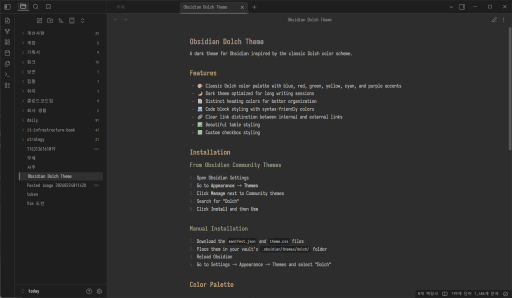
README file from
GithubObsidian Dolch Theme
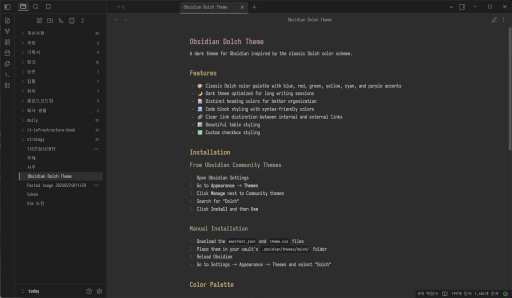
A dark theme for Obsidian inspired by the classic Dolch color scheme.
Features
- 🎨 Classic Dolch color palette with blue, red, green, yellow, cyan, and purple accents
- 🌙 Dark theme optimized for long writing sessions
- 📝 Distinct heading colors for better organization
- 💻 Code block styling with syntax-friendly colors
- 🔗 Clear link distinction between internal and external links
- 📊 Beautiful table styling
- ✅ Custom checkbox styling
Installation
From Obsidian Community Themes
- Open Obsidian Settings
- Go to Appearance → Themes
- Click Manage next to Community themes
- Search for "Dolch"
- Click Install and then Use
Manual Installation
- Download the
manifest.jsonandtheme.cssfiles - Place them in your vault's
.obsidian/themes/dolch/folder - Reload Obsidian
- Go to Settings → Appearance → Themes and select "Dolch"
Color Palette
| Color | Hex | Usage |
|---|---|---|
| Background | #2d2d2d |
Main background |
| Background Alt | #1e1e1e |
Sidebar, panels |
| Foreground | #d4d4d4 |
Primary text |
| Accent | #7aa2f7 |
Links, accents |
| Red | #f7768e |
H1, errors |
| Yellow | #e0af68 |
H2, warnings |
| Green | #9ece6a |
H3, success |
| Cyan | #7dcfff |
H4, code |
| Blue | #7aa2f7 |
H5, links |
| Purple | #bb9af7 |
H6, external links |
Contributing
Feel free to open issues or submit pull requests if you have suggestions or improvements.
License
MIT License