
README file from
GithubDeskmate · 桌伴
把 Obsidian 变成一张书桌:纸面、便利贴、索引卡和一盏台灯,每一种 Markdown 语法都有自己的样子。 Turn Obsidian into a desk: paper, sticky notes, index cards and a lamp, with a distinct look for every piece of Markdown.
中文
它长什么样
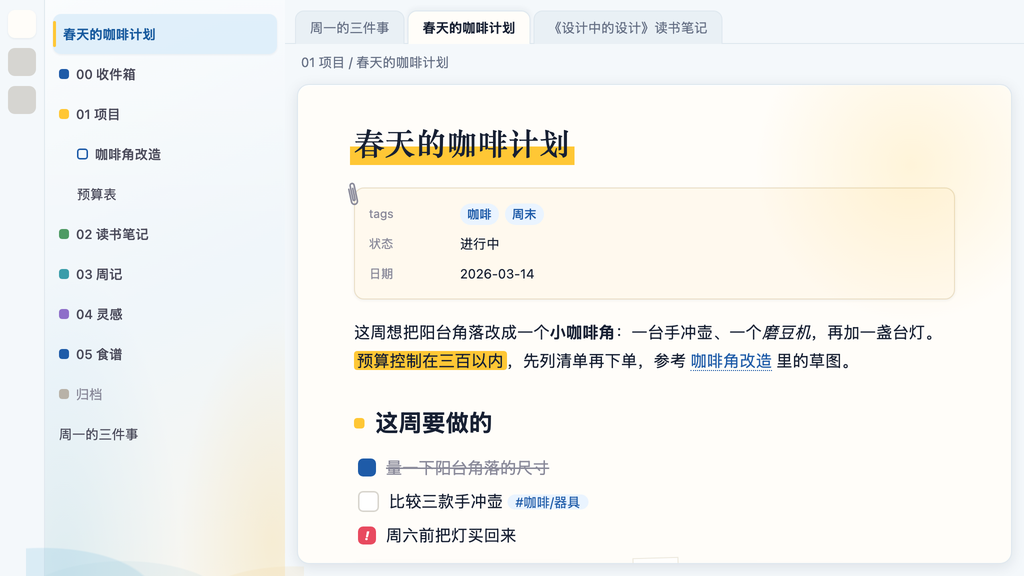
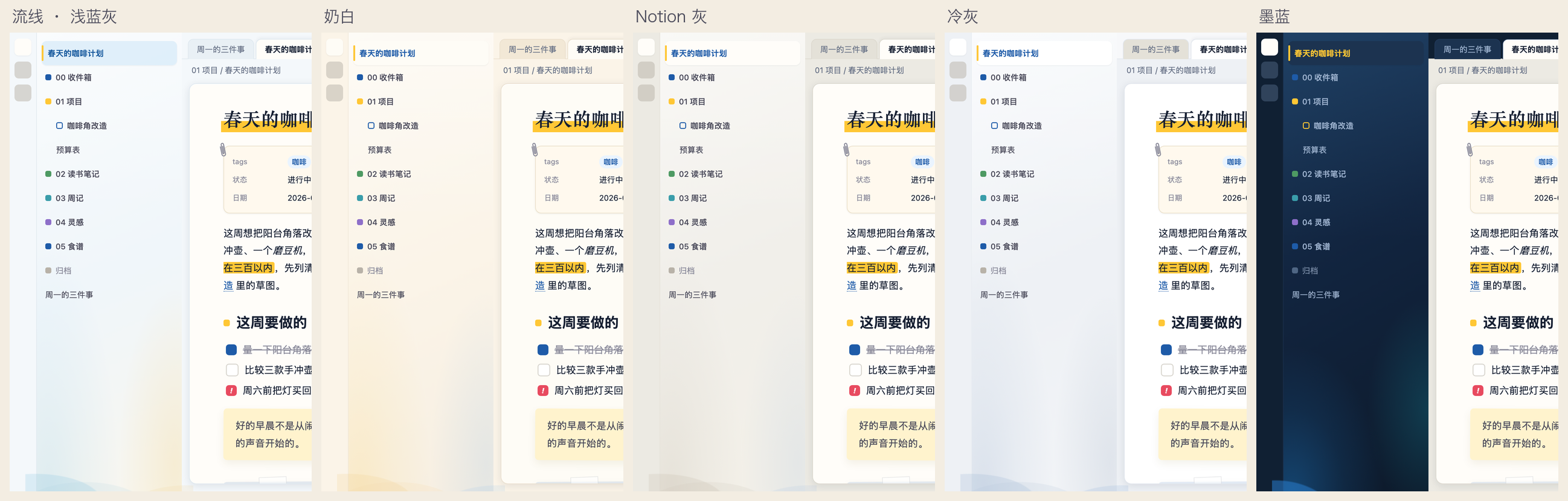
- 一张纸浮在桌上:正文区是一张有投影的纸,外圈是带流线渐变的桌面,五种侧栏风格可选
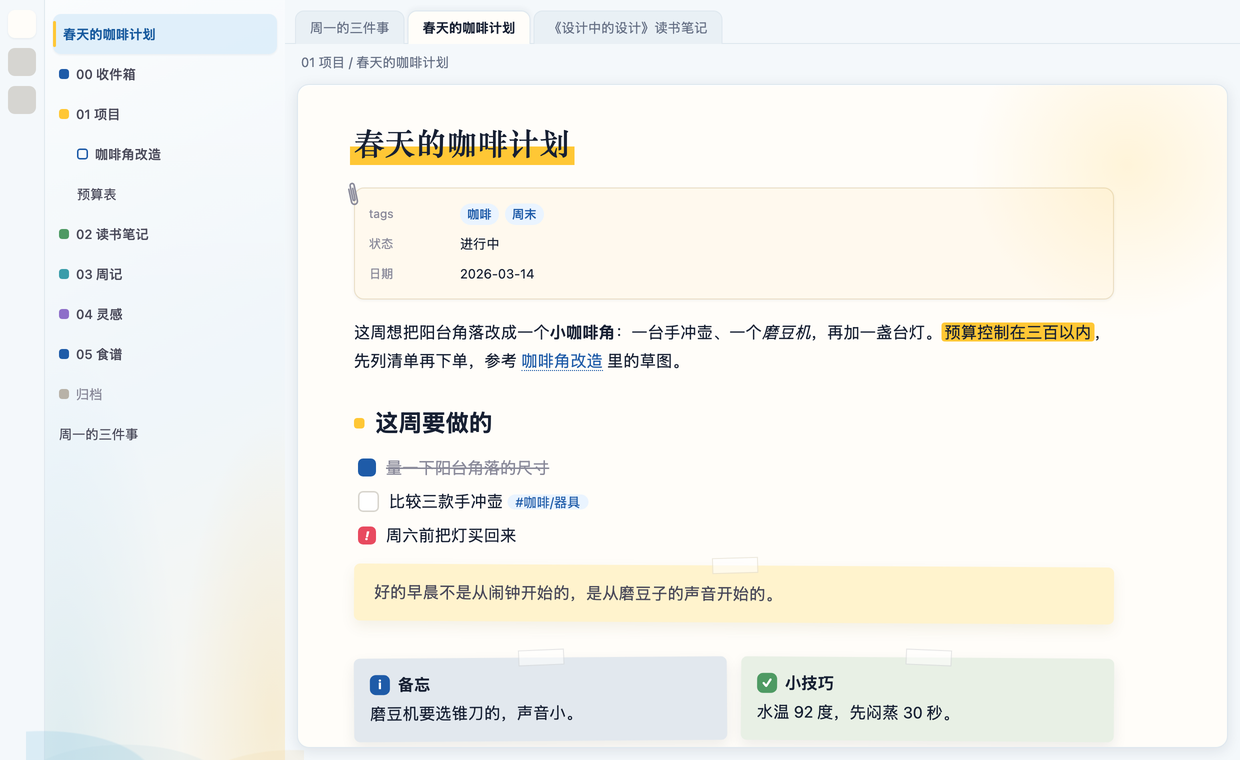
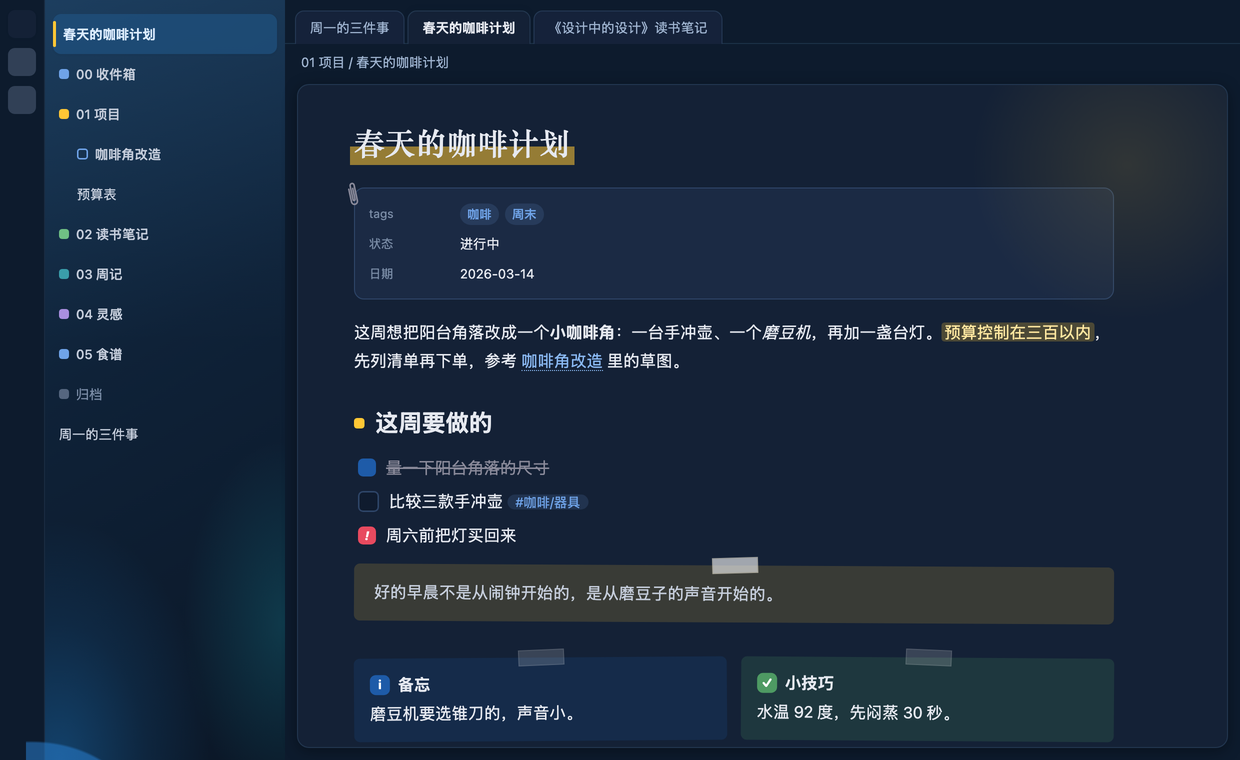
- 便利贴是全局语言:所有 callout 按类型变成蓝 / 绿 / 黄 / 粉 / 紫 / 灰便签,带胶带、微微歪一点;引用块是一张黄便签;弹出通知和悬停预览也贴着胶带
- 彩色文件夹方块:一级文件夹前一个实心方块,六色循环;子文件夹空心方块继承父级颜色;归档类文件夹自动变灰
- 索引卡属性区:笔记属性变成一张夹着回形针的索引卡
- 标题有性格:H1 和笔记标题用宋体类衬线,底下压一条橙色马克笔;H2 前一个橙色小方块,和文件夹方块同一几何语言
- 空白标签页是一张书桌:电脑、台灯、马克杯、便利贴;台灯光 7 秒一次缓慢呼吸;夜景版台灯是唯一光源
- 动一次就停的动效:打开笔记时马克笔划过、便利贴贴上、点文件时橙条长出来;全部尊重系统"减弱动态效果"
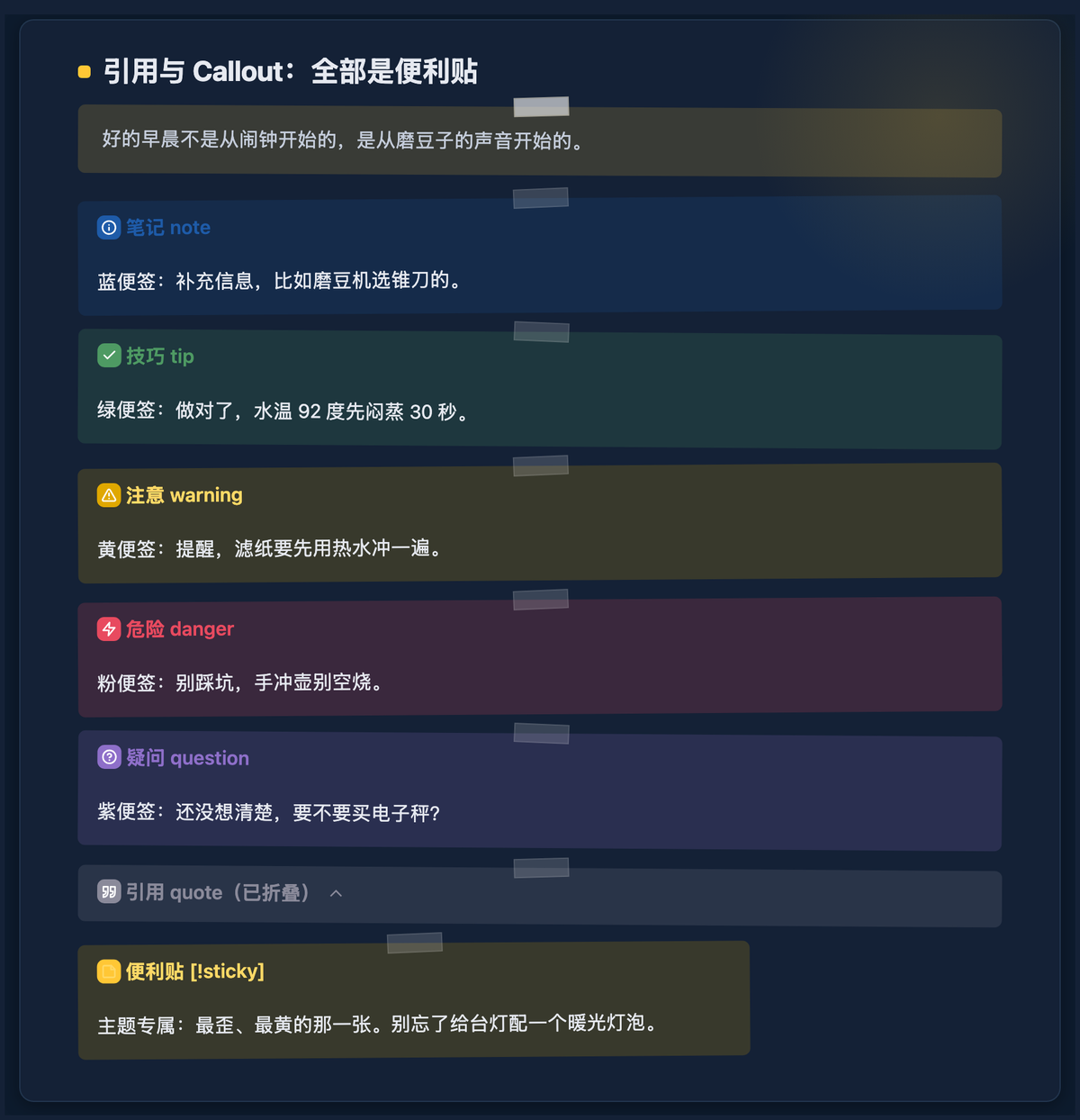
- 亮暗双模:暗色是"夜间书房",不是亮色反相
| 亮色 | 暗色 |
|---|---|
 |
 |

以上截图均为示例库「小满的书桌」的虚构内容。
每一种语法都有自己的样子
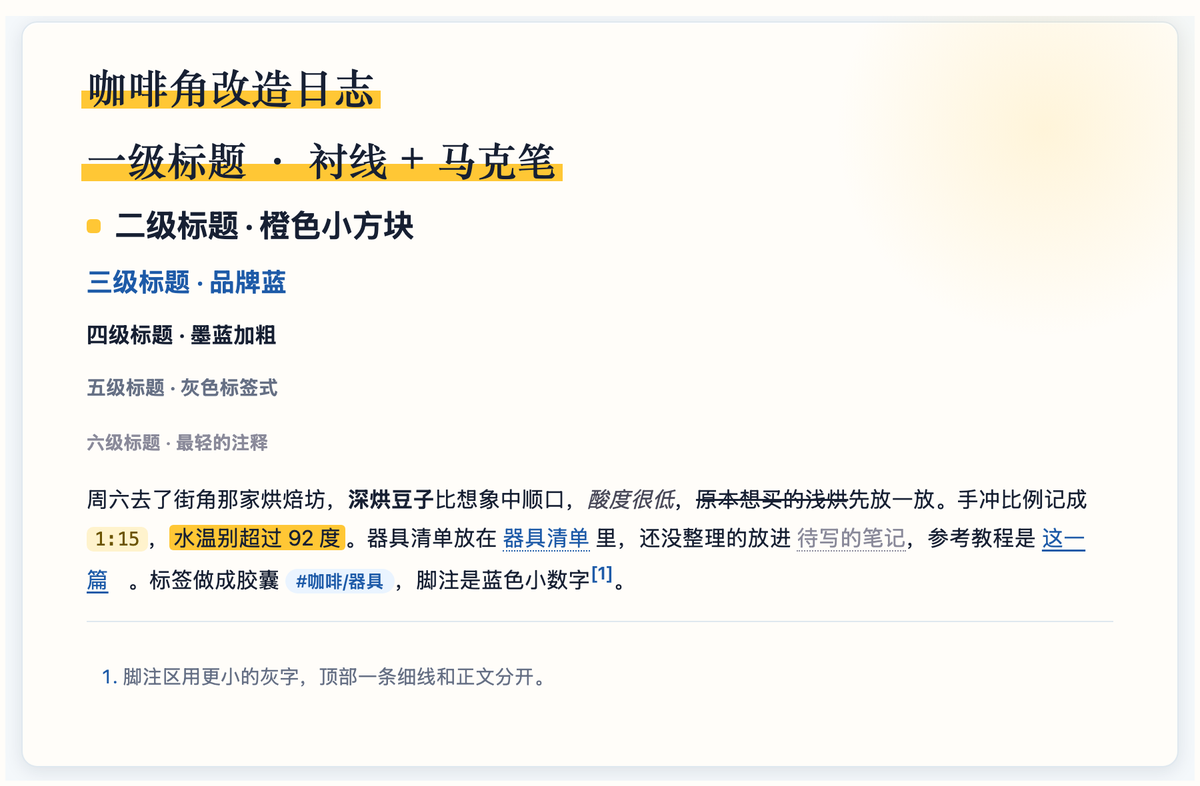
标题与行内元素:H1 和笔记标题用宋体类衬线,底下压一条橙色马克笔;H2 前一个橙色小方块;H3 用品牌蓝;H4 到 H6 逐级变轻。行内代码是橙底,高亮是马克笔黄;内部链接是虚线下划线,未创建的笔记是灰色虚线;标签是蓝色胶囊;脚注是蓝色小数字。
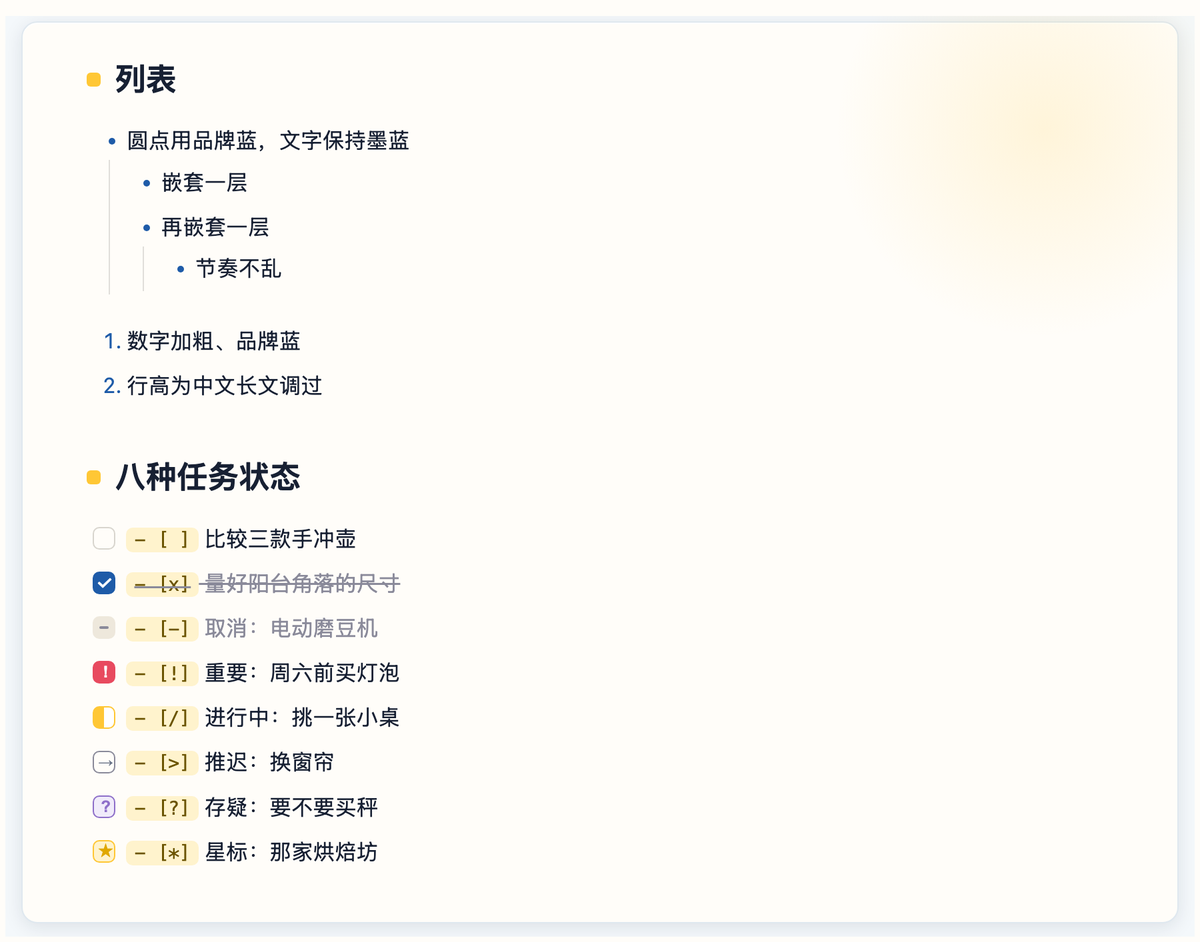
列表与八种任务状态:列表圆点和序号用品牌蓝,嵌套有细线引导。除了完成和未完成,还支持取消、重要、进行中、推迟、存疑、星标六种状态,每种一眼能分开。
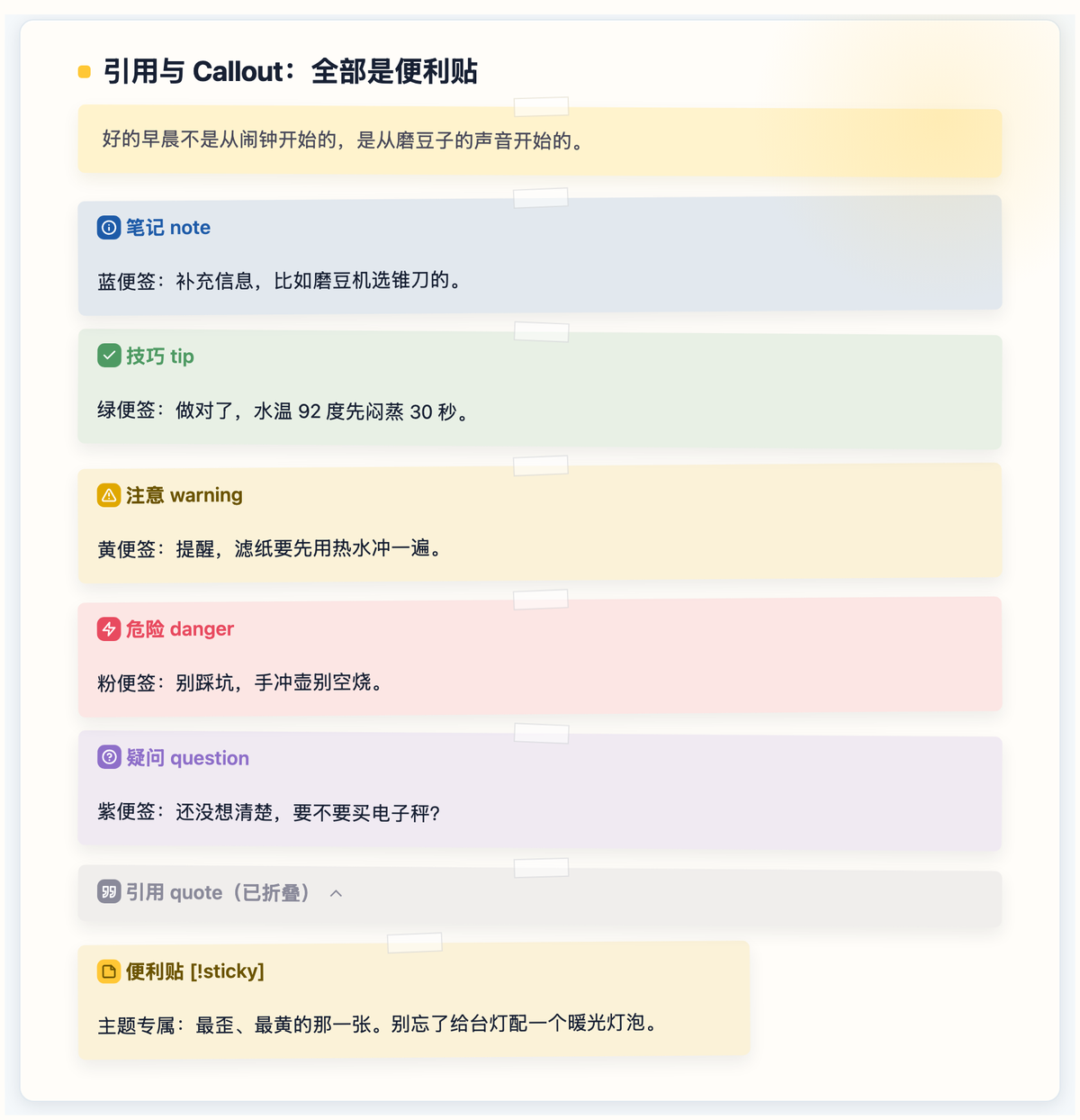
引用与 Callout 全是便利贴:引用块是一张黄便签;每种 callout 按类型变成不同颜色的便签,顶上一条胶带、微微歪一点;[!sticky] 是主题专属的那张最歪最黄的。
| 亮色 | 暗色 |
|---|---|
 |
 |
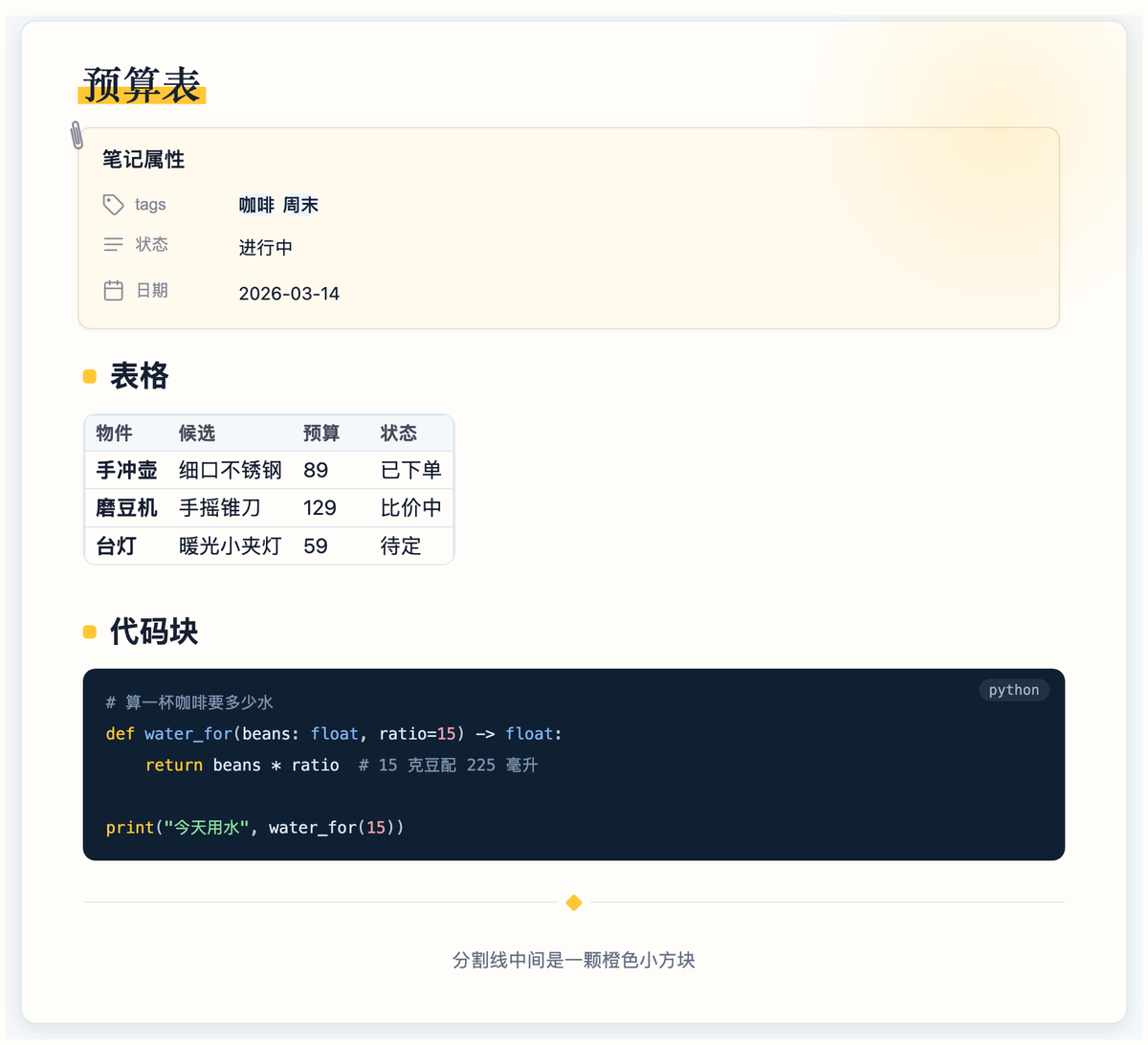
属性、表格、代码块与分割线:笔记属性是一张夹着回形针的索引卡;表格圆角描边、表头一条浅色带、首列加粗;代码块是墨蓝底,右上角标出语言;分割线中间一颗橙色小方块。
安装
从社区主题商店:设置 → 外观 → 主题 → 管理 → 搜索 Deskmate。
手动安装:下载 manifest.json 和 theme.css,放进 你的库/.obsidian/themes/Deskmate/,然后在 设置 → 外观 → 主题 里选择 Deskmate。
可调项(需要 Style Settings 插件)
装上 Style Settings 后,在 设置 → Style Settings → Deskmate · 桌伴 里:
| 选项 | 默认 | 说明 |
|---|---|---|
| 侧栏风格 | 流线 · 浅蓝灰 | 浅蓝灰 / 奶白 / Notion 灰 / 冷灰 / 墨蓝,都是底色渐变 + 底部流线 |
| 文件夹方块只用品牌蓝 | 关 | 关闭六色循环 |
| H1 标题马克笔 | 开 | 一级标题底下的橙色马克笔 |
| 纸面卡片 | 开 | 正文区浮在桌面上的卡片 |
| 便利贴风格 | 开 | 所有 callout / 引用 / 通知 / 悬停预览都是便利贴 |
| 桌垫点阵 | 开 | 流线侧栏下自动关闭 |
| 台灯光 | 开 | 纸面右上角的暖光,暗色里是阅读灯 |
| 衬线大标题 | 开 | H1 和笔记标题用宋体类衬线 |
| 动效 | 开 | 马克笔划过 / 便利贴贴上 / 选中文件 / 台灯呼吸 |
| 空白页书桌场景 | 开 | 新标签页上的书桌插画 |
没装 Style Settings 也能用,所有默认值已经是推荐值。
主题专属语法
> [!sticky] 便利贴
> 一张最歪、最黄的便利贴。
勾选框支持 - [ ]、- [x]、- [-] 取消、- [!] 重要、- [/] 进行中、- [>] 推迟、- [?] 存疑、- [*] 星标。
已知限制
- 文件夹六色按"同一层里第几个文件夹"着色,新建文件夹后颜色会顺延
- 归档灰只识别名字以
99/archive开头或含"归档"的文件夹 - 装了 Iconize(icon-folder)时,有图标的文件夹会自动隐藏方块
- 衬线标题依赖系统里的宋体类字体(macOS 自带"宋体-简"),没有时自动退回黑体
- 需要 Obsidian 1.6 或更新
致谢
- 侧栏流线渐变的配色方案来自主题作者提供的设计稿
- 便利贴 callout 的图标来自 Obsidian 内置的 Lucide 图标集
English
What it looks like
- A sheet of paper on a desk: the editor is a card with a soft shadow, the chrome is a desk with flowing gradients; five sidebar styles to pick from
- Sticky notes everywhere: every callout becomes a sticky note colored by type, with a strip of tape and a slight tilt; blockquotes are yellow stickies; notices and hover previews get tape too
- Colored folder squares: top-level folders get a solid square cycling through six colors; subfolders get a hollow square inheriting the parent color; archive folders turn gray
- Index-card properties: the properties block becomes a card held by a paperclip
- Headings with character: H1 and the inline title use a serif face with an orange marker underneath; H2 gets a small orange square, the same shape as the folder squares
- The empty tab is a desk: a laptop, a lamp, a mug and a sticky note; the lamp light breathes every 7 seconds; at night the lamp is the only light source
- Motion that settles: the marker draws itself when you open a note, stickies land, the orange bar grows when you select a file; all of it respects "reduce motion"
- Light and dark: dark mode is a night study, not an inverted light mode
| Light | Dark |
|---|---|
|
|
Screenshots use a fictional sample vault.
A distinct look for every piece of Markdown
Headings and inline elements: H1 and the note title use a serif face with an orange marker; H2 gets a small orange square; H3 is brand blue; H4 to H6 step down quietly. Inline code sits on orange, highlights are marker yellow, internal links have a dotted underline, unresolved links are gray, tags are blue pills and footnotes are small blue numbers.
Lists and eight task states: bullets and numbers in brand blue with indentation guides. Besides done and open, tasks can be cancelled, important, in progress, deferred, questioned or starred, each easy to tell apart.
Quotes and callouts are sticky notes: blockquotes are yellow stickies; every callout becomes a sticky colored by type, with tape and a slight tilt; [!sticky] is the theme's own extra-yellow, extra-tilted one.
| Light | Dark |
|---|---|
|
|
Properties, tables, code and dividers: properties become an index card held by a paperclip; tables get rounded borders, a soft header band and a bold first column; code blocks sit on navy with a language label; dividers carry a small orange diamond.
Install
From the community theme store: Settings → Appearance → Themes → Manage → search Deskmate.
Manually: download manifest.json and theme.css into <vault>/.obsidian/themes/Deskmate/, then pick Deskmate under Settings → Appearance → Themes.
Options (Style Settings plugin)
With Style Settings installed, open Settings → Style Settings → Deskmate · 桌伴:
| Option | Default | Notes |
|---|---|---|
| Sidebar style | Flow · light blue-gray | light blue-gray / cream / Notion gray / cool gray / ink, all with gradient + flowing arcs |
| Folder squares in brand blue only | off | disables the six-color cycle |
| H1 marker | on | orange marker under level-1 headings |
| Paper card | on | editor floats on the desk |
| Sticky-note style | on | all callouts / quotes / notices / hover previews become stickies |
| Desk-pad dots | on | auto-off under flow sidebars |
| Lamp glow | on | warm glow in the paper's top-right corner; a reading lamp in dark mode |
| Serif titles | on | serif for H1 and inline title |
| Motion | on | marker, stickies, file selection, lamp breathing |
| Desk scene on empty tab | on | the illustration on new tabs |
The theme works without Style Settings; the defaults are the recommended values.
Theme-specific syntax
> [!sticky] Sticky note
> The yellowest, most tilted sticky of them all.
Checkboxes: - [ ], - [x], - [-] cancelled, - [!] important, - [/] in progress, - [>] deferred, - [?] question, - [*] starred.
Known limitations
- Folder colors follow "the n-th folder among its siblings", so adding a folder shifts the colors after it
- Archive gray only matches folders named
99…,archive…or containing "归档" - With Iconize (icon-folder) installed, folders that have an icon hide their square automatically
- Serif titles rely on a system serif CJK font (macOS ships "Songti SC"); it falls back to sans otherwise
- Requires Obsidian 1.6 or newer
License
MIT © 2026 轩言PM (lykAntonio)