
README file from
GithubBrutalGarden
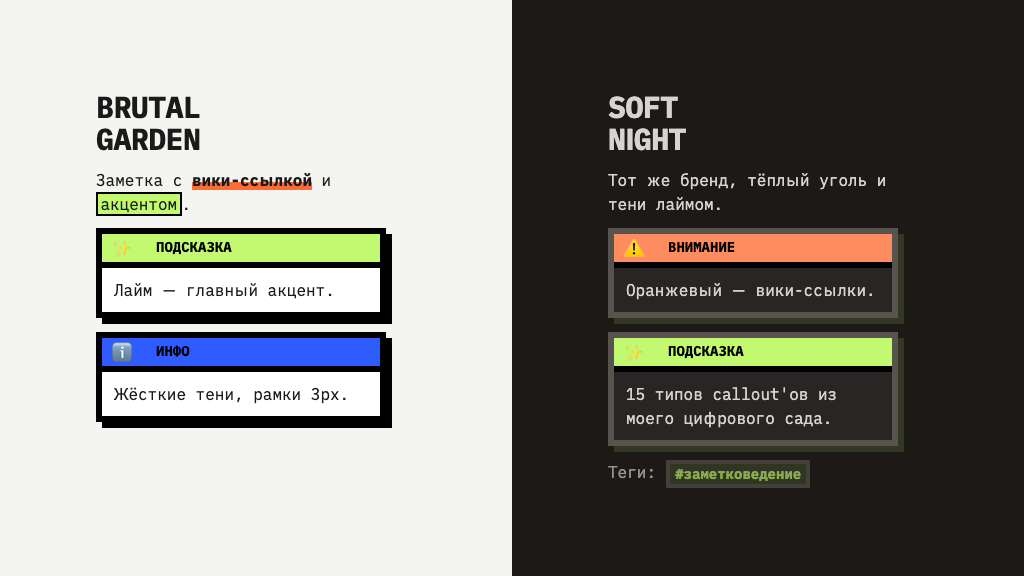
A neo-brutalist Obsidian theme ported from my digital garden at rustamagamaliev.ru — paper, hard shadows, black 3px borders, and a full system of 15 hand-designed callouts.
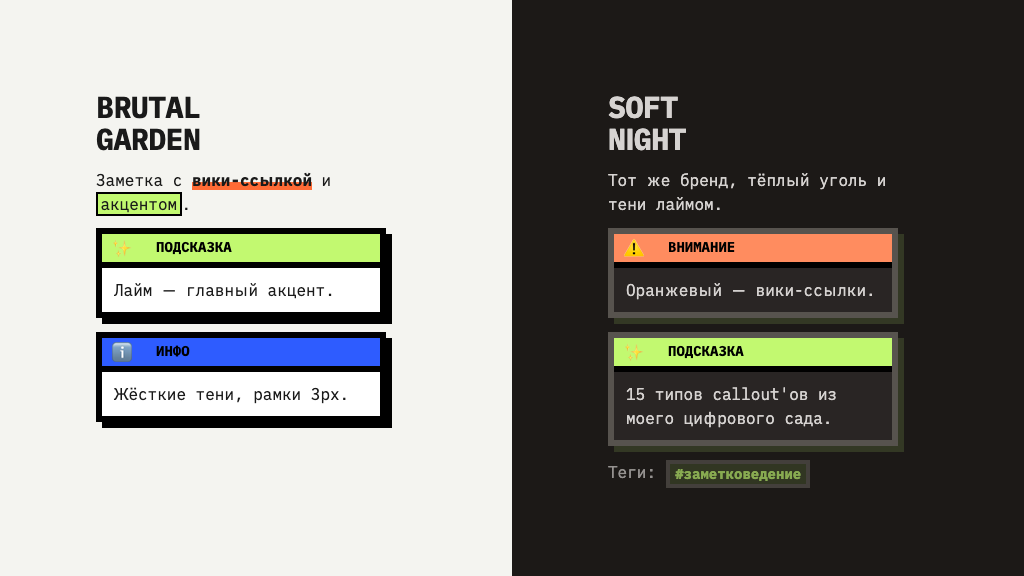
Two faces, switched by Obsidian's own light/dark toggle:
- Light — «paper».
#F4F4F0, black borders, shadows cut like cardboard (6px 6px 0, zero blur), a 24px dot grid on the chrome. - Dark — «Soft Night». Warm charcoal
#1C1917, borders#57534E, and the signature move: shadows tinted lime instead of black.
Accents follow the house palette — Neo-Lime #C2F970 leads, Neo-Blue
#2E5CFF adds depth, Neo-Orange #FF6B35 marks attention and wiki-links.
🎨 15 callouts, not repainted rectangles
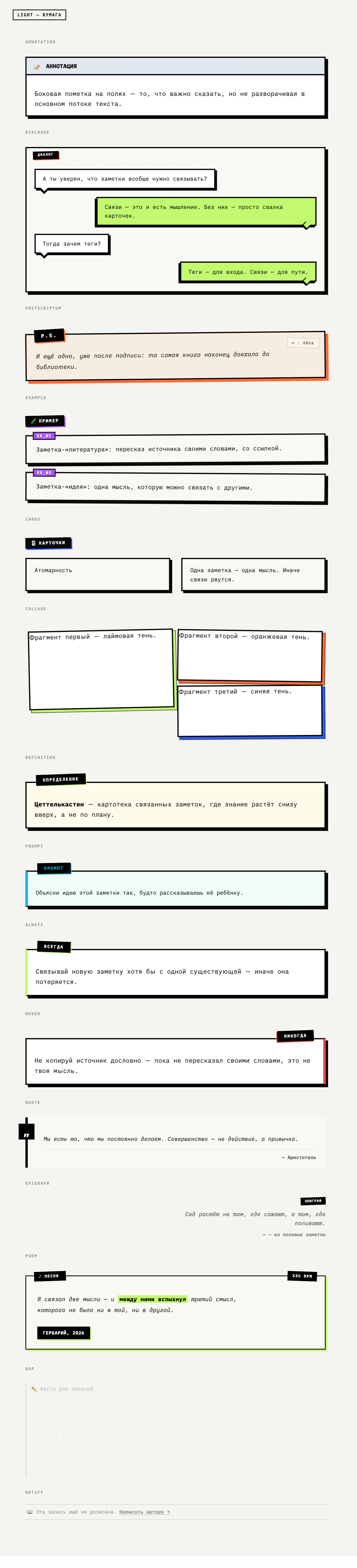
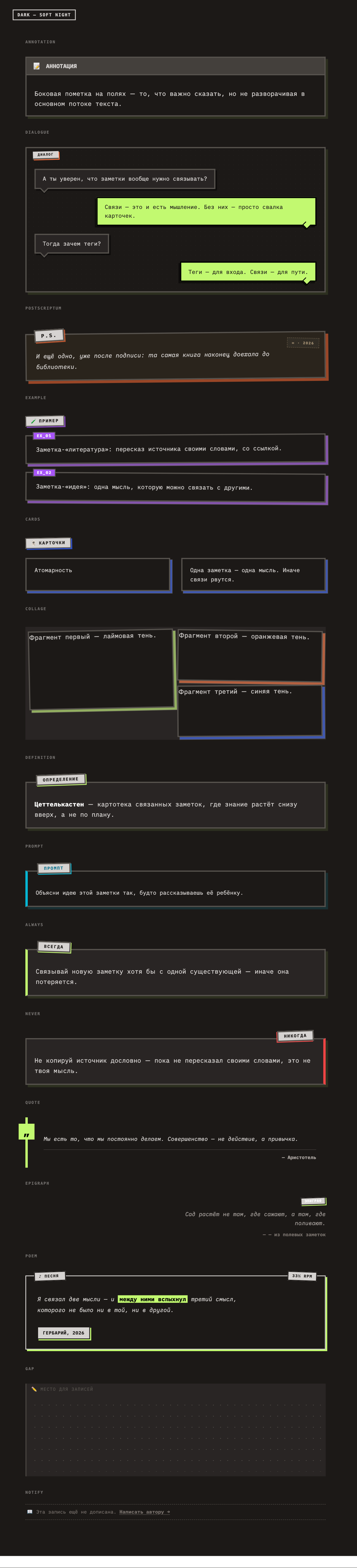
This is the part I actually care about. The callouts aren't recolored boxes — each type has its own character, ported from the live CSS of my garden:
quote |
book page — black bar, quote mark hanging in the margin |
epigraph |
a whisper in the margin, right-aligned, sticker title |
poem |
concert poster — silkscreen, «33⅓ RPM», signature stamp |
definition |
dark paper, lime sticker |
example |
numbered specimen cards (EX_01, EX_02…) |
dialogue |
alternating chat bubbles |
collage |
rotated cards with lime / orange / blue shadows |
postscriptum |
a postal card with a stamp |
always / never |
green stamp left / red stamp right |
prompt |
terminal card for AI prompts |
gap |
dot-grid writing area — room to think |
notify |
a quiet dashed banner, no background |
annotation |
a side note that doesn't derail the text |
cards |
flip-card layout |
Standard Obsidian callouts (info, tip, warning, success, bug…) all
work too — they inherit the same brutal frame and title bar.
Two honest limitations. cards doesn't flip and prompt has no copy button:
on the website that DOM is built by JavaScript, and a theme is CSS only. Their
graphics are intact; only the interaction is missing.
✍️ Typography
The theme sets iA Writer as its font stack — Duo S for text, Quattro S for the interface, Mono S for code. Duo S is a duospaced face: it keeps the monospace texture of the original site (IBM Plex Mono) but reads easier on long essays.
Two things worth knowing:
- Your font settings win over the theme. Obsidian resolves fonts as
--font-text: var(--font-text-override), var(--font-text-theme), …— the override is your setting in Appearance, and it comes first. Leave the font fields empty for the theme's fonts to apply. - iA Writer tops out at Bold 700 — there is no 900 in any of its cuts. The
giant headline of the site is
font-weight: 900, so here the density is rebuilt from size, uppercase, and tight tracking instead. If you prefer your own fonts, just set them in Appearance — everything else holds.
The fonts are not bundled. Grab them free from iaolo/iA-Fonts (install the Static cuts — Regular, Italic, Bold, BoldItalic). Without them the theme falls back to your system monospace, which is fine but not the intended texture.
[!note] A bug you may hit iA's
iAWriterQuattroS-Bold.ttfships withusWeightClass: 400while its style bits say Bold. macOS forgives this; Chromium — which Obsidian runs on — does not, and synthesizes a smeared fake bold instead. If your bold looks mushy, patch the metadata to700.
📦 Install
Manually. Download manifest.json and theme.css from the
latest release, drop them into
YourVault/.obsidian/themes/BrutalGarden/, then pick BrutalGarden in
Settings → Appearance → Themes. The folder name must match exactly.
Via BRAT. Add this repo as a beta theme.
🔧 How it's built
The theme is variable-first, the way Obsidian's docs recommend: it overrides
the --color-base-00…100 scale and the semantic tokens, so plugins that read
the same variables — Canvas, the graph, Excalidraw, Kanban — get repainted for
free. On top of that sits a thin layer of selectors carrying the brutal
signature: 3px borders, zero-blur shadows, the dot grid, uppercase headings.
The callout layer is generated, not hand-copied. A transpiler reads the live
CSS of the website and rewrites it for Obsidian's markup
(.callout-<type> → [data-callout], .callout-body → .callout-content,
.theme-soft-night → .theme-dark). That's why the theme can't drift from the
site: the site stays the source of truth.
Everything below the PORTED CALLOUTS marker in theme.css is generated —
don't edit it by hand.
🇷🇺 По-русски
BrutalGarden — это мой цифровой сад, перенесённый
в Обсидиан. Нео-брутализм: бумага #F4F4F0, чёрные рамки 3px, тени без размытия
— как вырезанный картон. Ночью — «Soft Night»: тёплый уголь и тени лаймом.
Главное в теме — система из 15 callout'ов. Не перекрашенные прямоугольники, а разные характеры: цитата как страница книги, эпиграф-шёпот на полях, стихи как концертная афиша, «пауза» с точечной сеткой, чтобы было где подумать.
Шрифты — iA Writer (ставятся отдельно, бесплатно). Чтобы тема ими управляла, поля шрифтов в настройках внешнего вида надо очистить — ваши настройки всегда бьют тему.
License
MIT © Rustam Agamaliev
Use it, fork it, repaint it. If you build something on top — I'd love to see it.