
README file from
GithubContemporary
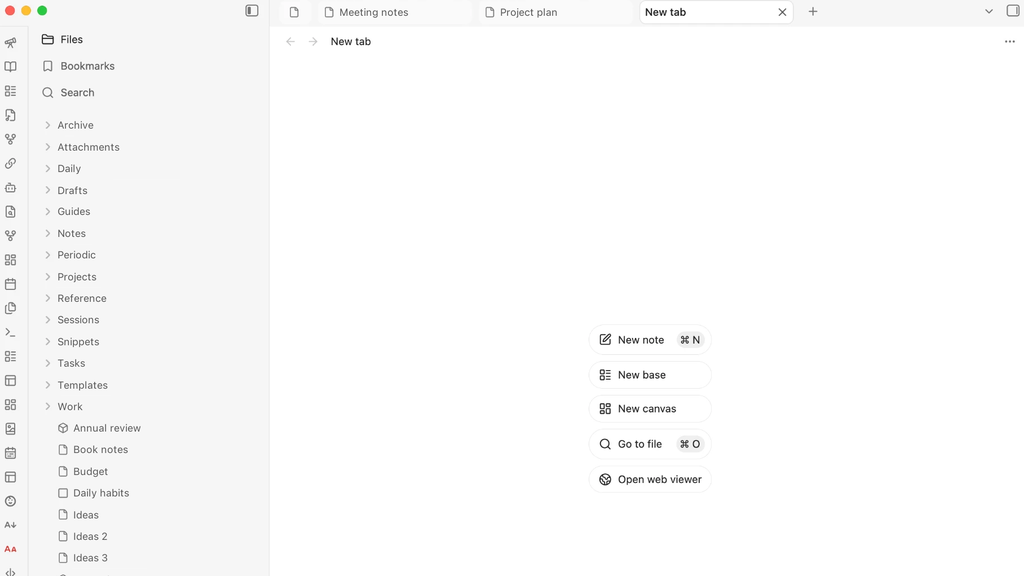
An Obsidian theme, built up one change at a
time. See the header of theme.css for what's in so far.
Companion plugin
The left sidebar's Files row gets a hover "..." menu (new note, new folder, sort order, expand/collapse...) from the Contemporary Theme Settings plugin. The theme works without it; the explorer just keeps its normal button row.
Developing
This folder lives at .obsidian/themes/Contemporary inside the vault you edit it from,
so Obsidian picks it up automatically:
- Settings → Appearance → Themes → select Contemporary.
- Uncheck Settings → Appearance → Show ribbon for the full effect.
- Edit
theme.css, save, and reload Obsidian ("Reload app without saving" in the command palette) to see changes. - Check both light and dark under Settings → Appearance → Base color scheme.
Reference for available variables: https://docs.obsidian.md/Reference/CSS+variables
Releasing
The community directory installs from GitHub releases, so each version needs one:
-
Bump
versioninmanifest.json(x.y.z) and commit. -
Create a release whose tag matches that version, with
manifest.jsonandtheme.cssattached:gh release create X.Y.Z manifest.json theme.css --title "X.Y.Z" --notes "What changed"
Submitting to the Obsidian community directory
- Sign in at community.obsidian.md and link your GitHub account.
- Add the theme. The repo needs
README.md,LICENSE,manifest.json,theme.cssand a screenshot (screenshot.png, 512 x 288 recommended) in place, plus the release above.
Full guidelines: https://docs.obsidian.md/Themes/App+themes/Submit+your+theme