
README file from
GithubCalm Page
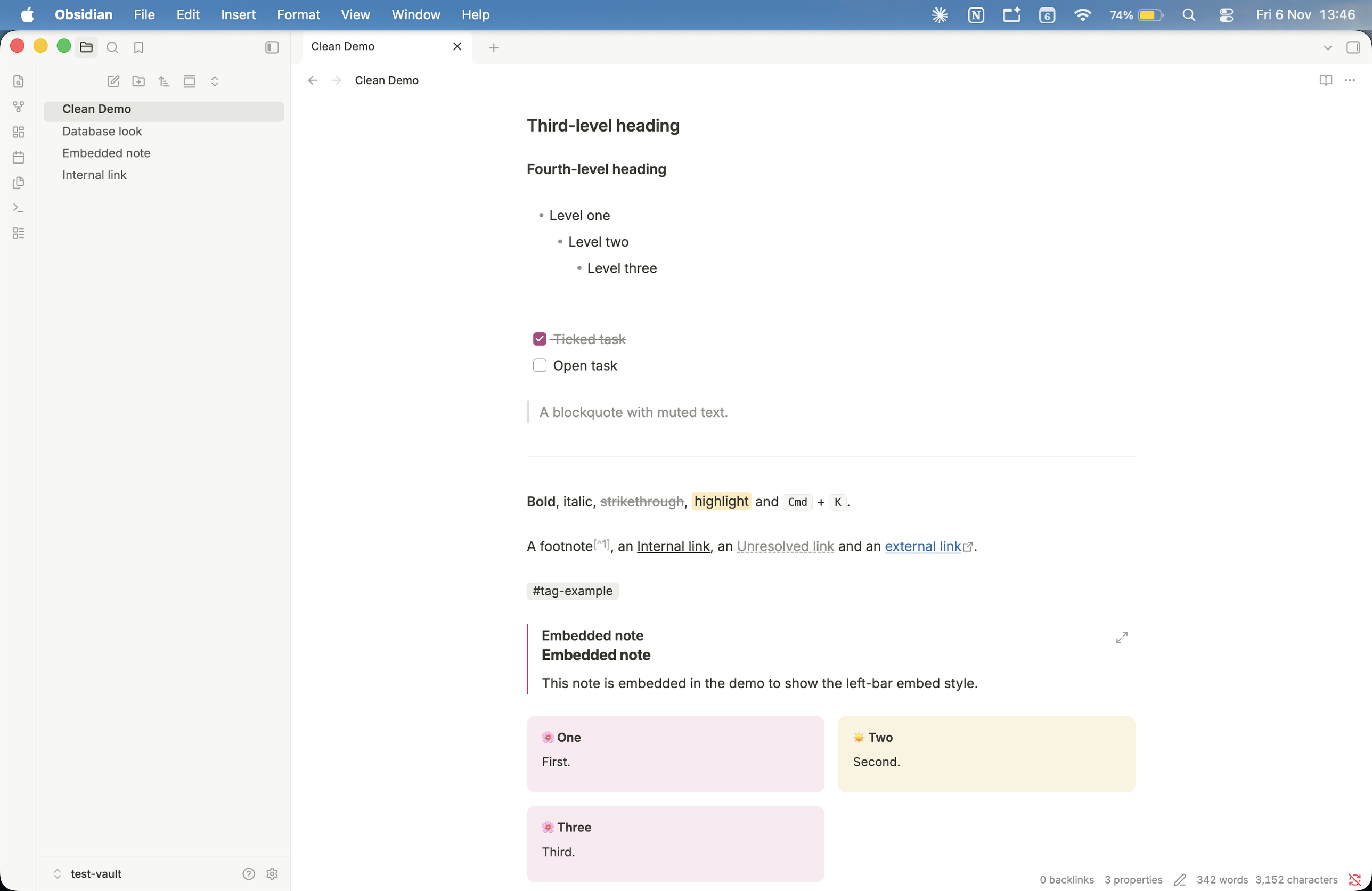
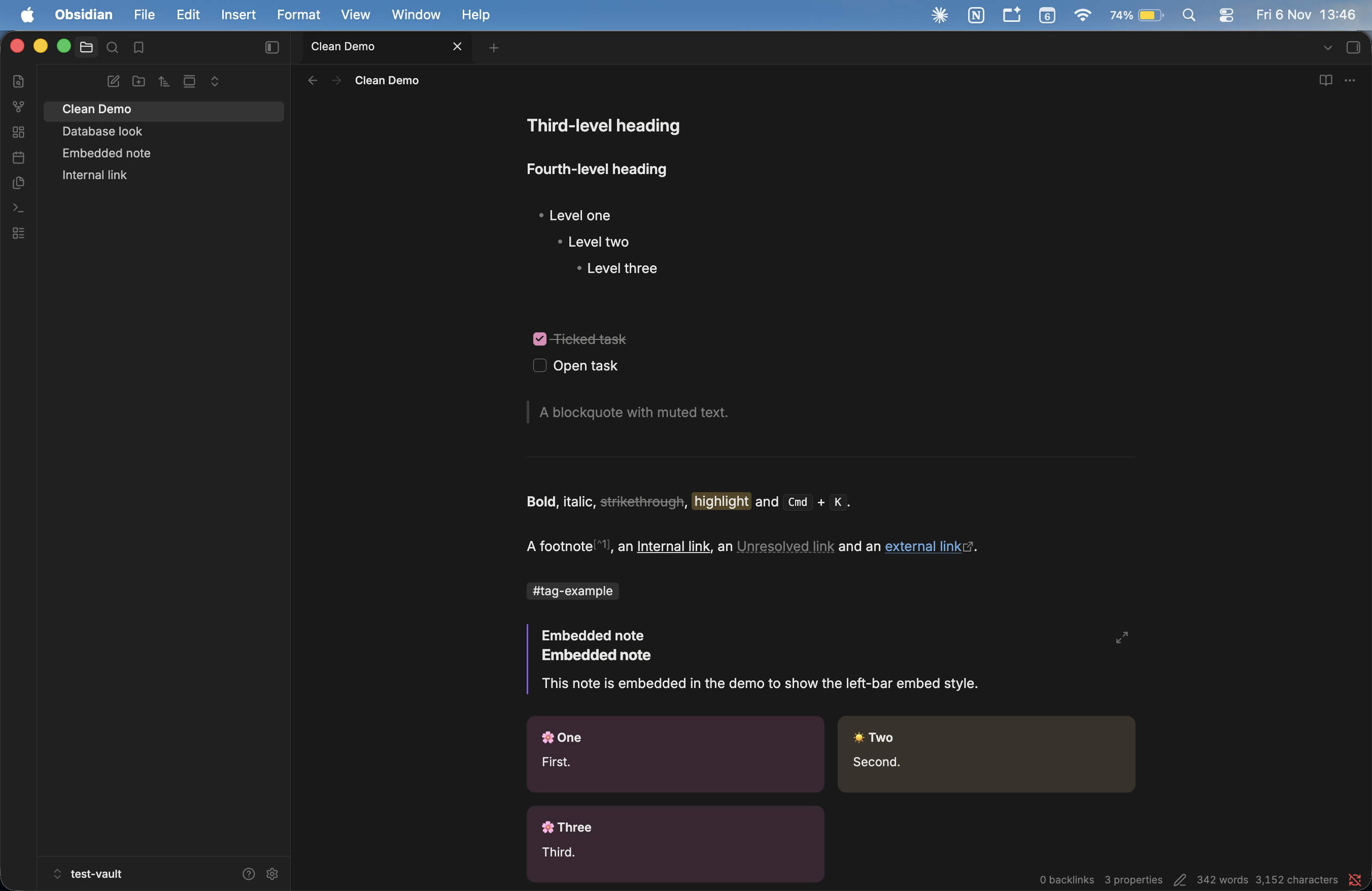
A calm, light-first, Notion Inspired theme for Obsidian, with light and dark modes. By Anthirayas.
Light & Dark
Callouts and columns
Two custom callouts: [!blush] (pink) and [!sand] (cream). Put your own emoji at the start of the title. Place them side by side with [!columns]:
> [!columns]
>> [!blush] 🌸 Title
>> Text.
>
>> [!sand] ☀️ Title
>> Text.
Columns collapse to one when narrower than about 240px each. See the known limits below for Live Preview.
What you get
- Light and dark modes, both fully defined from one set of
--nc-*tokens. - Notion Inspired page: bold but modest title and headings (H1 2em, H2 1.35em, H3 1.15em), tight heading-to-body spacing, calm 720px reading column, soft underlined links (internal links in text colour, external in blue, unresolved dashed).
- Soft inline code chips and rounded code blocks with muted, readable syntax colours.
- Notion-style callouts: borderless and rounded, plus two custom types,
[!blush](pink) and[!sand](cream). - Columns without a plugin: put callouts inside
[!columns]for two or three columns that collapse on narrow screens (works on Obsidian Mobile too). - Tables: a Notion "simple table" (square 1px grid, light header, top-aligned cells, row hover, no zebra stripes) and an optional database look.
- Clean lists and tasks: muted bullets, accent-coloured numbers, rounded checkboxes, struck-through done items.
- Flat sidebar and tabs: soft rounded file highlights at Obsidian's default row size, no indent guides, quiet chevrons, flat tabs with a hairline outline on the active one.
- Quiet details: highlights,
<kbd>keys, tags as chips, embedded notes with a left bar, hover-only fold chevrons. - Optional Notion colour palette:
nc-red,nc-blue-bgand so on, for coloured text and backgrounds. - Obsidian defaults where they work best: Properties, the command palette, search, inputs and the file explorer's row size and spacing keep Obsidian's own layout.
- Small and offline: one
theme.cssof about 30 KB, with no remote fonts, no JavaScript and no icon replacement. Passesstylelint-config-obsidianmdwith zero warnings.
Install
As a theme
Copy manifest.json and theme.css into <vault>/.obsidian/themes/Calm Page/ (the folder name must be exactly Calm Page), then choose it under Settings, Appearance, Themes.
- Mac:
~/Documents/MyVault/.obsidian/themes/Calm Page/ - Windows:
C:\Users\<name>\Documents\MyVault\.obsidian\themes\Calm Page\
.obsidian is a hidden folder: press Cmd+Shift+. on Mac, or turn on "Show hidden items" in Explorer on Windows.
As a snippet
Copy only theme.css to <vault>/.obsidian/snippets/calm-page.css, then Settings, Appearance, CSS snippets, reload, and toggle it on.
Recommended settings
- Editor: turn on "Readable line length".
- Appearance: base theme "Adapt to system" (or Light or Dark).
- Leave "Show inline title" off if your notes already start with an H1 (or uncomment the clutter-removal block at the end of
theme.css).
Font
The theme uses Inter if installed, then falls back to the system font (SF Pro on Mac, Segoe UI on Windows). Nothing is loaded from the internet. To install Inter locally, download it from rsms.me/inter on Mac or Windows.
Tweaking
All colours and sizes are tokens at the top of theme.css, prefixed --nc-. Common changes:
- Content width:
--nc-content-width - Text size and line height:
--nc-base-size,--nc-line-height - Title and heading sizes:
--nc-h1-sizeto--nc-h4-size(defaults 2em, 1.35em, 1.15em, 1.05em) - Heading gaps:
--nc-h-space-above,--nc-h-space-below - Corner roundness:
--nc-radius(rows, tabs, chips) and--nc-radius-lg(callouts) - Inline code colour:
--nc-code-text. The classic Notion red is#eb5757(light) and#ff8f8f(dark). - Muted text:
--nc-text-mutedis about 3:1 on white, fine for icons and placeholders. Use#787774for text that needs stronger contrast.
Table styles
- Default: Notion simple table (square grid, light header).
cssclasses: notion-db: database look (row lines only).cssclasses: table-first-col-boldandtable-compact: helpers.
Optional extras (not part of the theme)
- Emoji file-tree icons need the Iconize plugin. The sidebar leaves room for an emoji before the file name.
- Cover images need a banner plugin.
Known limits
Tested by eye on Obsidian desktop (Mac) in light and dark mode, and briefly on Obsidian Mobile in an Android emulator. Not tested on Windows. Still open:
- Bullet glyphs
•,◦,▪apply in Reading view only. Live Preview keeps Obsidian's dots. - In Live Preview, a table header cell can show extra space above its text while you are editing it. Not yet explained; it may be an Obsidian quirk.
- Dataview, Bases, stacked tabs and hover popovers have not been checked.
- Some selectors (tabs, fold indicators, Reading view table wrapper) come from memory of Obsidian's class names and may change between versions. Check them in Developer Tools (Cmd+Option+I on Mac, Ctrl+Shift+I on Windows).
Development
npm install, then npm run lint or npm run lint:strict (Stylelint with stylelint-config-obsidianmd, Node 22 or later).