
README file from
GithubMidnight Fjord Black
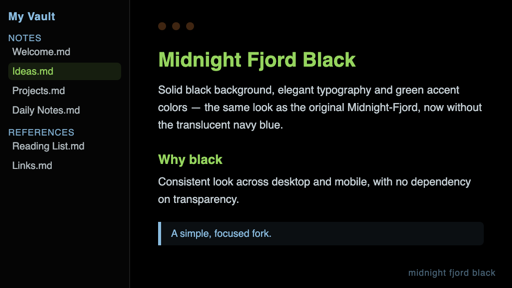
A fork of the Midnight-Fjord theme, by Quintavalle Pietro, with a single change: the background (main area and both sidebars) goes from a translucent navy blue to solid black, for visual consistency between desktop and mobile.
Everything else — typography, accent colors, layout — is identical to the original. Full credit for the design goes to the original author; this fork is under the same MIT license (see LICENSE).
Installation
From within Obsidian (Community Themes)
- Open Settings → Appearance → Themes → Browse.
- Search for "Midnight Fjord Black".
- Select Install and use.
Manual installation
- Download
manifest.jsonandtheme.cssfrom this repository (or from the latest release). - Copy both files to
<your-vault>/.obsidian/themes/Midnight Fjord Black/. - In Obsidian: Settings → Appearance → Theme and select "Midnight Fjord Black".
What changed
In .theme-dark, the background variables went from:
--background-primary: rgba(11, 26, 39, 0.87);
to:
--background-primary: #000000;
--background-secondary: #000000;
--background-secondary-alt: #000000;
Português (BR)
Um fork do tema Midnight-Fjord, de Quintavalle Pietro, com uma única mudança: o fundo (área principal e as duas sidebars) passa de azul-marinho translúcido para preto sólido, para ficar consistente entre desktop e mobile.
Todo o resto do tema — tipografia, cores de destaque, layout — é idêntico ao original. Crédito integral do design ao autor original; este fork está sob a mesma licença MIT (ver LICENSE).
O que mudou
Em .theme-dark, as variáveis de fundo passaram de:
--background-primary: rgba(11, 26, 39, 0.87);
para:
--background-primary: #000000;
--background-secondary: #000000;
--background-secondary-alt: #000000;
Instalação manual
- Baixe
manifest.jsonetheme.cssdeste repositório. - Copie os dois arquivos para
<seu-vault>/.obsidian/themes/Midnight Fjord Black/. - No Obsidian: Ajustes → Aparência → Tema e selecione "Midnight Fjord Black".
Instalação via Community Themes
Ajustes → Aparência → Temas → Procurar e busque por "Midnight Fjord Black".