
README file from
GithubLamplit
English · 简体中文
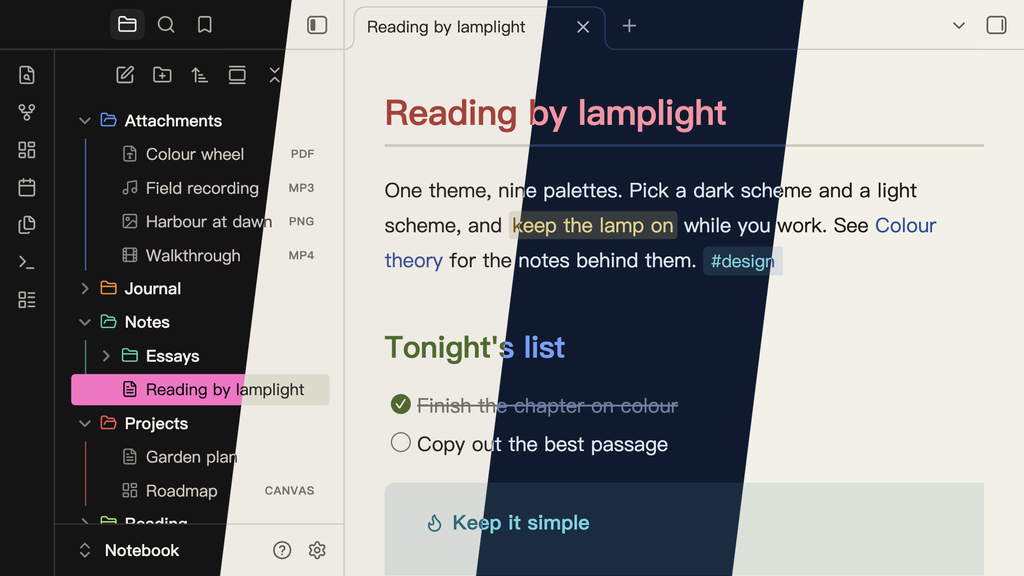
One theme, nine palettes. Pick a scheme for dark mode and another for light mode, from any palette you like.
Get started
- Install Lamplit from Settings → Appearance → Themes → Manage.
- Install Style Settings from the Community Plugins list.
- Open Settings → Style Settings → Lamplit and pick a Dark Mode Scheme and a Light Mode Scheme.
Without Style Settings you get Wonderland, and no way to switch palettes.
Palettes
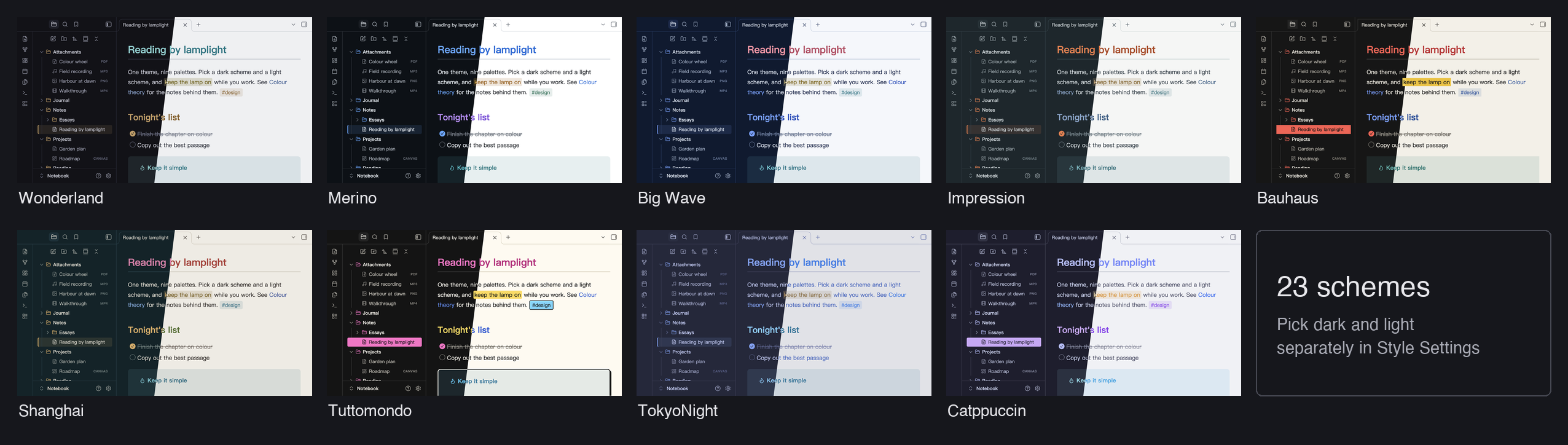
| Palette | Dark | Light | After |
|---|---|---|---|
| Wonderland | Underground, Office District | Lab | Murakami's Hard-Boiled Wonderland: ink black and a single brass accent (original) |
| Merino | Dark | Light | The Merino terminal themes: neutral grounds, GitHub Primer colors |
| Big Wave | Pipeline | Spray | Tatsuro Yamashita's Big Wave: ocean navy, spray white, a coral title |
| Impression | Havre | Brume | Monet's Impression, Sunrise: grey-green mist and one orange sun |
| Bauhaus | Weimar | Dessau | The Bauhaus: three primaries, solid blocks, square corners |
| Shanghai | Bund | Wukang | Shanghai across the Huangpu: river-ink ground, the Bund's gold, the Pearl's magenta |
| Tuttomondo | Subway | Pisa | After the 1989 mural Tuttomondo in Pisa: heavy outlines, hard shadows, solid tags and highlights |
| TokyoNight | Storm, Night, Moon | Day | The official tokyonight.nvim palette |
| Catppuccin | Mocha, Macchiato, Frappé | Latte | The official Catppuccin palette |
Features
- Some palettes change shape, not just color: Bauhaus has square corners and solid highlights; Tuttomondo draws heavy outlines and hard shadows, with solid tags and highlights
- Same look in Reading view and Live Preview: headings, code, tables, quotes, tags, highlights and links match
- File type icons in the file explorer: notes, images, canvases, bases, PDFs, audio and video
- Mermaid diagrams in your scheme's colors, in dark and light mode: flowcharts, sequence, pie, class, state, Gantt, ER, git and mindmap diagrams
- Callouts: all 13 official types, each with its own color
- Task states:
x,/,-,>,?,!, drawn as round checkboxes - Search highlights in a color of their own, apart from highlighted text and the selection
- Chinese-first typography: PingFang SC → Hiragino Sans GB → Noto Serif SC
The Style Settings page also has four toggles: Hide Folder Icons, Hide File Icons, Color Folders and Use Default Mermaid Colors.
Good to know
- The picture above has Color Folders on. It is off by default, and each scheme looks a little different when it is on.
- Color Folders follows position, not name. Each top-level folder takes the next of 8 colors from the scheme, so a new top-level folder shifts the colors after it. In a long file list, Obsidian removes folders that are scrolled out of view, so the remaining ones renumber and can change color while you scroll. A theme cannot avoid this, because it only has CSS.
- macOS context menus. Obsidian uses native system menus by default, and themes cannot style those. To see themed menus, turn off Settings → Interface → Advanced → Native menus.
Install by hand
- Download
theme.cssandmanifest.jsonfrom the latest release. - Put them in
<your-vault>/.obsidian/themes/Lamplit/. The folder must be named exactlyLamplit: Obsidian silently skips a theme whose folder name differs from the manifest'sname, even by case. - Restart Obsidian and select Lamplit in Settings → Appearance → Themes.
Source
The files in agiledolphin/lamplit are generated. Their sources, and the same palettes for Typora, are in agiledolphin/themes. Report issues in that repository.
Credits
- Palettes: tokyonight.nvim by @folke; Catppuccin by the Catppuccin org; Merino after the Merino Light / Dark terminal themes (GitHub Primer colors); Big Wave after the cover of Tatsuro Yamashita's Big Wave; Impression after Claude Monet's Impression, Sunrise; Bauhaus after the Bauhaus school; Shanghai after the two banks of the Huangpu; Tuttomondo in the spirit of the 1989 mural Tuttomondo in Pisa, with colors of our own; Wonderland is original
- Design reference: Minimal by @kepano
- Icons: Lucide, the set Obsidian itself uses
License
MIT