
README file from
GithubEmerald Synth for Obsidian
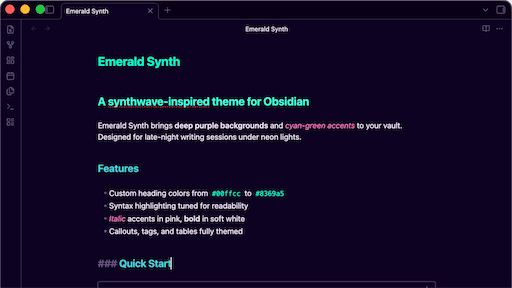
A synthwave-inspired dark theme for Obsidian with deep purple backgrounds and emerald-green foreground text.
This repository is a distribution copy of the Obsidian theme from malleroid/emerald-synth, published as a standalone Obsidian community theme.
Preview
| Role | Color | Hex |
|---|---|---|
| Background | #0d0221 |
|
| Foreground | #00ffcc |
|
| Accent | #ff79c6 |
|
| Heading 1 | #ff79c6 |
|
| Heading 3 | #4dd0e1 |
|
| Italic | #ff79c6 |
|
| Code | #ff79c6 |
|
| Error | #ff2a6d |
Install
From Community Themes (recommended)
- Open Obsidian
- Settings -> Appearance -> Themes -> Manage
- Search for "Emerald Synth" and install
Manual
- Download
theme.cssandmanifest.jsonfrom the latest release - Create a folder
emerald-synthunder your vault's.obsidian/themes/directory - Place
theme.cssandmanifest.jsoninto that folder - Settings -> Appearance -> Themes -> Select "Emerald Synth"
Issues & Contributions
Bug reports, feature requests, and contributions are managed in the parent repository:
Please open issues and pull requests there.