
README file from
GithubCupertino Soft
An independent, lightweight light-and-dark theme for Obsidian. Cupertino Soft brings a near-white reading surface, gentle gray navigation, discreet red accents, and a native-feeling interface without replacing Obsidian's window controls or layouts.

Companion project: Cupertino Zotero Soft Theme has a matching reading palette in Zotero.
Screenshots / Capturas de tela
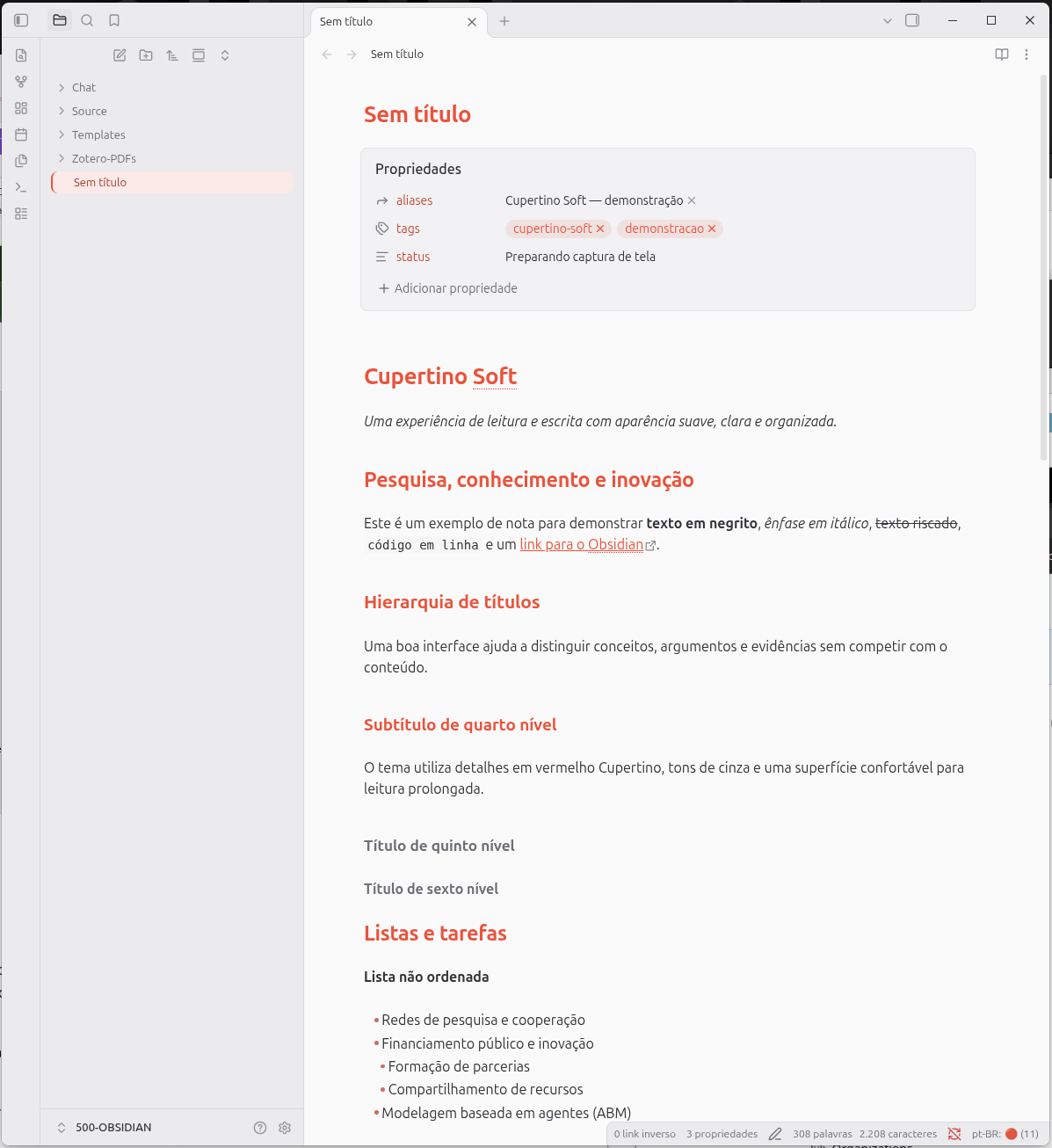
Real screenshots of Cupertino Soft in light mode, running in Obsidian on Linux:
| Typography, properties and lists | Tasks, tables, callouts and code |
|---|---|
A dark-mode screenshot and additional Linux visual checks are still pending.
Features
- Original, appearance-only CSS; Obsidian keeps its own tabs, title bar, ribbon, and navigation.
- Soft #FAFAFA note background, #EBEBED side panels, and readable #333338 text.
- Restrained #FF3B30 red for headings H1–H4, links, syntax, and selected navigation entries.
- Gentle metadata panel, striped tables, Markdown lists, callouts, and code highlighting.
- Dark-mode color variables with the same restrained visual language.
- Orange #FF9500 wavy misspelling marks, when Obsidian/Electron's spellchecker supports them.
The theme changes appearance only; it does not alter your notes or plugin settings.
Installation
Inside Obsidian
Once the theme is accepted into the Community directory, open Settings → Appearance → Themes → Manage and search for Cupertino Soft.
Manual installation (works now)
Download theme.css and manifest.json. Save both inside:
<your-vault>/.obsidian/themes/Cupertino Soft/
Restart Obsidian and select Cupertino Soft under Settings → Appearance → Themes.
Linux: Flatpak or .deb
For a vault at ~/Dropbox/500-OBSIDIAN (default), close Obsidian and run:
mkdir -p "$HOME/Downloads"
curl -fL --retry 3 \
  https://raw.githubusercontent.com/vict0rg/cupertino-soft/main/scripts/install-and-activate.sh \
  -o "$HOME/Downloads/instalar-cupertino-soft.sh"
bash "$HOME/Downloads/instalar-cupertino-soft.sh"
The installer downloads this project's two theme files and creates a dated backup of .obsidian/appearance.json before changing only cssTheme. Notes, plugins, snippets, and Dropbox files are preserved. To revert:
bash "$HOME/Downloads/instalar-cupertino-soft.sh" --reset
See INSTALL_LINUX.md for full instructions, including a custom vault path and update options.
Palette
| Element | Color |
|---|---|
| Writing surface | #FAFAFA |
| Navigation panels | #EBEBED |
| Metadata panel | #F2F2F4 |
| Reading text | #333338 |
| Accent | #FF3B30 |
| Selection fill | #FFE9E8 |
| Misspelling underline | #FF9500 |
Originality, inspiration and license
This is a new independent repository, not a GitHub fork. Its current theme.css, scripts, documentation and screenshots are authored for Cupertino Soft. It contains no source files, fonts, or graphical assets copied from the original Cupertino for Obsidian by svnaxis. The name and general visual direction acknowledge Cupertino's design influence; this does not imply an endorsement or affiliation.
An earlier experimental GitHub fork is retained separately at vict0rg/cupertino-obsidian-soft-theme for historical reference; its commit history is not included here. See CREDITS.md and NOTICE.md for attribution.
Cupertino Soft is licensed under MIT. Maintained by vict0rg. It is not affiliated with Obsidian or any upstream theme author.
Community directory
The 0.4.1 release provides theme.css and manifest.json for manual installation and the official directory submission. Listing inside Obsidian requires review and approval; track status in SUBMISSION.md.