
README file from
Github❄️ Frozen Kingdom Obsidian Theme
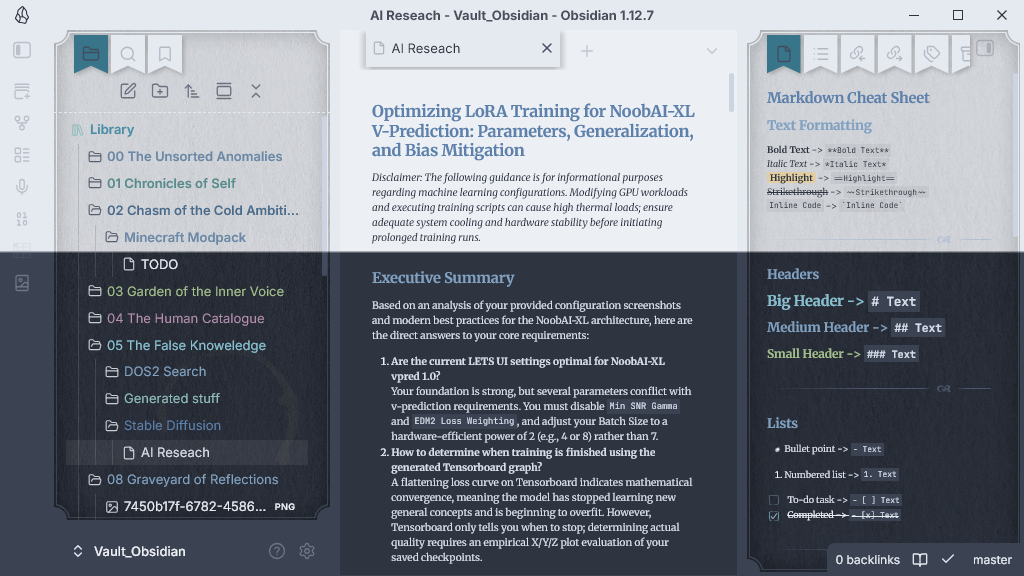
A highly aesthetic, deeply customized, and autonomous theme for Obsidian, heavily inspired by Nord and Aurora color palettes, designed for pristine organization, cool frosty aesthetics, and zero external dependency management.
🚀 Version 1.1.0 Highlights
Major Refactor & Paradigm Shift
- Autonomous & Standalone: We have officially removed the dependency on the
Style Settingsplugin! The theme is now fully self-contained. No more wrestling with complicated snippet toggles or external UI configurations. - Thematic Nord / Aurora Hierarchy: The file explorer is now a self-organizing rainbow of cold Nord and Aurora tones. The theme automatically targets root and level-2 folders and paints their subtree in beautifully balanced, frosty palettes (Arctic Cyan, Lunar Orchid, Pine Sage, Frost Amber, etc.).
- Stepped Lightness Gradients (Depth Perception): Nested subfolders are no longer a flat list. Every time you descend a level in the hierarchy, the subfolders increment in lightness, naturally guiding the eye down the tree.
- Total
IconicPlugin Integration: Custom folder and file icons rendered by theIconicplugin now flawlessly inherit the color and brightness shifts of the folders they reside in. Perfect visual harmony.
🎨 Git-Optimized Dynamic Palette Mapping
The theme is built around a structured hierarchy of primary and secondary folders, automatically assigning distinct, carefully curated colors based on their sequential order. This creates a visually intuitive and atmospheric vault structure that integrates flawlessly with the Obsidian Git plugin:
- Root / Default — Pure Nord Frost Ice (
#88c0d0) - Primary Folder 00 — Frost-tempered Amber
- Primary Folder 01 — Nord Aurora Cold Rose
- Primary Folder 02 — Glacial Arctic Cyan
- Primary Folder 03 — Glacial Pine & Sage
- Primary Folder 04 — Nord Frost Topaz
- Primary Folder 05 — Synthetic Ice-Violet
- Primary Folder 06 — Aurora Copper Terracotta
- Primary Folder 07 — Arctic Water Blue (
#81a1c1) - Primary Folder 08 — Polar Slate Mist
- Primary Folder 09 — Deep Sea Sapphire (
#5e81ac) - Primary Folder 10 — Lunar Frost Amethyst (
#b48ead)
Why this structure? By mapping colors to a sequenced primary/secondary folder architecture, your vault naturally encourages a clean, root-level directory design. This predictability is ideal for version control:
- Clean Commits: It prevents root-level clutter by isolating knowledge domains into distinct top-level directories (
00,01,02, etc.). - Effortless
.gitignoreManagement: You can easily ignore specific secondary or primary folders without complex wildcard rules. - Visual Branching: The distinct color palette helps you instantly identify which "knowledge branch" you are currently navigating, reducing friction when staging files for Git.
🛠 Features
- No CSS Snippets Required: The folder styling is injected directly into
theme.css. - Interactive States: Hover and Active states on files ignite specific saturation and luminosity changes, making selection unambiguous and satisfying.
📥 Installation
- Create a
Frozen Kingdomfolder in.obsidian/themes/. - Drop
theme.cssandmanifest.jsoninto this folder. - Select Frozen Kingdom from your Obsidian settings.
- Enjoy the frost!
Architected by Sto3IV & Ranni