
README file from
Githubcosmic
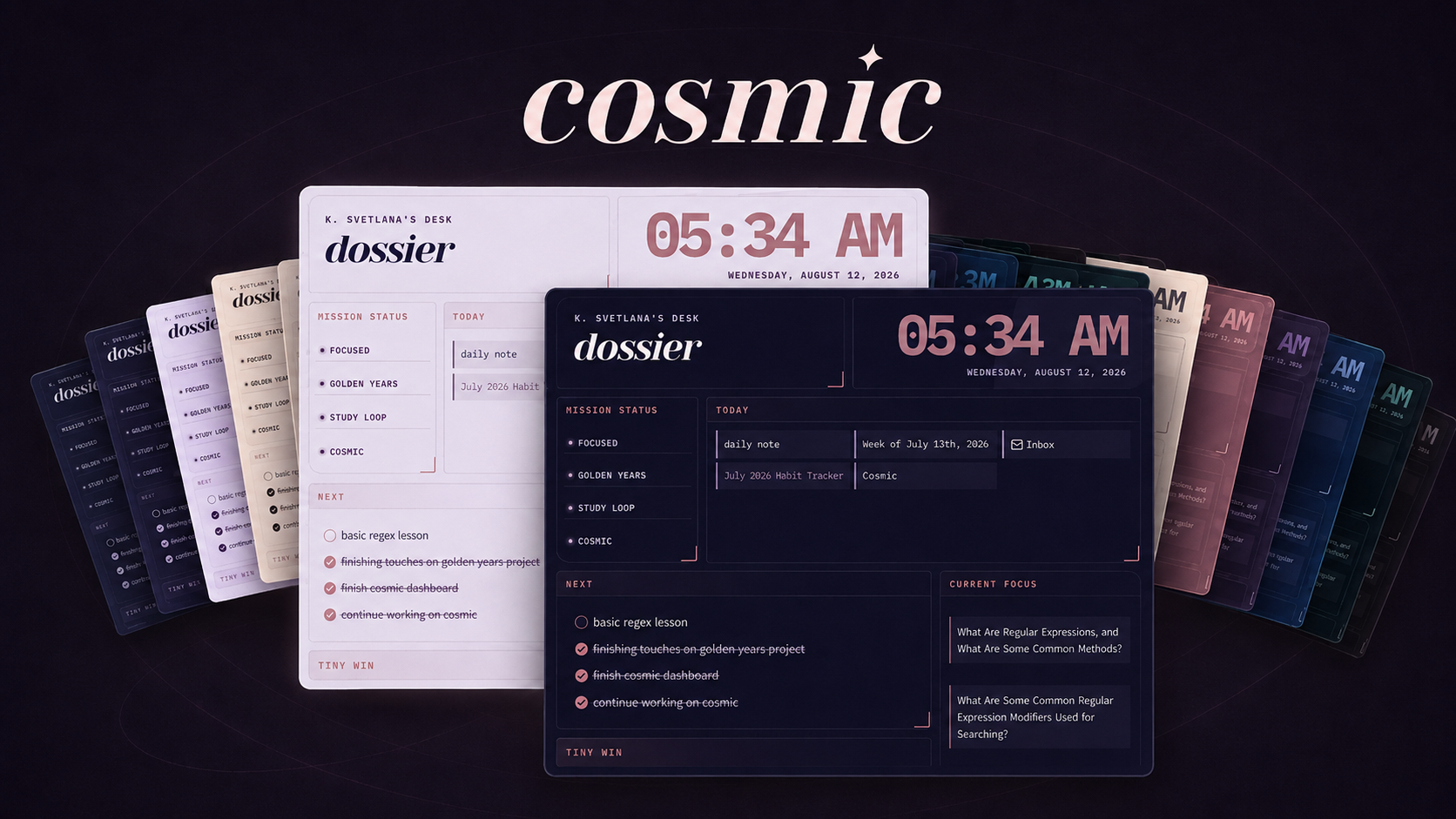
A colorful, customizable theme for Obsidian, inspired by painted night skies.
cosmic pairs deep, atmospheric surfaces with expressive color, readable typography, and coordinated light and dark modes. It includes seven color schemes, optional workspace atmospheres, and focused customization through the Style Settings plugin.
Features
- Coordinated light and dark mode
- Seven complete color schemes
- Colorful headings and interface accents
- Adjustable workspace backgrounds and sidebar contrast
- Customizable typography, note width, and interface density
- Continuous, readable code blocks with colorful syntax highlighting
- Styled tables, properties, callouts, embeds, Canvas, Graph, Bases, and PDF views
- Semantic alternate checkboxes
- Optional per-note layouts for cards, images, tables, properties, and wide media
- Print-friendly and reduced-motion styles
- Responsive adjustments for smaller screens
cosmic does not require any companion plugins to function. The optional Style Settings plugin unlocks the theme's built-in customization controls.
Installation
Obsidian Community Themes
Once cosmic is available in the Obsidian theme directory:
- Open Settings > Appearance
- Next to Themes, select Manage
- Search for cosmic
- Select Install and use
Manual Installation
- Download
theme.cssandmanifest.jsonfrom the latest GitHub release - Create a folder named
cosmicinside your vault's.obsidian/themes/directory - Place
theme.cssandmanifest.jsoninside thecosmicfolder - Restart Obsidian or reload the available themes
- Open Settings > Appearance and select cosmic
Your theme directory should look like this:
.obsidian/
└── themes/
    └── cosmic/
        ├── manifest.json
        └── theme.css
Color Schemes
cosmic includes seven palettes. Every palette has separate colors designed for light and dark mode, respectively.
To change palettes with Style Settings:
- Install and enable the Style Settings community plugin
- Open Settings > Style Settings
- Expand cosmic
- Under Colors and Moods, select a Color Scheme
Changing between Obsidian's light and dark appearance automatically activates the corresponding version of the selected palette.
Style Settings
The full list of cosmic's customizable options under Style Settings are as follows:
Colors and Moods
- Choose one of cosmic's seven color schemes (Original, Red Dwarf, Blue Blob, Aurora, Eclipse, Stardust, & Comet)
- Change the primary accent and hover accent
- Customize the colors used for H1, H2, and H3 headings
Fonts and Headings
- Choose the main note font
- Choose the display font used for titles and prominent headings
cosmic's default typography uses:
- Yeseva One for prominent headings
- Tirra for note text
- Inter for the interface
- IBM Plex Mono for inline code and code blocks
Alternative heading and note fonts are available through Style Settings.
Size and Spacing
- Adjust the maximum note width
- Choose Cozy, Compact, or Airy interface spacing
Backgrounds and Surfaces
Choose a sidebar treatment:
- Muted
- Separated
- Deep, available in dark mode
Choose a workspace background:
- Flat for a plain workspace
- Nebula for a palette-colored ambient glow
- Deep Space for a darker background with stronger color and a vignette
Finishing Touches
- Choose Soft, Solid, or Outlined callouts
- Choose Default, Pill, or Minimal status bar styling
- Remove frames from embedded notes and files
- Turn off ambient glow, decorative shadows, and transitions
Callouts
cosmic styles Obsidian's standard callouts and includes three additional callout styles:
> [!constellation]
> A highlighted idea or collection of related notes.

> [!orbit]
> Supporting information connected to a larger topic.

> [!signal]
> An important message, observation, or update.
The active cosmic palette supplies the colors for these callouts.
Alternate Checkboxes
cosmic provides distinct colors and symbols for several semantic task states.
| Syntax | Meaning |
|---|---|
- [ ] |
Incomplete |
- [x] |
Complete |
- [/] |
In progress |
- [!] |
Important |
- [?] |
Question |
- [*] |
Star |
- [>] |
Forwarded |
- [-] |
Cancelled |
- [i] |
Information |
Per-note Layouts
cosmic includes optional CSS classes that can change the presentation of individual notes without affecting the rest of the vault.
Add classes through the note's cssclasses property:
---
cssclasses:
  - cosmic-image-grid
---
Multiple classes can be combined.
Content Layouts
| CSS class | Effect |
|---|---|
cosmic-card-grid |
Arranges supported content blocks and callouts in a responsive card grid |
cosmic-image-grid |
Arranges groups of images in a responsive gallery |
cosmic-list-cards |
Turns a top-level list into a responsive card layout |
cosmic-wide-media |
Allows images, videos, iframes, and embeds to extend beyond the normal note width |
Properties
| CSS class | Effect |
|---|---|
cosmic-properties-card |
Displays note properties in a card-style grid |
cosmic-properties-compact |
Reduces property spacing |
cosmic-properties-plain |
Removes the surrounding properties treatment |
Tables
| CSS class | Effect |
|---|---|
cosmic-table-compact |
Reduces table cell spacing |
cosmic-table-center |
Centers the table and its cell content |
cosmic-table-nowrap |
Prevents table-cell text from wrapping |
cosmic-table-striped |
Adds alternating row backgrounds |
cosmic-table-numbered |
Adds visible row numbers |
Code Blocks
| CSS class | Effect |
|---|---|
cosmic-code-nowrap |
Prevents code lines from wrapping |
cosmic-code-lines |
Adds line numbers in Live Preview |
cosmic-code-compact |
Reduces code-block spacing |
cosmic intentionally renders code blocks as one continuous container rather than styling each line as a separate rounded element.
Fonts
cosmic loads its primary typefaces from Google Fonts and includes system-font fallbacks for situations where the web fonts are unavailable.
You can also override Obsidian's interface, text, or monospace fonts through Obsidian's built-in font settings.
Compatibility
cosmic requires Obsidian 1.5.0 or later.
The theme includes adjustments for narrow screens, printing, reduced-motion preferences, and forced-colors accessibility mode. Because cosmic modifies many parts of Obsidian's interface, future Obsidian updates or unrelated CSS snippets may occasionally cause visual conflicts.
If you encounter a problem, temporarily disable other CSS snippets before reporting it.
Feedback and contributing
Bug reports, feature requests, and pull requests are welcome through the project's GitHub Issue Tracker.
When reporting a visual problem, please include:
- Your Obsidian version
- Your operating system
- Whether you are using light or dark mode
- The selected cosmic color scheme
- A screenshot of the affected area
- Any CSS snippets or appearance-related plugins that may be active
License
cosmic is available under the MIT License.