
README file from
GithubRaunak Noir
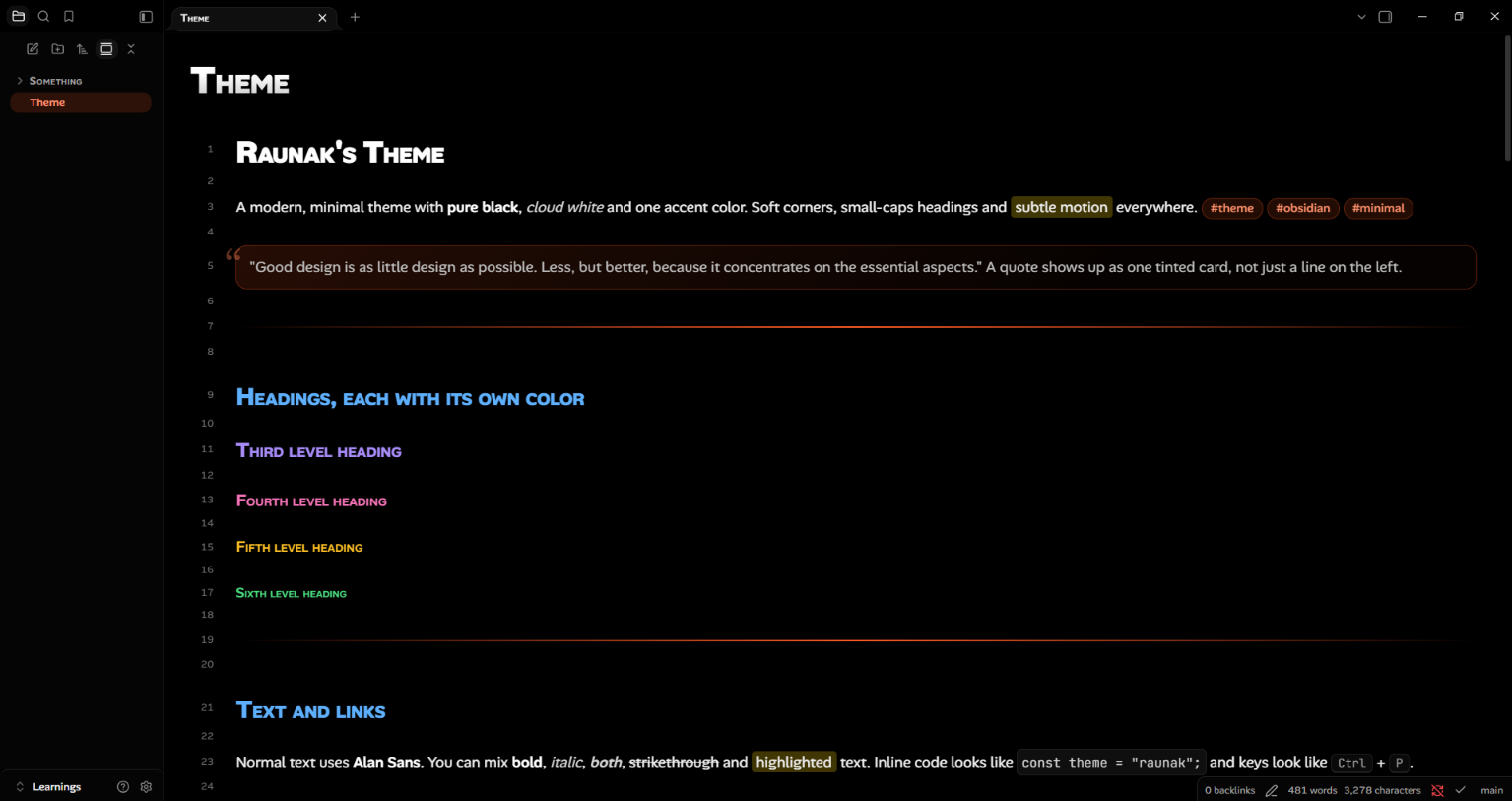
A modern, minimal theme for Obsidian, inspired by Vercel's design language: pure black and cloud white, a single accent color, rounded corners, small-caps headings and soft, subtle motion.
Features
- Two palettes: pure black for dark mode and a soft cloud white for light mode.
- One accent color: change a single hue value and links, tags, toggles, sliders, focus rings and glows all follow.
- Colored headings: every heading level (H1–H6) has its own color, tuned for both light and dark mode.
- Small-caps headings and titles: headings, note titles, tab titles, table headers and callout titles.
- Fonts: Alan Sans for text and the interface, JetBrains Mono for code.
- Rounded everything: tabs, buttons, inputs, dropdowns, code blocks, callouts, tables, tags, menus, modals and the command palette.
- Quote cards: blockquotes are highlighted as a whole tinted card with a decorative quote mark, not just a line on the left.
- Accent divider:
---renders as a single accent line that is brightest in the middle and fades out in both directions. - Polished code blocks: bordered, rounded, with a copy button that fades in on hover.
- Soft animations: gentle fades, rises and hover lifts. Everything is switched off automatically if your system has "reduce motion" enabled.
- Extra task states:
[!]important,[?]question,[>]forwarded,[-]cancelled. - Cleaned-up controls: custom dropdowns, sliders, toggles, scrollbars and settings pages.
Installation
From the community themes browser
- Open Settings → Appearance.
- Under Themes, click Manage.
- Search for Raunak Noir and click Install and use.
Manual installation
- Download
theme.cssandmanifest.jsonfrom the latest release. - In your vault, create the folder
.obsidian/themes/Raunak Noir/. - Put both files in that folder.
- Open Settings → Appearance, click the refresh icon next to Themes, and choose Raunak Noir.
Fonts
The theme loads Alan Sans and JetBrains Mono from Google Fonts, so they need an internet connection the first time. If you work offline, install both fonts on your system and the theme will use them.
The theme forces these fonts, so a custom font chosen under Settings → Appearance → Fonts will be ignored. To pick your own fonts, delete the block marked FONTS — forced so a custom font… near the top of theme.css (in your own copy).
Customization
Open theme.css and edit the Theme knobs section at the top:
| Variable | What it controls | Default |
|---|---|---|
--accent-h |
Accent hue (0–360). Try 262 for violet, 160 for green, 25 for orange. |
212 |
--accent-s |
Accent saturation | 100% |
--accent-l |
Accent lightness | 52% |
--radius-s / -m / -l / -xl |
Corner radius scale | 6px / 10px / 14px / 20px |
--file-line-width |
Reading width of notes | 46rem |
You can also set an accent color under Settings → Appearance → Accent color. The theme's tag, link and glow shades follow whatever accent is set.
To use your changes safely across updates, put them in a CSS snippet (.obsidian/snippets/) instead of editing the theme file.
Compatibility
- Obsidian 1.5.0 or newer.
- Light and dark mode.
- Desktop and mobile. Hover effects only apply where a pointer is available.
Known limitations
- Sliders do not show a filled track on the left of the thumb. CSS alone cannot do this.
- Live Preview renders quotes line by line, so very unusual quote formatting may look slightly different from Reading view.
Feedback and issues
Found a bug or have an idea? Open an issue. Screenshots help a lot, and please mention your Obsidian version and whether you were in Reading view or Live Preview.
License
MIT © Raunak