
README file from
GithubHidden Grotto
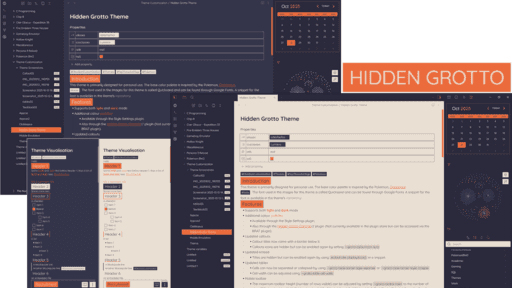
This is a theme I primarily made for personal use. It focuses on a clean and sharp design with some modifications to the default UI, especially on mobile, for a better experience. The base color palette is inspired by the Pokemon, Clobbopus.
Features
- Support for both light and dark mode
- 25 color palettes to choose from through Style Settings or from Hidden Grotto Controls (Available through BRAT)
- Updated mobile toolbar with vertical scrolling
- Updated callouts with hidden icons which can be reenabled by setting
--grotto-callout-icon: auto - Option to blur or redact everything to provide some privacy when notes are left unattended
- #Note : Only use this feature if you know how to navigate to the settings to disable it
Screenshots
#Note : The font used in the images for this theme is called Quicksand and can be found through Google Fonts. A snippet for the font is available here. It's not part of the theme because I wanted to keep the font usable without needing the theme.
Color Presets
You can create your own color preset using the following format in a snippet.
.preset-yourpresetname {
	--grotto-accent-h: ;
	--grotto-accent-s: ;
	--grotto-accent-l: ;
	--grotto-light-0: hsl();
	--grotto-light-1: hsl();
	--grotto-light-2: hsl();
	--grotto-dark-0: hsl();
	--grotto-dark-1: hsl();
	--grotto-dark-2: hsl();
	--grotto-accent: hsl();
}
If you are using the Hidden Grotto Controls plugin, your preset will be automatically added to the list of presets. In the case of Style Settings, you will need to add the following format to the snippet as well.
/* @settings
name: Personal Presets
id: personal-presets
collapsed: false
settings:
    -
        id: color-palette
        title: Personal Presets
        type: class-select
        allowEmpty: true
        options:
            -
                label: Your Preset Name
                value: preset-yourpresetname
*/
You can include additional changes to your preset using the variables declared by the theme. A full list of variables can be found in the theme.css file. #Note : The presets included in the theme are always subject to change. '
The Plugin
The Hidden Grotto Controls plugin includes all the settings available in Style Settings as well as an easy way to cycle through the presets and toggle blur through ribbon commands. There's no need to use it if you don't need the shortcuts.
Changelog
- Reverted some code cleanup because it somehow messes with the mobile UI
- Made small adjustments to some of the brighter colour palettes
Feedback
If there are any problems with the theme, you can submit an issue on the repository.