
README file from
GithubPlay
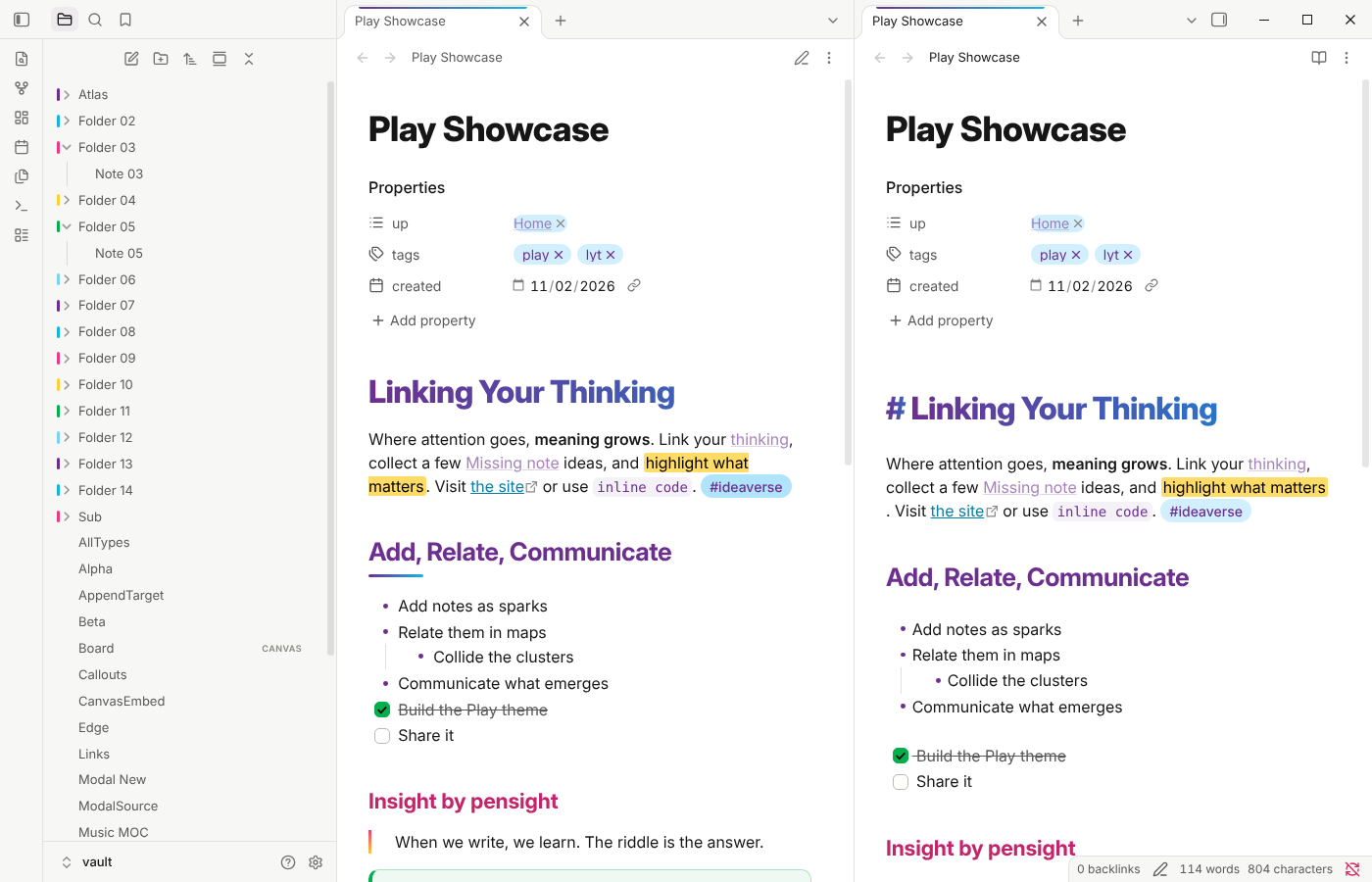
Play is an Obsidian theme in the Linking Your Thinking colors: violet, bold blue, magenta, yellow, green and sky blue, on clean white or true black.
What it does
- Brand colors with purpose. H1 carries a gradient (violet to blue in light mode, magenta to yellow in dark), and each heading level below it has its own brand color.
- Readable pairs. Text colors follow the brand's WCAG 2.2 AAA combinations: violet on sky blue for tags, black on yellow for highlights, black on green for checked tasks.
- Folder markers. Each top-level folder in the file explorer gets a small marker in the next brand color.
- Callouts in the brand colors, including callouts from older snippets that write colors as
r, g, b. - Light and dark. Both modes are designed, not inverted.
Fonts
Play uses Area Normal when it's installed on your computer. It isn't bundled, so without it Play falls back to Inter, then your system font. You can pick any heading font in Style Settings.
Style Settings
With the Style Settings plugin you can:
- Turn headings plain (all in the text color)
- Make H1 a solid color instead of a gradient
- Choose the heading font
- Turn off folder markers
- Show tags as plain colored text instead of pills
Requirements
Obsidian 1.13 or later.
License
MIT