
README file from
GithubNibble
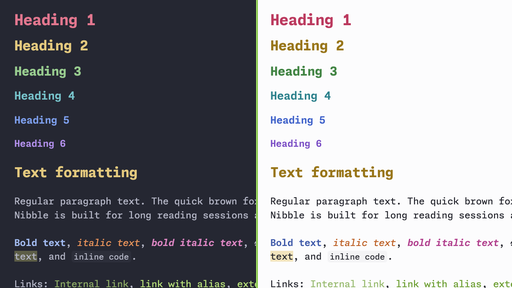
A calm, colorful theme for Obsidian with dark and light modes, built around monospace typography.
Nibble is a personal theme. I made it for my own everyday use, so it reflects my taste and the way I work. If it suits you too, I'd be really happy for you to use it! Feedback and ideas are always welcome.
Fonts
Nibble is designed for Monaspace Neon NF and JetBrains Mono. The whole interface, your notes and code blocks all use these fonts.
The theme does not bundle fonts, so install at least one of them before using Nibble:
- Monaspace — primary font. Install the Neon NF variant.
- JetBrains Mono — fallback if Monaspace Neon NF is not installed.
If neither font is installed, Obsidian falls back to your system monospace font, and the theme will not look as intended.
Prefer a different font? You can override it in Settings → Appearance → Font.
Features
- Dark and light modes with matching palettes
- Colored headings, from H1 to H6, each in its own color
- Distinct colors for bold, italic and bold italic text
- Buttons, inputs, borders and hover states tinted to match the background
- Works with Obsidian's accent color: change it in Settings → Appearance → Accent color
Installation
From Community themes
- Open Settings → Appearance → Themes → Manage.
- Search for Nibble.
- Select Install and use.
Manually
- Download
manifest.jsonandtheme.cssfrom the latest release. - Create a folder named
Nibblein<your vault>/.obsidian/themes/. - Put both files in that folder.
- Open Settings → Appearance → Themes and select Nibble.
Support
If you enjoy Nibble, you can buy me a coffee.
License
MIT © n3xtb1te