
README file from
GithubMonolith
Black, white and one ice-blue accent. Monolith borrows its look from an instrument panel: hairline rules, square corners, corner brackets, a ruler along the tab strip and a ladder of greys. Dark is the main design. A paper-and-ink light mode comes with it.
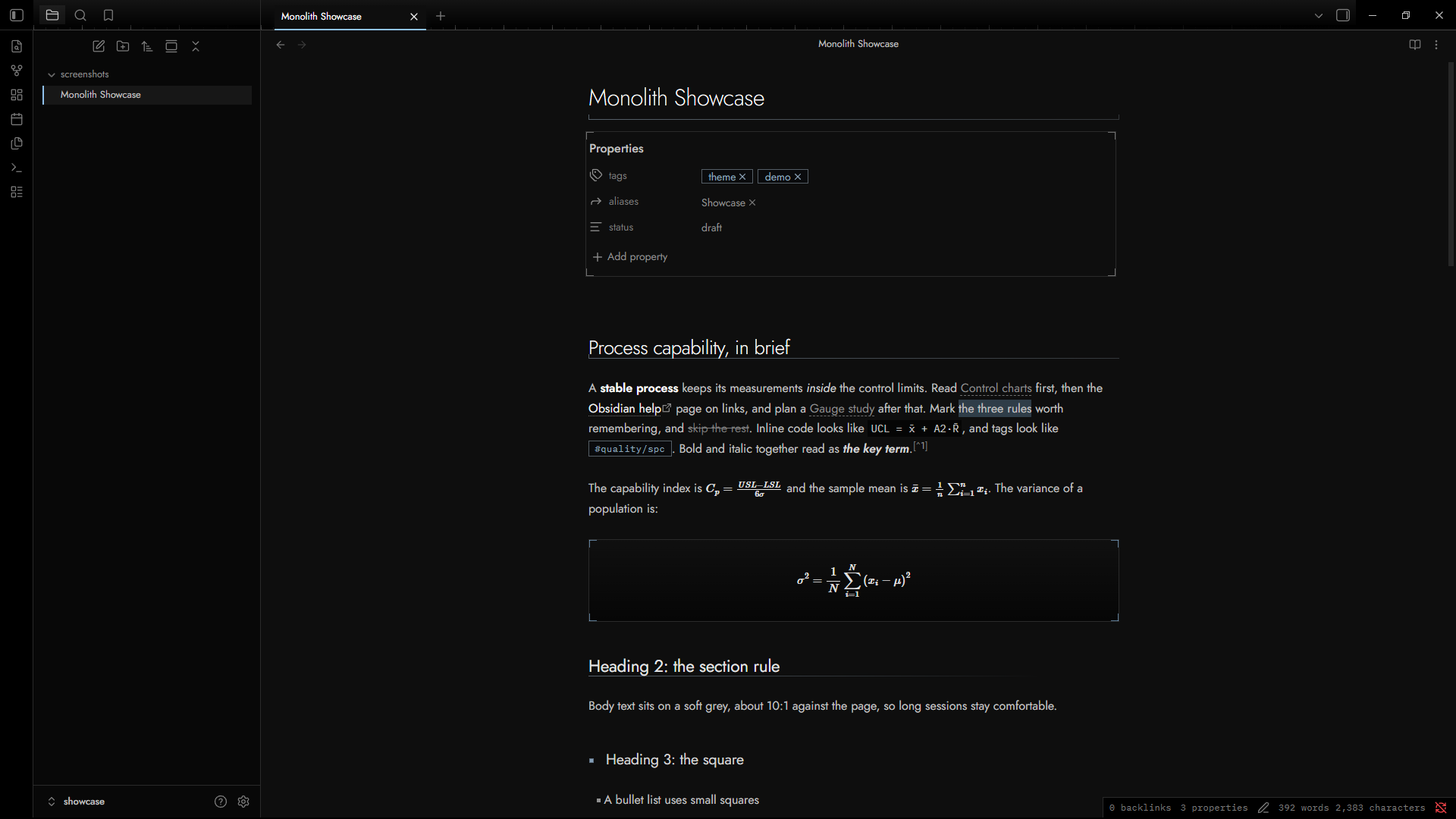
This image is a mock rendering of the CSS, not a screenshot from Obsidian. Replace
screenshots/screenshot.pngwith a real one and delete this note.
The grey ladder
Each heading level, bold, italic, link and equation has its own grey. Size, weight, typeface and a small marker back up the grey, so the roles stay distinct where two greys sit close together. Neighboring steps differ by 4.9 to 6.2 points of CIELAB lightness in dark mode and 5.9 to 8.2 in light mode.
| Role | Dark | Light | Size | Face | Extra cue |
|---|---|---|---|---|---|
| Note title | #ffffff (19.3:1) |
#000000 (19.1:1) |
1.9em | Jost 250 | Fading hairline with a tick at each end |
| Heading 1 | #f6f6f6 (17.9:1) |
#0e0e0e (17.6:1) |
1.6em | Jost 300 | Fading hairline with one tick |
| Heading 2 | #e5e5e5 (15.3:1) |
#1d1d1d (15.3:1) |
1.4em | Jost 400 | Hairline that fades out |
| Heading 3 | #d4d4d4 (13.0:1) |
#2c2c2c (12.7:1) |
1.22em | Jost 400 | Filled square marker |
| Heading 4 | #c4c4c4 (11.1:1) |
#3e3e3e (9.7:1) |
0.94em | Plex Mono 500 | Outlined triangle marker |
| Heading 5 | #b3b3b3 (9.2:1) |
#505050 (7.3:1) |
0.86em | Plex Mono 500 | Outlined diamond marker |
| Heading 6 | #a3a3a3 (7.7:1) |
#5e5e5e (5.9:1) |
0.78em | Plex Mono 400 | Outlined ring marker |
| Bold | #ffffff (19.3:1) |
#000000 (19.1:1) |
body | Jost 600 | Brightest text in a paragraph |
| Link | #f0f0f0 (16.9:1) |
#181818 (16.1:1) |
body | Underline | Softly tinted underline (internal), dotted grey (external) |
| Link, unresolved | #8c8c8c (5.7:1) |
#666666 (5.2:1) |
body | Underline | Dashed grey underline |
| Math | #e2e2e2 (14.9:1) |
#242424 (14.1:1) |
body | Math font | Display math sits in a recessed box with accent corner brackets |
| Italic | #d2d2d2 (12.8:1) |
#353535 (11.2:1) |
body | Jost italic | A true italic, not a slanted upright |
| Body | #c2c2c2 (10.8:1) |
#474747 (8.4:1) |
body | Jost 400 | Plain text |
| Quote | #a8a8a8 (8.1:1) |
#565656 (6.7:1) |
body | Jost 400 | Cool grey edge on the left |
Sizes use em, so headings follow the text size you set under Settings, Appearance. The numbers in brackets are contrast ratios against the page color (#0e0e0e in dark, #f4f4f4 in light). WCAG success criterion 1.4.3 sets 4.5:1 as the minimum for normal text. Each grey in the table, the muted and faint text greys, the accent and the code colors clear 4.5:1 on every surface they sit on: page, sidebar, frame, code well and callout title bar.
The accent
Dark mode uses #8fc1ee. Light mode uses #2e5fa0. Both come from the faceted gem in the source page's favicon. The accent works as a treat: small and quiet at rest, a little brighter when you reach for something.
At rest:
- the caret, the selection and
==highlights== - the open tab, the open file and checked tasks
- a faint tint in tags, link underlines, heading markers and the cool cast of heading rules
- the corner brackets around display math, and the tip callouts
On hover:
- a heading's rule warms and its marker lights up
- display math brackets brighten
- links and tags fill in
Never: bullets, plain borders, or a heading rule drawn as a bar or a solid accent line.
To turn the accent up or down, use the Accent strength slider in Style Settings. Without that plugin, add a snippet such as body { --mn-accent-k: 0.6; }. At 0 the tints go grey. To change the accent color itself, pick one under Settings, Appearance, Accent color. Obsidian documents that setting as an override for the theme's accent, and Monolith reads it everywhere.
Lines and shapes
Small details, kept faint:
- heading rules that fade out, with a tick at each end for the note title and one for H1
- a ruler along the bottom of the tab strip, with a tick every 16px and a longer one every 64px, fading to the right
- a dimension line for
---, with square ends and a dashed middle - corner brackets on code blocks, display math and the Properties panel
- square checkboxes and tags
- one shape per level for H3 to H6: filled square, outlined triangle, diamond and ring, all the same size
Plain headings and Flat surfaces in Style Settings turn these down.
Easy on the eyes
- The page is
#0e0e0e, not pure black. Body text is#c2c2c2, not pure white. - Body text sits about 11:1 against the page. Pure white on pure black is 21:1. Material Design's convention for dark themes is softer than pure white as well, about
#e0e0e0. Monolith goes a little softer still. If the body text feels dim, raise--mn-bodyin a snippet. - Glows are rare and small: the open tab, hovered links and buttons, and the tip callout.
- Interface text uses Obsidian's own size scale, so tabs, the sidebar and the status bar match other themes. The theme sets no
remsizes, which follow the root font size and can run large. - Transitions run for 0.15 seconds and switch off when the system asks for reduced motion.
Other details
- Callouts use no hue. The icon, the edge and the line style carry the type. A dashed outline marks open items. Hatching marks danger.
- Code is grey by value. Functions take the accent.
- Tables get hairlines and a mono header row.
- Fonts: Jost for text, IBM Plex Mono for labels and code, IBM Plex Sans Arabic for Arabic script. They load from data URLs inside
theme.css, so the theme works offline. If you pick your own fonts under Settings, Appearance, those win. - Arabic and right-to-left text: Arabic has no italic, so emphasis there shows by shade, one step brighter than Latin italic. Tracking resets to zero on right-to-left lines, and rules mirror.
Style Settings
If you install the Style Settings plugin, Monolith adds five options:
- Plain headings removes the rules and markers.
- Flat surfaces removes glows, corner brackets and the tab ruler.
- Numbered tabs prefixes tabs with
01 /,02 /and so on. - Readable line width sets the width of a note.
- Accent strength scales the accent tints from 0 to 1.
Install
From the community directory, once approved: install it from within Obsidian under Settings, Appearance, Themes.
By hand: copy manifest.json and theme.css into <your vault>/.obsidian/themes/Monolith/, then pick Monolith under Settings, Appearance, Themes. The folder name must match the name in manifest.json.
Monolith needs Obsidian 1.10.6 or newer.
Try it
Open showcase/Monolith Showcase.md in a vault. It uses every element the theme styles, including an Arabic section.
Update
Change version in manifest.json, add the same version to versions.json, commit, then publish a GitHub release whose tag matches the new version and attach manifest.json and theme.css.
Not tuned yet
Canvas, Bases, Obsidian Publish, mobile-only chrome, PDF export and third-party plugin interfaces.
Sources
- Obsidian developer docs, CSS variables and Theme guidelines
- Material Design: dark theme
- WCAG 2.1: Understanding Contrast (Minimum)
License
The theme is MIT licensed. The embedded fonts (Jost, IBM Plex Mono, IBM Plex Sans Arabic) use the SIL Open Font License 1.1. See THIRD-PARTY-NOTICES.txt.