
README file from
GithubLagom
A phone-focused theme for Obsidian
Screenshots | Features | Snippets | Lagom vs Default Theme | What's new | Fonts | Support & Contributions
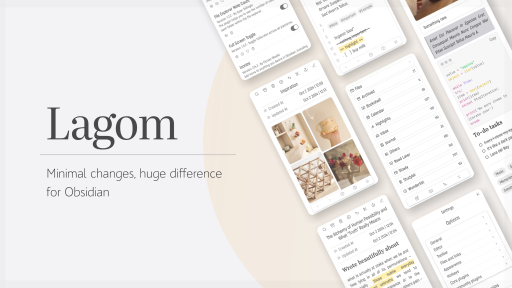
Lagom tries to focus on just the right amount of changes needed to make Obsidian look more aesthetically conventional and modern. It's not about reinventing the wheel or offering a unique or flashy theme. I simply think Obsidian is a diamond in the rough that needs some polishing to shine. ✨
The theme follows these core principles:
-
Avoid extreme minimalism. The UI should always be clear and recognizable.
-
Make subtle, noticeable improvements that feel natural and don't distract from your work in Obsidian.
-
Maintain symmetry and visual consistency throughout.
-
Optimize exclusively for phones and tablets.
-
Stay color-palette and typeface agnostic, so you can pair it with whatever you prefer.
Work in progress...
Screenshots
Fonts
Main font: Akrobat Semibold or Pragati Regular, but Interphases Pro Condensed Regular is more pleasant and perhaps more suitable for reading.
Headers: Playfair Display
Mono: Iosevka Regular.
Code: JetBrains
Quotes: Caecilia
Features
-
The file panel occupies 100% of the screen to take advantage of the available space (optional pop-up style)
-
Files show their full name on multiple lines. No more unfinished titles or ellipses!
-
Nested folders with a subtle open-folder indicator
-
Separator inspired by the book A Psalm for the Wild-Built
-
Code blocks more similar in appearance to a macOS terminal (colorful for dark mode and monochromatic for light mode)
-
Quotes with classic style
-
Collapsed header indicator
-
Embedded notes have been slightly redesigned
-
Inline title separator in editor mode
-
Translucent navigation bar (optional)
-
Chat bubble style callouts (optional)
-
An elegant inline title inspired by The New Yorker covers
-
Dynamic fullscreen notes
Note
Make sure to use Commander, Iconize, Custom file explorer sorting, Style Settings and File explorer note count with this theme for a complete experience.
Snippets
Icons (No plugins needed)
To add icons next to each Folder Name:
.nav-folder-title[data-path]::before {
  content: "" !important;
  display: inline-block !important;
  position: relative;
  top: 3px;
  width: 22px !important;
  height: 22px !important;
  margin-right: 5px;
  flex-shrink: 0;
  background-color: var(--text-muted);
  -webkit-mask-repeat: no-repeat;
  -webkit-mask-position: center;
  -webkit-mask-size: contain;
  mask-repeat: no-repeat;
  mask-position: center;
  mask-size: contain;
}


.nav-folder-title[data-path="Folder_path_name_here"]::before {
  -webkit-mask-image: url("data:image/here");
  mask-image: url("data:image/here");
}
Grouping folders
To use the file name at the vault root to categorize a group of folders, it is necessary to set up the Custom File Explorer Settings with something like:
---
sorting-spec: |
  // ::::: ROOT :::::
  target-folder: /*
  /:files
  > a-z by-metadata: Created
  /:folders
   Markdown filename here.md
   Folder name here
   Markdown filename here.md
   Folder name here
   Folder name here
-----
And this snippet to adjust the filenames in the vault root relative to the folders:
.nav-file-title[data-path*=".md"]:before {
	content: "" !important;
}

.nav-file-title:not([data-path*="/"]) {
  left: 0px !important;
  margin: -10px !important;
  color: var(--text-accent);
}
Style Settings
The following snippet can be pasted directly into the style settings to achieve the Lagom look as shown in the screenshots.
{
  "notes-values@@page-style-read-mode": true,
  "notes-values@@page-style-editor-mode": true,
  "hide-elements@@safe-place-position": 35,
  "notes-values@@magazine-style": false,
  "others-values@@theme-light-opacity": 1,
  "others-values@@theme-dark-opacity": 1,
  "notes-values@@inline-title-always-uppercase": false,
  "notes-values@@headers-align": "left",
  "notes-values@@p-spacing": 32,
  "notes-values@@quote-hide-top-line": "1.5px",
  "notes-values@@quote-hide-down-line": "1.5px",
  "yaml-values@@hide-separator-yaml": "unset",
  "notes-values@@wrap-code-blocks": "pre",
  "notes-values@@enable-shadows-borders-img": false,
  "notes-values@@hide-embed-title": true,
  "others-values@@navbar_blur_level": "8px",
  "notes-values@@active-line-indicator": "",
  "notes-values@@show-dotted-line": "1.5px",
  "yaml-values@@hide-add-button": "flex",
  "files-folders@@popup-explorer": true,
  "notes-values@@headers-space-simetry": 1.2,
  "notes-values@@separator-icon-color": "#9090906B",
  "notes-values@@background-image-editor": "url(http://127.0.0.1:8181/(4)Wall.jpg)",
  "notes-values@@inline-title-bold": 600,
  "hide-elements@@num-of-notes": "none",
  "notes-values@@magazine-background": "URL('https://files.catbox.moe/gqnsc2.jpg')",
  "notes-values@@text-note-align": "justify",
  "notes-values@@magazine-opacity": 0.8,
  "hide-elements@@files-bookmarks-search-bar-position": "1",
  "hide-elements@@vault-settings-position": "1",
  "notes-values@@magazine-title-font": "PlayfairDisplay-Regular",
  "others-values@@nav-bar-blur": false,
  "notes-values@@grayscale-dark-mode": true,
  "files-folders@@disable-root-file-lines": true,
  "yaml-values@@pill-style-alias": true,
  "notes-values@@inline-title-align": "center",
  "notes-values@@line-height-note": 26,
  "notes-values@@focus-active-line-opacity": 1,
  "notes-values@@focus-non-active-line-opacity": 1,
  "notes-values@@hide-icon-link-embed-notes": "transparent",
  "notes-values@@h1-size": 1.4,
  "notes-values@@h2-size": 1.2,
  "notes-values@@h3-size": 1,
  "notes-values@@h4-size": 0.8,
  "notes-values@@h5-size": 0.7,
  "notes-values@@h6-size": 0.7,
  "notes-values@@embed-font-size": 0.93,
  "files-folders@@icon-file-size": 1.59,
  "notes-values@@quote-font-size": 0.9,
  "notes-values@@padding-default-note-style": 35,
  "notes-values@@padding-note-content": 0,
  "notes-values@@letter-spacing-note": 0,
  "files-folders@@nav-item-size": null,
  "notes-values@@default-font-size": 0.95,
  "notes-values@@inline-title-size": 1.3,
  "notes-values@@code-size": 0.9,
  "notes-values@@code-size-edit-mode": 0.9,
  "notes-values@@inline-code-size-editor": 0.75,
  "notes-values@@inline-code-size-read": 0.8,
  "hide-elements@@scrollbars": "none",
  "hide-elements@@icon-settings": "none",
  "hide-elements@@explorer-bar-position": "absolute",
  "hide-elements@@show-editor-text-bar": "unset",
  "hide-elements@@hide-navbar": "block",
  "hide-elements@@files-bookmarks-search-bar": "none",
  "others-values@@icon-ui-opacity": 1,
  "hide-elements@@show-vault-name": "none",
  "hide-elements@@show-explorer-buttons": "none",
  "notes-values@@main-list-item-style": "italic",
  "notes-values@@main-list-item-color": "var(--text-accent)",
  "notes-values@@sublist-vertical-line": 1.2,
  "notes-values@@main-list-item-weight": 600,
  "notes-values@@dinamic-note-value": -75,
  "notes-values@@hide-callout-title": "none"
}
Comparison
If you want to use Lagom alongside another theme (Gruvebox, Rosé Pine, Borealis, etc.) you can simply move the theme.css file into your snippets folder and activate it.
Roadmap
-
Clean and improve the CSS code - Adapt it for the rest of the platforms
-
Fix some aesthetic issues -
Add options for Style Settings
Special thanks
@Bluemoondragon07 For their fantastic theme that encouraged me to choose Obsidian as my replacement for Evernote.
@ariehen In this post for the properties snippet in notes
AlanG for the code block snippet
@LuisaKart For the code to modify the new tab view
Changelog
V1.7.5
- Added dynamic full screen in notes! (Style Settings option)
- Fixed ghost spacing above the inline title in Editor mode.
- Fixed top overflow affecting the note element.
- Visual improvements to search bars, buttons, settings cards, and the accessibility focus outline.
- Fixed an issue where code blocks displayed code in single unwrapped lines instead of wrapping across multiple lines.
- Better vertical centering of the icon preceding each file name.
- Fixed inconsistencies in some Style Settings defaults.
- Fixed(?) issue with the view toggle button appearing off-screen on Windows (I hope so @Disa)
- Fixed list indentation inside callouts (Style Settings option)
V1.7.4
- Fixed bug with search bar inside a note
- Minor Fixes
V1.7.3
- Fixed the ghost text
- Improvements in code block numbers
- Small improvements in the appearance of code blocks in editor mode
- Option to hide the note burger menu
- Option to correct the position of the toggle view button
- Fixes when setting font sizes on some items
V1.7.2
- Options to customize some list settings
- Added descriptions for all settings within Style Settings
- Switched to em instead of pixels for font sizes
- Settings icon now shows by default when installing the theme
- Fixed bug when setting font size in the inline-title
- Fixed the font size issue in inline code and code blocks
- Fixed the issue with showing or hiding the file explorer toolbar
V1.7.1
- Fixed visual inconsistencies in tables, code blocks, and pop-ups
- Added Aliases with a pill-shaped design (optional)
- Added chat bubble-style callouts: [!IN] and [!OUT]
V1.7.0
- Fixed the issue of overlapping settings in Style Settings
- Now the divider line can be hidden in files at the vault root
V1.6.9
- Bug fixes (this time using Claude)
- Added a separator in editor mode for the inline title
- Fixed the page style that was being applied unnecessarily to embedded notes
- Fixed the issue with the icons next to the filenames
V1.6.8
- Added option to revert the position of some elements in the new Obsidian UI
- General improvements and fixes for (hopefully) the theme's correct functioning with the latest Obsidian update.
V1.6.7
- Added a new style to the inline titles!
V1.6.6
- Bug fixes
V1.6.5
- Minor visual fixes for the latest Obsidian update.
- Improvements in the appearance of the settings panel.
- Fixed issue that prevented setting a symbol preceding the file name in the file explorer.
V1.6.4
- Collapsible Heading Indicators: A visual indicator now appears in headings when their content is collapsed. This indicator has been repositioned to the right margin for improved readability and to minimize interference with text.
- Independent Page Style Selection: Users can now select page styles independently for both the editor and reading modes.
- Title Corrections: Minor corrections have been applied to the title display within notes.
- Interface Enhancements: Border lines have been added to several previously missing interface elements for improved visual consistency.
V1.6.3
- Option to enable a translucent glass effect on the navigation bar.
- Fixed the issue with the small selector icon in dates within properties.
- Option to adjust the padding of note content.
- Some aesthetic corrections to the appearance of global search.
- Fixed several inconsistencies when hiding or showing the settings button, vault name, number of notes, etc.
V1.6.2
- The version number in the GitHub changelog now matches the one shown in Obsidian to avoid confusion regarding changes
- Improvements to the navigation bar: now it takes up less screen space with a floating design
- Added an option to turn off image borders and shadows (resolves problems with transparent images)
- You can now choose between two note styles for reading mode: page style and card style (though it still conflicts if the note has embedded notes)
V1.9
- Now the macOS style buttons in the Code Blocks (Light Mode) are images instead of symbols. It is no longer necessary to modify their size in Style Settings
- The line borders of code blocks, callouts and embedded notes share the same design.
- Some other small details fixed
V1.8
- Small fixes in the search and replace bar
- Option to show or hide the link icon in embedded notes(!)
- Option to choose text alignment in the notes list within the file explorer
V1.7
- Option to change the background color of the active line
- Images are now centered by default and occupy the full width for better visual consistency with the rest of the content.
- New option to activate grayscale images when dark mode is active.
- You can now choose the underline style for local links
- Small changes in Style Settings
V1.6
- Added option to prevent changes to the Inline Title in reading mode.
- Fixed list inconsistency caused by the latest Obsidian update.
V1.5
- New design for quotes
- You can now modify the padding of the quote blocks.
- Option to choose a local image or URL as the note background in the text editor
- You can now always capitalize the title inside notes.
- Extra options to customize the dividing line between notes in the file explorer (style and thickness)
- Small changes in search boxes
V1.4
- Fixed disproportionate margin in images
- New option to change the size of headers
- Removed the option to change the font size of the active line (apparently it was not useful) as it caused display problems in editor mode.
- New option to adjust the height of the tab preview.
- The note name in the tab list is displayed on multiple lines.
- It is now possible to choose the font size of YAML metadata in editor mode.
- The icon next to each file was slightly misaligned; it is now centered correctly relative to the text height.
- Some other minor changes
V1.3
- Fixed the position of the date and labels in properties. They are now aligned with the other values.
- A tiny correction in the embedded notes (the bottom padding was too short)
- Tables now show vertical separator lines inside.
- New option to separately choose font size inside code blocks in edit mode and preview mode.
- Fixed top margin of the Command palette
- Small changes in tables
Contribution
This is my personal Obsidian theme, but since I'm not a CSS expert, there'll probably always be things to fix or improve. Contribute by reporting bugs and code improvements, any feedback is welcome!
Please open an issue on GitHub, DM me on Twitter / Bluesky or via Email. I will try to fix it as soon as possible.
If you really like this theme, please consider supporting me ᵔᴥᵔ