
README file from
GithubEnglish · العربية · Français · Español · Türkçe
Old Damascus, for the notes you keep.
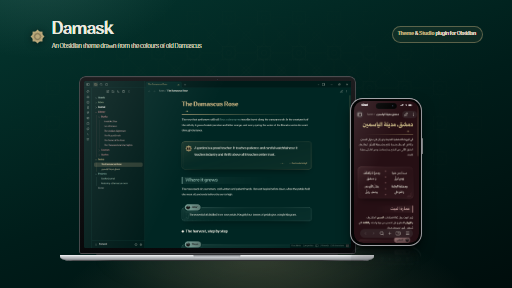
An Obsidian theme drawn from the colours, stone and woodwork of old Damascus — calm enough for long writing, ornamented enough to feel like a place.




✦ Get more from Damask with its companion plugin, Damask Studio: insert any callout from a gallery, preview every palette live, and turn a note into a home dashboard.
Get started · Overview · The name · The colours · Palettes · Writing · Arabic · Callouts · FAQ
Get started
Damask works the moment you switch to it: the typeface, the ornaments, the callouts and the two default palettes, Forest night and Wheat paper, need nothing else. Three steps show you the rest.
- Install Style Settings for the palettes and options. Settings → Community plugins → Browse → Style Settings, then Settings → Style Settings → Damask. Pick any of the seven palettes and set the line height, line width, ruled paper, plain headings and more. Themes can't add a settings page of their own, so this is how every Obsidian theme exposes its options.
- Open the showcase note to see every feature at once. Download Damask showcase.md (right-click → Save link as) into your vault, or read it here. It shows each quote, verse, poem, panel, divider and callout next to the Markdown that makes it, ready to copy.
- Add Damask Studio (recommended). The companion plugin is the easiest way to use everything above: it inserts any block from a gallery in one click, picks palettes with live previews, and adds a home dashboard. Settings → Community plugins → Browse → Damask Studio.
[!TIP] The typeface, itf Qomra Arabic, is built in. To use a different one, set it in Settings → Appearance → Font; no plugin needed.
Overview
Calm. Generous line height, a readable measure and warm, low-contrast colours keep the page quiet. Nothing on screen competes with what you are writing.
Ornamented, never busy. Headings carry a fading rule and a diamond, quotes sit in an illuminated margin, dividers become small pieces of inlay. The ornaments follow the geometry of Damascus craft — the eight-point khatam star and the girih lattice — and stay out of the way of the text.
Bilingual by birth. Damask was designed for Arabic and Latin script at the same time. Right-to-left notes are laid out right-to-left, not mirrored after the fact, and the theme's settings are written in five languages.
Complete on its own. No plugin is required. Palettes and options live in Style Settings, and everything else works the moment you switch to the theme.
Why Damask
Damask is an English word that comes straight from Damascus. Medieval traders brought home a silk woven in the city, and Europe named it after the place: damasco in Italian, damas in French, damask in English.
A damask cloth has a pattern you only see when the light catches it. The motif is woven into the fabric itself, glossy threads against matte ones in a single colour, so it shows when you look closely and disappears when you don't. That is exactly what this theme tries to do: its ornaments are drawn in low contrast, close to the colour of the page, so they are there for the eye that looks for them and quiet for the eye that is reading.
The word carries more of the city too:
- The Damask rose (Rosa × damascena) grows in the courtyards of Damascus and gives the theme its rose colour.
- Damask is also an old English name for a deep rose-pink, the colour of that rose.
- Damask steel, the watered blades of Damascus, has the same rippled, hidden pattern.
In Arabic it is الدامسكو (damasko), the name the Levant still uses for this fabric. Short, easy to say in every language, and unmistakably from Damascus. The theme was briefly published as Damascene; it is the same theme under a name that is easier to remember.
The colours
Every colour in Damask has a place in the city it is named after.
| Colour | Hex | Where it comes from | Where you'll see it | |
|---|---|---|---|---|
| Wheat gold | #B9A779 |
The wheat of the Hauran plain, and the gold leaf on ʿajami painted ceilings | Accents, H1, links and ornaments in dark mode | |
| Ghouta green | #002623 |
The orchards that ring Damascus, at the hour the lamps come on | The Forest backgrounds; ink in light mode | |
| Barada sage | #7EA69C |
The river Barada, and the patina on old copper basins | H2, secondary accents, the Midnight palette | |
| Damask rose | #A67B7C |
The rose that carries the city's name | Tertiary accents, the Umber palette | |
| Walnut umber | #260F14 |
Carved walnut and the inlaid wood of Damascus reception rooms | The Umber night background | |
| Basalt | #161616 |
The black stone of ablaq walls, laid in alternating rows… | The Charcoal and Midnight backgrounds | |
| Limestone | #EDEBE0 |
…with the pale stone that answers it | Text in dark mode; the Wheat paper background |
Light palettes swap the roles: paper becomes the ground, and forest green and a deep garnet #6B1F2A become the ink.
Palettes
| Dark | Light | ||
|---|---|---|---|
| Forest night | Ghouta orchards after dusk, lit with wheat gold | Wheat paper | Warm paper, forest ink and a touch of garnet |
| Charcoal & wheat | Black basalt and gilded wood, for the darkest rooms | White paper | Clean white with garnet and forest headings |
| Umber night | Old walnut panelling and the Damask rose | Forest day | Pale green light through a courtyard's leaves |
| Midnight | Charcoal under the sage of the Barada |
Choose one for each mode in Settings → Style Settings → Damask, or from the Theme tab of Damask Studio, which previews every palette live. Obsidian switches between your dark and light choice with the system, as usual.
Writing surfaces
- Headings carry their own ornaments: a fading rule and a diamond under H1, a bar on H2, a lozenge before H3. Prefer them plain? Turn on Plain headings.
- Dividers.
---becomes an ornamental rule. For a titled one, write<div class="dm-divider">The courtyard</div>, and adddots,wave,starordoubleto the class for a different motif. - Ruled paper. Add the
dm-linedcssclass to a note for faint notebook lines, or switch it on for every note in Style Settings. - Quotes and callouts come in shapes made for long-form writing: a quote with its author, a verse in ornate brackets, a two-column poem, a saying in a double frame, a numbered timeline. See the callout reference.
- Tables, checkboxes, embeds and properties are all restyled in the palette's colours.
> [!quote|side]
> A garden is a grand teacher. It teaches patience and careful watchfulness.
>
> — Gertrude Jekyll

> [!steps]
> 1. Pick the half-open buds before sunrise
> 2. Carry them to the still within the hour
> 3. Distil slowly over a low flame
Arabic first
Damask ships with itf Qomra Arabic, a typeface with real Arabic and Latin designs, so a note that mixes both scripts reads as one voice. Notes written in Arabic are laid out right-to-left — headings, quotes, callouts, poem columns and lists — while English notes in the same vault stay left-to-right. Ornaments that point somewhere (rules, bars, quote marks) point the right way in both.
Prefer another face? Type any installed font's name in the theme's font fields, or set it in Obsidian's Appearance settings, which always win.
Mobile
The same palettes, ornaments and callouts work on iPhone, Android and iPad. On small screens the reading layout tightens — smaller margins, callouts that fit the width — and touch targets stay comfortable.
Install
From Obsidian — Settings → Appearance → Themes → Manage, search for Damascene, then Install and use. The theme browser still lists it under its first name while the rename to Damask is processed; it is the same theme. Install Style Settings too if you want to change palettes and options.
By hand — download theme.css and manifest.json from the latest release into .obsidian/themes/Damascene/, then pick Damascene in Settings → Appearance.
Theme options
Everything below lives in Style Settings → Damask, written in English, Arabic, French, Spanish and Turkish.
| Option | Default |
|---|---|
| Dark palette · Light palette | Forest night · Wheat paper |
| Text font · Interface font | itf Qomra Arabic |
| Line height | 1.9 |
| Readable line width | 46 rem |
| Ruled paper in every note | Off |
| Plain headings | Off |
| Justified paragraphs | Off |
| Flat interface (no shadows) | Off |
| Colourful ribbon icons | Off |
Callout reference
| Callout | Use it for | Options after | |
|---|---|---|
[!quote] |
A quote, with its author on the last line | big side forest umber wheat title |
[!ayah] |
A verse, framed in ornate brackets | title |
[!poem] |
Two-column verse: write each hemistich as a list item | title |
[!wisdom] |
A saying in a double frame | |
[!definition] |
A term and its meaning | |
[!key] |
The one idea to remember | |
[!steps] |
A numbered timeline (use a numbered list) | |
[!box] |
A plain panel | forest umber wheat charcoal outline glass center tab title |
[!lined] |
A ruled sheet with a margin line | title |
Obsidian's own types — note, tip, warning, danger and the rest — are restyled in the palette's colours. Add - or + after any type to make it foldable.
> [!poem|title] Ahmad Shawqi
> - سلامٌ من صَبا بَرَدى أرقُّ
> - ودمعٌ لا يُكفكَفُ يا دمشقُ

> [!definition] Attar
> The essential oil distilled from rose petals.

> [!box|forest]
> Forest green, wheat gold, basalt and walnut: the four colours of the city.

> [!lined|title] A note to self
> Jasmine blooms from May to October; its best hour is just after sunset.
For snippet writers
Every palette sets the same --dm-* variables, so a CSS snippet written against them follows whichever palette is active.
| Variables | What they are |
|---|---|
--dm-bg --dm-bg2 --dm-bg3 |
Page, sidebar and raised surfaces |
--dm-text --dm-muted --dm-faint |
Text, from strongest to quietest |
--dm-accent --dm-accent2 --dm-accent3 |
The palette's three accents; the first two also come as -rgb triplets |
--dm-forest --dm-wheat --dm-umber --dm-charcoal |
Named colour families, each with -bg, -text and -rgb |
--dm-folder-1 … --dm-folder-9 |
Nine folder colours tuned to the palette |
--dm-h1 … --dm-h6 |
Heading colours |
--dm-mask-star --dm-mask-diamond --dm-mask-wave --dm-mask-quote --dm-mask-khatam-ring |
Ornament shapes, for use as CSS masks |
/* a folder colour that changes with the palette */
.nav-folder-title[data-path="Projects"] { color: var(--dm-folder-2); }
Companion plugin
The theme needs nothing else, but it was designed together with Damask Studio, and the two are best used side by side. The plugin adds:
- A block gallery — every quote, verse, poem, panel and divider above, inserted with one click or by typing
;;in a note. - A palette picker with live previews of all seven palettes, no Style Settings needed.
- A home dashboard — greeting, quote of the day, habits, tasks, focus statistics and vault activity.
- Embed layouts, folder and heading colours, a focus timer and a health check, each with its own switch.
Install: Settings → Community plugins → Browse → search Damask Studio → Install → Enable.
FAQ
Do I need a plugin? No. The theme is complete on its own; Style Settings is only needed to change palettes and options. For the fullest experience we recommend adding Damask Studio.
I installed it when it was called Damascene.
Nothing to do: it is the same theme and keeps updating where it is. Damask Studio picks up the settings of the earlier Damascene Studio on its own, and old damascene-home blocks keep working.
I used Qomra.
Switch to Damask: the palettes and callouts are the same, and the classes now start with dm- instead of qm-. Rename qm- cssclasses in your notes, or let Damask Studio's health check do it for you.
Can I use my own font? Yes. Type its name in the font fields in Style Settings, or set it in Obsidian's Appearance settings, which take priority.
How were these screenshots made?
From a sample vault in this repository, so no one's personal notes appear here. npm run demo builds it, and npm run mockups turns the captures into the images above.
Credits
Made by k7aleds8. The ornaments follow the geometry of Damascus woodwork and tile: the eight-point khatam and the girih lattice.
- Font: itf Qomra Arabic by Indian Type Foundry is licensed separately and is not covered by this repository's MIT licence. See fonts/NOTICE.md.
- Quotes in the screenshots: Gertrude Jekyll and Kahlil Gibran; the poem is by Ahmad Shawqi (1868–1932).
- Code: MIT.