
README file from
GithubDark Knight — an Obsidian theme
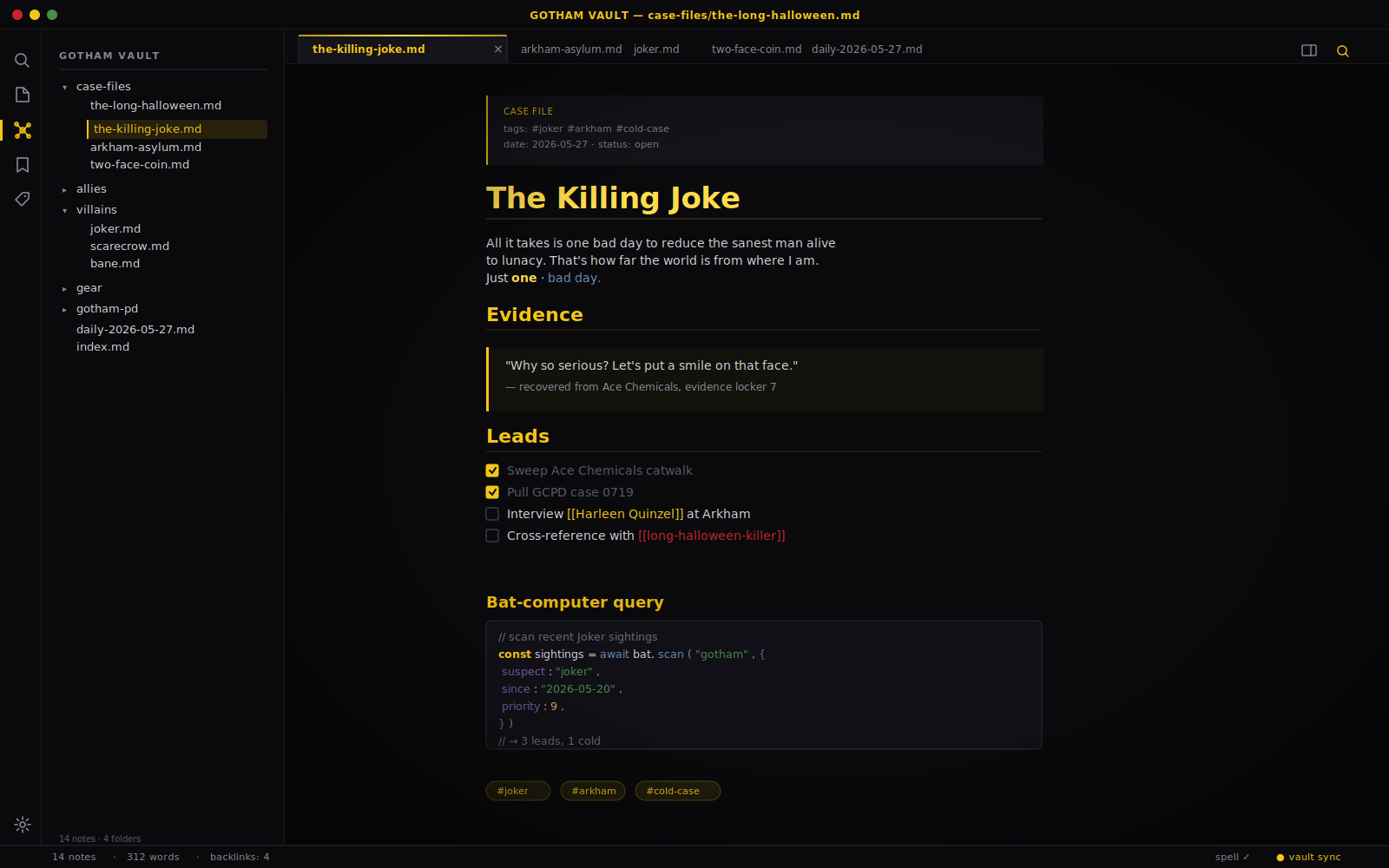
A Gotham-noir theme for Obsidian. Deep blacks, Bat-signal gold, and steel-blue accents, with Joker red reserved for errors and unresolved links.
Palette
| Token | Hex | Used for |
|---|---|---|
| Gotham Black | #0a0a0c |
Primary background |
| Night Sky | #14141a |
Secondary surfaces, modals, tab strip |
| Asphalt | #1c1c24 |
Inputs, buttons, embedded blocks |
| Steel | #2a2a35 |
Borders, dividers |
| Bat-Signal Gold | #f5c518 |
Accent, headings, links, active states |
| Steel Blue | #4a6b8a |
Secondary accent, italic, code functions |
| Joker Red | #c8252c |
Errors, unresolved links, danger |
| Riddler Green | #4a8b4a |
Success, strings in code |
H1–H3 use the gold gradient; H4–H6 fall back to steel blue and fog so heading hierarchy stays legible at a glance.
Install
Manually
- Copy this folder into your vault at
<vault>/.obsidian/themes/Dark Knight/— the folder must containmanifest.jsonandtheme.css. - In Obsidian: Settings → Appearance → Themes → Dark Knight.
From the community directory
Not yet listed. PRs welcome.
Compatible with
- Obsidian 1.4+ (including the Properties / metadata editor)
- Default core plugins (Graph, Outline, Tags, Search, Bookmarks, Canvas)
- Popular community plugins (Dataview, Tasks)
- Light mode at full parity — Gotham at dawn (softened cream + gold) gets the same structure as dark: gold heading rules, signal blockquotes, styled tables, callouts, scrollbars, and tags. Both variants are driven by the same palette tokens, so the two modes stay in lockstep.
Accessibility
- Faint and code-comment text are tuned for legible contrast on Gotham black.
mod-ctabuttons and checkbox markers use a contrast-aware on-accent color, so gold buttons stay readable in light mode too.- Keyboard navigation shows a clear gold
:focus-visiblering.
Notes
- Headings, links, tags, and the active tab are picked out in Bat-signal gold.
- Code blocks use a near-black background with gold keywords and green strings.
- Blockquotes get a gold left bar and a faint glow — the "signal" motif.
- Joker red is reserved for unresolved links and destructive actions, so it stays meaningful when you see it.