
README file from
GithubEnglish | 简体中文
This is a code block plugin for Obsidian (https://obsidian.md) generating a progressbar.
Obsidian ProgressBar plugin can render the progressbar code block
into a progressbar based on Time or Manually,
which support:
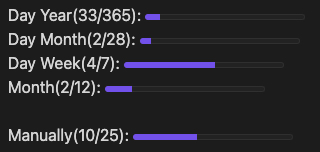
- day-year: a progress bar showing how many days passed in this year.
- day-month: a progress bar showing how many days passed in this month.
- day-week: a progress bar showing how many days passed in this week.
- day-custom: a progress bar showing how many days passed in custom start and end.
- month: a progress bar showing how many months passed in this year.
- manual: a progress bar specified by user
Configuration
Obsidian ProgressBar plugin will work when creating a progressbar code block,
and use Yaml to configure.
the name is showing as the description before the progressbar, and it support templates, please refer to the Name Templates.
for example:
    ```progressbar
    kind: day-year
    name: This Year
    ```
will generate:

Supported configurations
This is the example configuration obsidian progressbar support with some remarks
# == kind ==
# Required when specifying a time based progress bar
#
# Optional if manually specifying value
#
# Possible values:
#   day-year:
#   day-month:
#   day-week:
#   month:
#   day-custom: min, and max is required, both min and max should in format: YYYY-MM-DD
kind: day-year

# == name ==
# Specify the progress bar name, in front of the bar
# support templates: max, value, percentage
#
# quote is recommanded if templates are used
#
# Optional, will use kind as name if not specified
name: "{percentage} from {min} to {max}"

# == width ==
# Specify the progress bar width
# Optional
# Possible format: 50%, 100px
width: 50%

# == value ==
# Specify the progress bar current value
# Optional when specified a valid kind
# Required when not having a kind
# Possible format: numbers
value: 10

# == min ==
# Specify the progress bar max value
#
# Optional when specified a valid kind
# Only Required when kind is day-custom
#
# Possible format:
#   day-custom: YYYY-MM-DD
#   others: number
min: 2024-02-01

# == max ==
# Specify the progress bar max value
#
# Optional when specified a valid kind
# Required when not having a kind
#
# Possible format: numbers
#   day-custom: YYYY-MM-DD
#   others: number
max: 2024-04-30

# == button ==
# Specify whether you wish to show the buttons to +1 or -1 the current value
#
# Requires an id
# Can only be used with kind manual/others or no kind
#
# Possible format: boolean (true or false)
button: true

# == id ==
# Specify the id for a progressbar.
# Multiple progressbar throughout the same document will be synced for buttons
#
# Optional when buttons are turned off
# Required when buttons are turned on
#
# Possible format: numbers, text
id: homework-progressbar
Name Templates
the name option for progressbar supports the following templates:
- max
- value
- percentage
it can be used in format {max},
the plugin will replace it to the real value automatically.
for example, currently is {value}, it's {percentage} to {max}
will produce: currently is 123, it's 34% to 365.
the no supported template will no be changed, for example, I am {unknown},
will still stay as I am {unknown}.
If no name specified, name will be kind({percentage}) by default.
Using id and button together
The button option is supposed to be used with the id options where the id option can be used anywhere but will have no practical use without the buttons, It will be the same as not having and id.
id can be used to have multiple progressbar throughout the same document to represent the same quantity. Two progressbar having the same id will be updated together whenever one is updated using the button.
The progressbars will not be synced automatically without the button's click. The auto syncing between progressbars with same id can be implemented in future releases.
If the written value by the user differ between different progressbar with the same id, then the value of the progressbar from which the buttons are clicked will be updated in all of the applicable.
example: These will have the same id, synced together on button clicks, but notice that we can have different names(along with the usage of templates).
    ```progressbar
    id: test <-- an id assigned as "test"
    kind: manual
    name: "manual with buttons 1 {max}" <-- Notice the name
    button: true
    value: 5
    max: 10
    ```


    ```progressbar
    id: test <-- The same id used in a different place
    kind: manual

    # Notice that progressbar with same id can still be used with different names
    name: manual with buttons 2 <-- Notice the name here

    button: true
    value: 5
    max: 10
    ```
will generate:
