
README file from
GithubTyrone Neon Theme for Obsidian
A modern Obsidian theme with vibrant neon aesthetics, featuring a clean interface and customizable accent colors to match your style
✨ Features
🎨 Customizable Accent Colors
- User-controlled accent color selection - Choose any accent color from Obsidian's appearance settings
- Dynamic color adaptation - The theme automatically adapts all UI elements to your chosen accent color
- Consistent color palette - Your accent color is applied throughout the entire interface for a cohesive look
🌓 Dual Theme Support
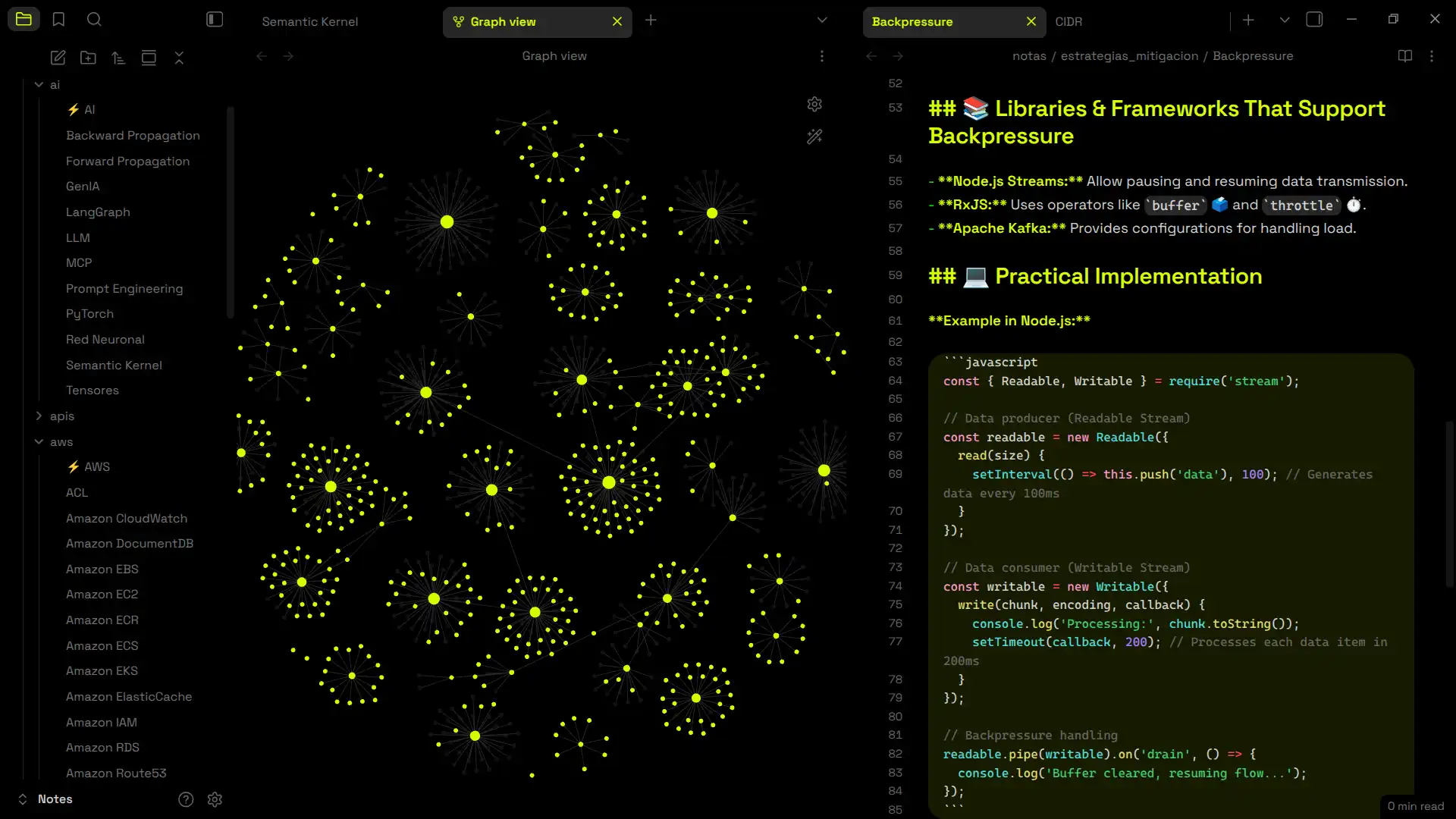
- Dark Mode: Pure black backgrounds with vibrant neon accents
- Light Mode: Clean white interface with refined color adjustments
- Seamless switching between light and dark modes
🎯 Modern Design Elements
- Rounded corners throughout the interface for a contemporary feel
- Clean typography using Inter font family for optimal readability
- Minimalist borders - Removed unnecessary borders for a cleaner look
- Smooth hover effects with consistent interactive feedback
📝 Enhanced Editor Experience
- Syntax highlighting with theme-appropriate colors
- Code block styling with accent-colored borders
- Improved readability with optimized line spacing and font sizes
- Visual hierarchy with properly weighted headers and text
🚀 Installation
Method 1: Community Themes (Recommended)
- Open Obsidian Settings
- Navigate to Appearance
- Click Browse under Community Themes
- Search for "Tyrone Neon"
- Click Install and Use
Method 2: Manual Installation
- Download the
theme.cssfile from this repository - Copy it to your vault's
.obsidian/themes/folder - Rename it to
Tyrone Neon.css - Go to Settings → Appearance → Themes
- Select "Tyrone Neon" from the dropdown
⚙️ Customization
Accent Color
The theme's greatest strength is its user-customizable accent color:
- Go to Settings → Appearance
- Under Accent color, choose any color you like
- The theme will automatically apply your color to:
- Headers and titles
- Links and internal links
- Active tabs and navigation elements
- Code block borders
- Interactive hover states
- Graph view highlights
Recommended Colors
While any color works, these combinations look particularly stunning:
- Yellow (
#daff01) - Bright yellow - Hot Pink (
#ff0051) - Vibrant magenta - Neon Green (
#00ff04) - Electric lime - Purple (
#9d00ff) - Deep violet - Electric Blue (
#00e5ff) - Classic neon blue
🔧 Compatibility
- Obsidian Version: 1.0.0+
- Plugin Support: Compatible with most community plugins
- Mobile Support: Optimized for both desktop and mobile experiences
- Graph View: Full support with themed colors
- Canvas: Compatible with Obsidian Canvas feature
📄 License
This theme is released under the MIT License.
⭐ If you enjoy this theme, please consider giving it a star!
Made with ❤️ by Tyrone José