README file from
GithubStrict Obsidian Theme
1. Description
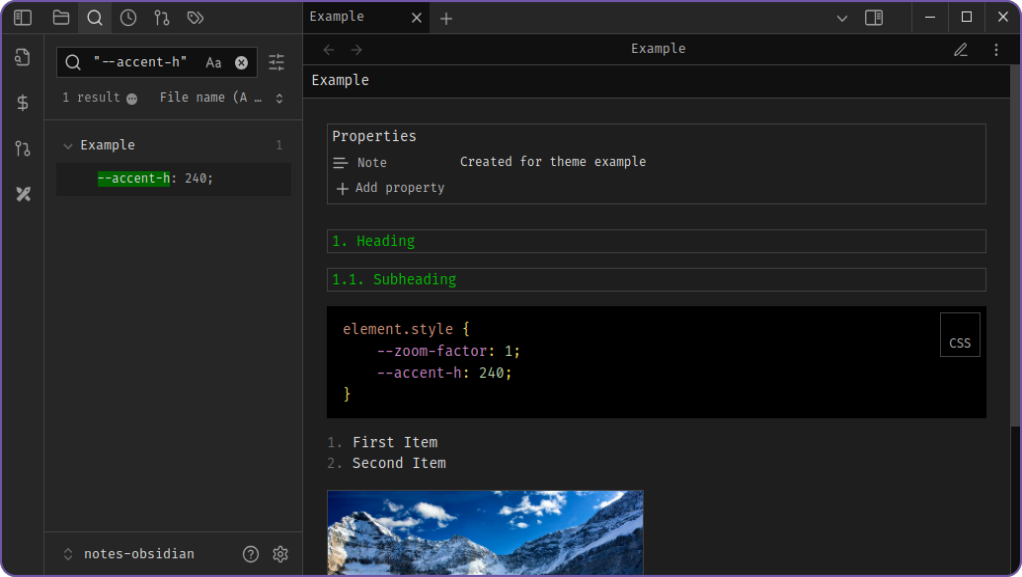
Simple compact strict dark theme for Obsidian. Differences from the default theme
- The corners of many elements are pointed;
- Animations are disabled;
- Some indents between elements have been reduced;
- The application header and tabs is made smaller;
- Dark highlighting of input fields and main elements;
- Line numbers are decorated;
- The text is justified (except for code blocks);
- The code blocks are made darker, and the colors mimic VS Code;
- Images have max-height (it is assumed to use Image Toolkit plugin to view them);
- Headings have the size of the main text and are highlighted with a border.
2. Preview
2.1. Reading view

2.2. Editing view

2.3. Editing view with source mode

3. Customizations
You can customize headings color, by adding CSS snippet with your desired color (default is #00bb00):
.markdown-source-view.mod-cm6 .cm-content > .HyperMD-header, h1,h2,h3,h4,h5,h6,
.setting-item-heading > .setting-item-info > .setting-item-name {
color: #00bb00 !important;
}
4. Contribution
Feel free to contribute via pull requests or issues!