
README file from
GithubMatsuba 松叶
Matsuba 是 Shittori 系列的 Obsidian 主题,适合中文长文和中英混排笔记。浅色用暖纸白和松叶绿,深色用蓝灰和浅蓝;通过字号、字重和留白区分层级,让颜色留给链接、高亮和提示。
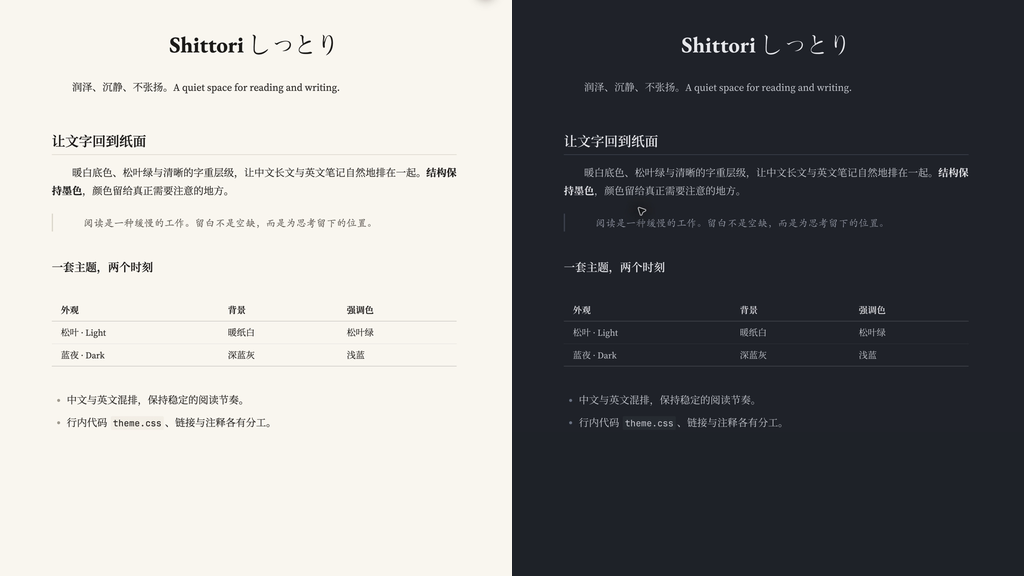
预览为 macOS 上 Obsidian 1.14.4 的实际阅读视图,裁剪后并排展示。截图环境另开了首行缩进 CSS 片段;主题本身不带首行缩进。其他桌面系统和移动端尚未实测。
安装
在社区目录收录前,可从 Releases 下载 theme.css 和 manifest.json,放入你的库目录 .obsidian/themes/Matsuba/,再到「设置 → 外观 → 主题」选择 Matsuba。浅深色由 Obsidian 的基础颜色设置控制。
已手动安装旧版 Shittori 的用户,可把原主题文件夹改为 Matsuba 并替换这两个文件,再选择 Matsuba。Style Settings 中仍使用 Shittori 这个分组名,原有设置可以保留。
最低版本为 Obsidian 1.8.0。主题支持阅读视图与实时预览,不要求安装其他插件。
字体
主题调用本机字体,不加载网络资源,也不附带字体文件。
- 中文正文:思源宋体 VF;英文正文:Source Serif 4。
- 一级标题:方正大标宋简体、EB Garamond。
- 强调:霞鹜文楷;引用:楷体-简;代码:JetBrains Mono。
未安装时会使用后备字体,显示效果因系统而异。方正字体需自行确认使用许可。希望减少字体差异时,可在 Style Settings 中启用「一级标题用正文字体」,或自行调整 theme.css 中的字体变量。
可选设置
安装 Style Settings 插件后,在「设置 → Style Settings → Shittori」中可调整三个选项:
- 加粗带强调色,默认关闭。
- 一级标题用正文字体,默认关闭。
- 正文两端对齐,默认关闭。
正文建议从 18px 开始按屏幕调整。主题默认左对齐,避免两端对齐把行内代码周围的字距拉开。
已知边界
中文与英文共用弯引号字形,英文弯引号可能显得偏宽。日文假名可正常显示;需要日文字形的汉字可放入带 lang="ja" 的片段。已有 CSS 片段和插件样式可能覆盖主题,排查时可暂时关闭它们。
许可
MIT。反馈时请附 Obsidian 版本、操作系统、阅读或编辑模式,以及最小复现示例。
English
Matsuba is the Obsidian edition of the Shittori theme family, designed for Chinese long-form writing and mixed Chinese–English notes. Light mode pairs warm paper-white with pine-green accents; dark mode uses blue-gray and pale blue. Font size, weight, and spacing establish hierarchy, while color emphasizes links and highlights.
The theme supports reading view and live preview. The optional Style Settings plugin exposes controls for colored bold text, using the body font for H1 headings, and justified paragraphs. Its settings group remains named Shittori to preserve existing preferences.
Installation
Download theme.css and manifest.json from the latest release, place both files in .obsidian/themes/Matsuba/ inside your vault, then select Matsuba in Settings → Appearance. The minimum Obsidian version is 1.8.0. Users upgrading from the manually installed Shittori theme can rename its folder to Matsuba, replace both files, and select Matsuba again.
Fonts and compatibility
The theme uses locally installed fonts and makes no network requests. Preferred fonts include Source Han Serif, Source Serif 4, EB Garamond, LXGW WenKai, and JetBrains Mono. The Chinese H1 font, FZ Da Biao Song, is optional and subject to its own license. Fonts are not bundled; system fallbacks are used when they are unavailable.
Screenshots show the actual reading view in Obsidian 1.14.4 on macOS, with an additional first-line indentation snippet enabled. The theme itself does not add that indentation. Windows, Linux, and mobile have not been tested. Existing CSS snippets and plugin styles can affect rendering. The directory's CSS scanner reports partial-support warnings for some browser features and treats the MathJax mjx-container tag as unknown; these are warnings, not proof of full cross-platform compatibility.
The theme is released under the MIT license. Please include your Obsidian version, operating system, view mode, and a minimal example when reporting an issue.