
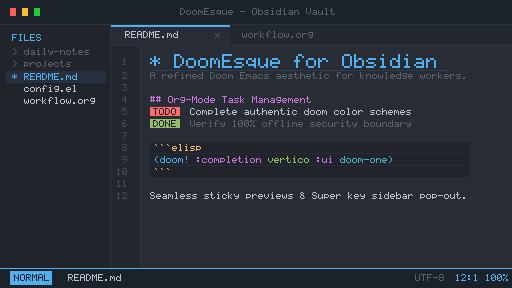
README file from
GithubDoomEsque Theme for Obsidian
A Doom Emacs inspired theme for Obsidian: Emacs buffer aesthetics, Org-mode typography and Doom colour schemes.
Features
- 14 palettes. Dark:
doom-one(default),doom-vibrant,doom-dracula,doom-tokyo-night,doom-gruvbox,doom-cyberpunk,doom-retro-terminal,doom-suit-and-tie. Light:doom-one-light(default),doom-nord-light,doom-gruvbox-light,doom-solarized-light,doom-tomorrow-day,doom-suit-and-tie-light. - Org-mode typography. Rainbow heading levels (or monochrome), optional
TODO/DONEtask badges, a:PROPERTIES:style frontmatter drawer and legal outline numbering (I.→A.→1.→a.→i.). - Editor. Five cursor styles (bar, block, glow, hollow, underline), rainbow or single-colour indent guides and an optional monospace buffer.
- Tables and Bases. A stable grid that does not shift on edit, with density, gridline and zebra striping options.
- Hover previews. Doom-styled preview windows with configurable size and an optional properties drawer.
- Offline. No network requests or
@importrules; uses locally installed fonts.
Configuration
Adjust the theme with either plugin:
- Style Settings (third party). Find DoomEsque under Settings → Style Settings: palettes, spacing, indentation, typography, tables and Bases, hover preview size and the settings window style.
- DoomEsque Settings (companion plugin). The same options plus extra controls, commands, and resizable, draggable, sticky hover preview windows. When Style Settings is also enabled, Style Settings controls the options both plugins share.
Installation
From Obsidian: Settings → Appearance → Themes → Manage, search for DoomEsque, then Install and use.
Manually: copy manifest.json and theme.css into <vault>/.obsidian/themes/DoomEsque/.
Editing palettes
Each palette defines raw Doom colours (--doom-bg, --doom-base0–8, accents). Text, borders and table colours use derived tokens (such as --doom-text-muted, --doom-border-subtle and the --doom-<accent>-text variants) generated to meet contrast targets on every palette. After changing a palette:
node scripts/palette-tokens.mjs           # contrast report per palette
node scripts/palette-tokens.mjs --write   # regenerate derived tokens
node scripts/palette-tokens.mjs --check   # what CI runs
License
MIT © 2026 blursedperf