
README file from
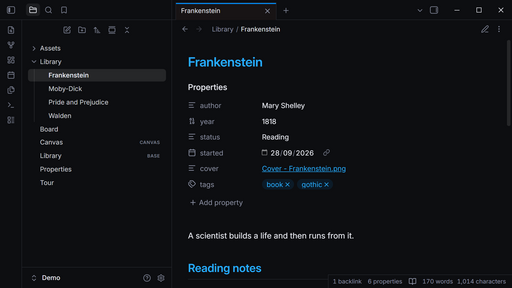
GithubAn Obsidian theme inspired by the style guide of the Tela app. It supports dark and light mode, on desktop, phone and tablet.
Screenshots
Why Tela
- Easy to read, easy to scan. Every text colour clears WCAG AA (4.5:1) in dark and light mode, on desktop, phone and tablet, and headings step down by colour as well as size. An automated contrast audit of notes, Canvas, Bases, search, menus and settings checks this before each release.
- Ready as installed. One quiet surface for sidebars, tabs and notes, hairline borders, and nothing to set up.
- Built to survive Obsidian updates. The theme works through Obsidian's own variables rather than fragile selectors, and a weekly check tests each new Obsidian release for changes that would break it.
Features
- Dark and light palettes taken from the Tela app, with its blue accent. Your own accent colour in Settings → Appearance still applies.
- Code blocks in the colours of Tela's terminal, every one readable on the code background.
- Tasks with their own marks for important
[!], question[?], cancelled[-]and in progress[/]. - Headings at one weight in a gentle size scale. H1 and H2 take the accent, with a hairline under them; H3 mixes the accent into body ink; the two smallest levels stay muted.
- Unresolved links keep full colour, with a dashed underline instead of fading.
- Phone and tablet keep the desktop palette rather than switching to pure black.
- Printing and PDF export keep callouts, code blocks, tables and images on one page, and each heading on the page of the text it introduces.
Settings
With the Style Settings plugin, the theme has one option:
- Distinct sidebars gives the sidebars a recessed surface of their own.
Fonts
The theme sets Inter, which Obsidian ships with, for the interface and notes, and your system's monospace font for code. Your choices in Settings → Appearance → Font always win over the theme's.
Compatibility
Obsidian 1.13.4 or later, on desktop and mobile. Checked with the Dataview, Tasks, Kanban, Excalidraw and Iconize plugins, and with right-to-left text. File-tree icons are left to a plugin such as Iconize.
Verifying a release
Each release's theme.css and manifest.json carry signed build provenance. To check
that a downloaded theme.css was built by this repository's release workflow:
gh attestation verify theme.css -R rbartoli/obsidian-tela-theme