
README file from
GithubSlatewave (Obsidian)
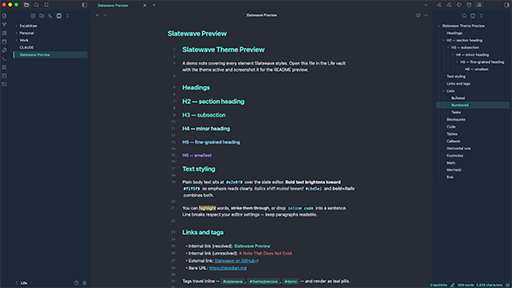
A dark Obsidian theme on a slate foundation with a teal signature. Part of the Slatewave family — one palette across editors, terminals, prompts, notes, and more.
Slate below, teal above.
What it styles
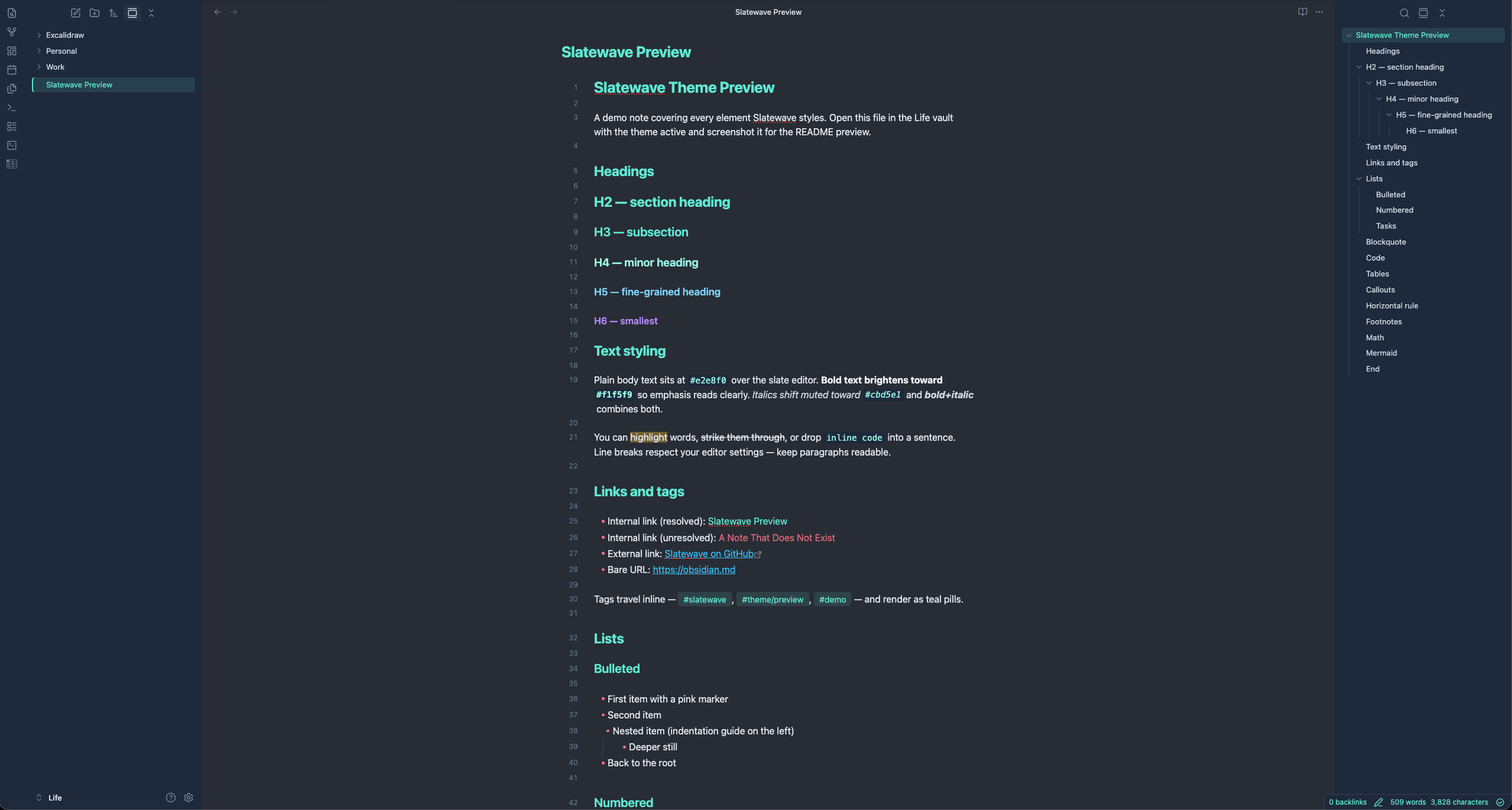
Slatewave is a from-scratch theme written against Obsidian's public CSS variable API — no upstream theme dependencies. It tunes:
- Headings — teal cascade (H1–H3
#5eead4, H4#99f6e4, H5#7dd3fc, H6#b388ff), bold weight - Bullet markers — pink
#fb7185so lists read at a glance - Accent states — active file, active tab, cursor, checkboxes, and outline selection all resolve to
#5eead4 - Links — resolved teal, unresolved pink, external sky
- Code — inline pill with pale-teal foreground on
#1e293b; fenced blocks get a soft border - Callouts — tuned so
[!tip],[!success],[!warning],[!error],[!example],[!quote]each map to a distinct Slatewave accent - Tabs — teal top indicator on the active tab, matching the VSCode theme
- Status bar — teal text on
#1e293b, matching the oh-my-posh prompt's left block
Both dark and light modes are included. Dark is the primary target.
Installation
From the Community Theme browser
- Open Settings → Appearance → Themes → Manage
- Search for Slatewave
- Click Install, then Use
Or visit the directory entry directly.
From a local clone
git clone https://github.com/kevinlangleyjr/obsidian-slatewave \
  ~/Obsidian/YourVault/.obsidian/themes/Slatewave
Open Settings → Appearance → Themes and pick Slatewave.
Palette
Slatewave shares its palette with the companion VSCode theme and prompt. The anchor colors:
| Hex | Tailwind | Role | |
|---|---|---|---|
 |
#282c34 |
— | editor background |
 |
#21252b |
— | sidebar, tabs |
 |
#1e293b |
slate-800 | status bar, modals, code blocks |
 |
#334155 |
slate-700 | borders, dividers |
 |
#e2e8f0 |
slate-200 | body text |
 |
#5eead4 |
teal-300 | primary accent — headings, cursor, active state |
 |
#99f6e4 |
teal-200 | hover accent, H4 |
 |
#7dd3fc |
sky-300 | H5, functions in code |
 |
#38bdf8 |
sky-400 | external links, keywords |
 |
#b388ff |
— | H6, decorators |
 |
#fb7185 |
rose-400 | list markers, unresolved links, errors |
 |
#fbbf24 |
amber-400 | warnings, highlights |
See the VSCode theme README for the full scale and syntax mapping.
Customize
Slatewave is a single theme.css built around CSS custom properties. To override a variable without forking, create a CSS snippet in VAULT/.obsidian/snippets/slatewave-overrides.css:
.theme-dark {
  --interactive-accent: #34d399;  /* swap teal for emerald */
  --list-marker-color: #fbbf24;   /* amber bullets instead of pink */
}
Enable the snippet in Settings → Appearance → CSS snippets. Snippets load after the theme, so your overrides win.
Slatewave family
One palette. Every tool.
- Editors — VSCode · JetBrains · Xcode · Sublime Text · Zed · Neovim · NvChad · Helix
- Terminals — Alacritty · Ghostty · iTerm2 · kitty · Warp · WezTerm · Windows Terminal
- Prompts — Oh My Posh · Powerlevel10k · Starship
- Multiplexer — tmux
- CLI — bat · delta · LSD · btop
- Notes — Logseq · MarkEdit · Anytype
- Launchers — Alfred · Raycast
- Chat — Slack
See getslatewave.com for the full family.
Contributing
Issues and PRs welcome. For palette changes, include a before/after screenshot of the same note so the visual tradeoff is obvious.
License
WTFPL — Do What The Fuck You Want To Public License. See LICENSE.