
README file from
GithubSalamander — Appalachian Terminal Theme for Obsidian
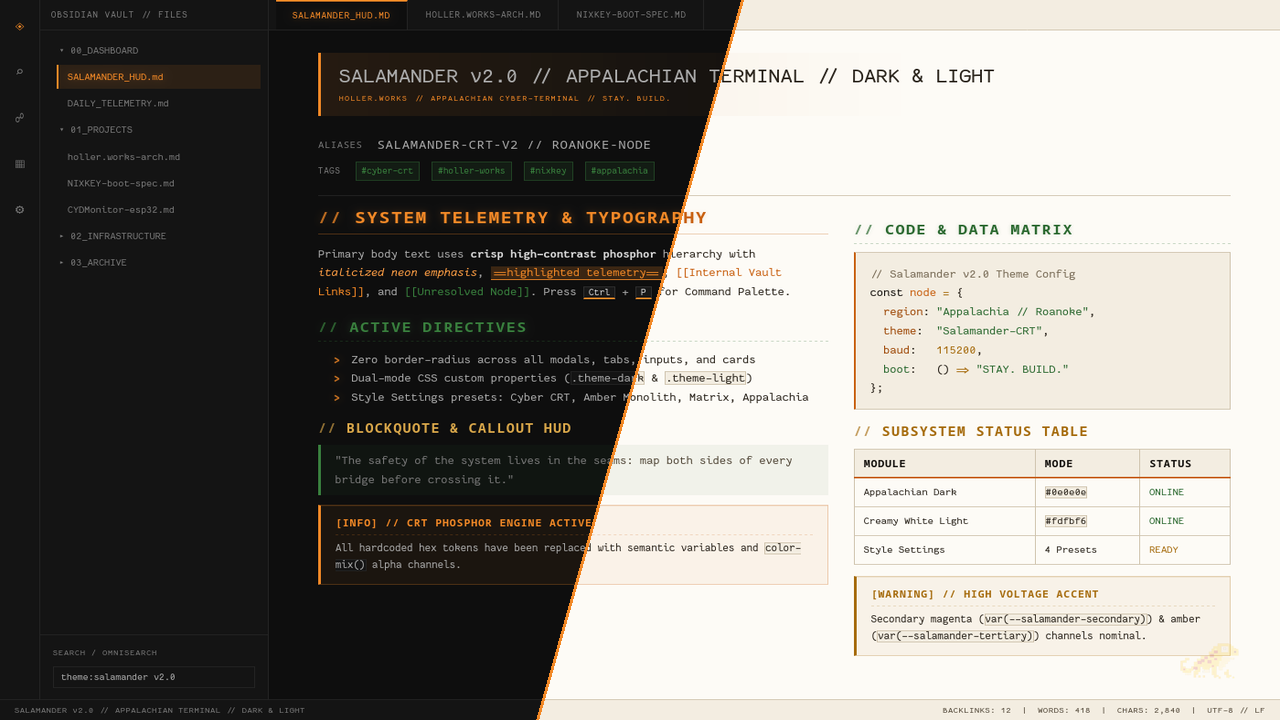
Salamander is a high-contrast, monospace-first terminal theme for Obsidian inspired by Appalachia's prolific amphibian.
- Dark Mode (
.theme-dark): Carbon black (#0e0e0e), Appalachian Rust Orange (#f28927), Forest Pine Green (#39803e), and Warm Ochre (#d9a74a). - Light Mode (
.theme-light): Glare-free Creamy White parchment (#fdfbf6), Warm Oat-Cream sidebars (#f3ede1), Deep Appalachian Rust (#c86010), and Forest Pine (#2b6930). - Sharp Terminal Geometry: Zero border-radius across tabs, modals, callouts, code blocks, and inputs.
- Telemetry Typography: Uppercase
//prefixed headings,>list markers, and full Nerd Font / monospace support. - Style Settings Compatible: Includes built-in palette presets (Appalachian Terminal, Phosphor Amber Monolith, Cyberpunk / CRT Phosphor, and Matrix Telemetry), CRT scanline toggles, phosphor glow controls, and watermark opacity sliders via the Style Settings plugin.
Installation
From Obsidian Community Themes
- Open Settings → Appearance → Themes → Manage.
- Search for Salamander and click Install and use.
Manual Installation
- Download
theme.cssandmanifest.jsonfrom the latest GitHub Release. - Place both files in
<Your Vault>/.obsidian/themes/Salamander/. - Enable Salamander under Settings → Appearance → Themes.
License
MIT License — Created by Jason.