
README file from
GithubNo Mans Sky - Atlas
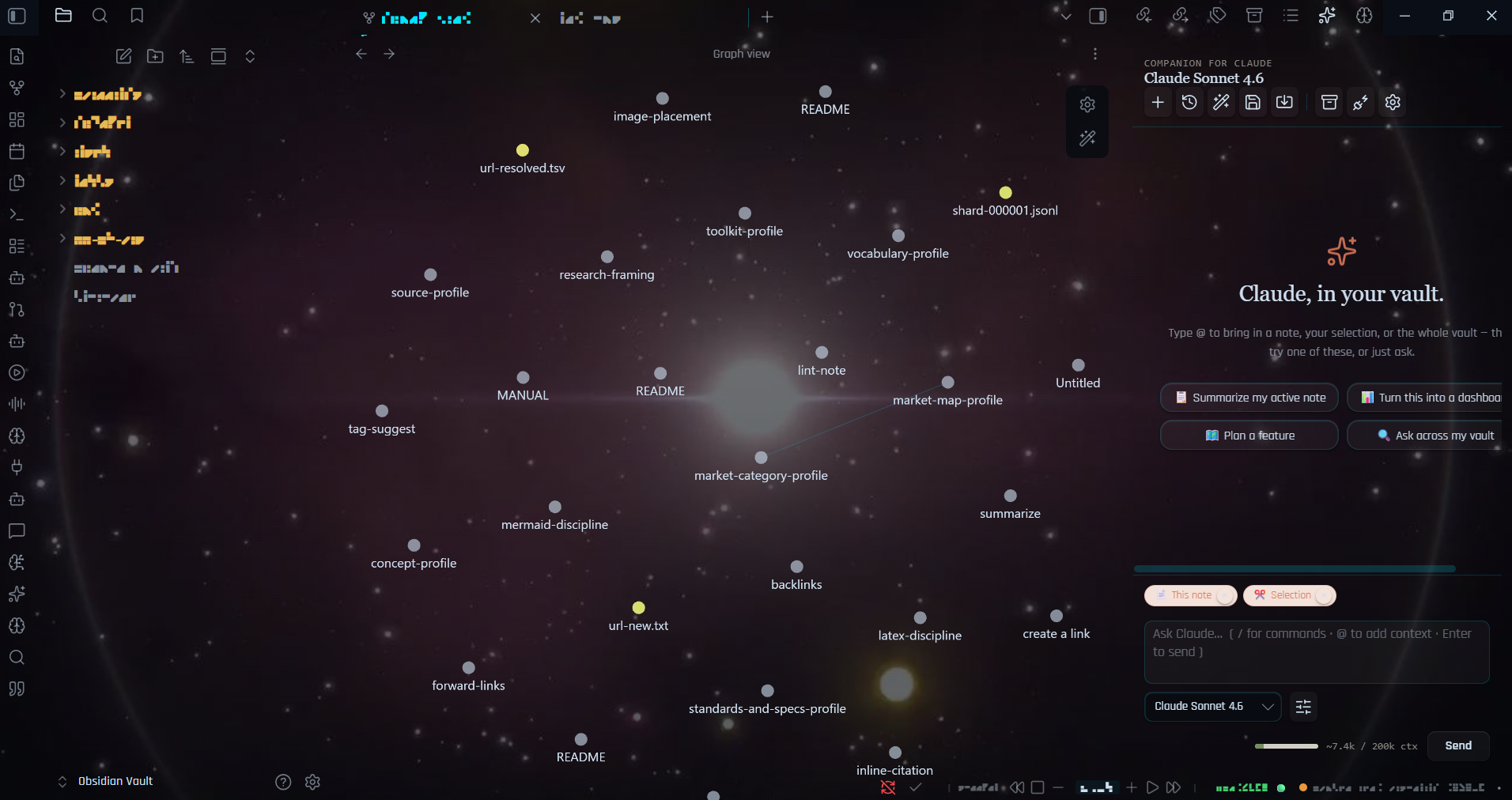
A deep-space, No Man's Sky-inspired theme for Obsidian. Your notes float on a living galaxy, headings are written in the Korvax alphabet and translate to English when you hover them, and the whole window boots like an Atlas terminal.
Cyan & gold HUD · galaxy background · alien glyph headings · dark + light · deep Style Settings.

Features
- Galaxy background behind the whole workspace — fully transparent panes, no boxed "sharp edges," with a readability dimming layer. Embedded in the CSS (no external files).
- Korvax glyph headings — note titles, reading-view headings, callout titles and tags render in the real NMS alphabet and decode to English on hover. Body text stays English and editable.
- Atlas boot splash — a scanner ring + "Establishing link" plays when the vault opens (reduced-motion safe, never blocks clicks).
- Cyan & gold HUD — Orbitron / Rajdhani type, accent glow, HUD grid, corner brackets on the active note, gold status-bar markers, scan-in title reveal, console-styled toasts/tables/code.
- Galaxy backdrops — recolor the nebula: Atlas Purple, Toxic Green, Scorched Red, Frozen Cyan, Irradiated Gold.
- NMS callouts —
> [!atlas],> [!sentinel],> [!korvax],> [!vykeen],> [!gek],> [!traveller],> [!anomaly],> [!scan]. - Focus / writing mode — calms the galaxy and reverts glyphs to English for distraction-free writing.
- Dark + light — dark is the deep-space console; light is "Daylight Scanner."
Install
From the community store (once published): Settings → Appearance → Themes → Manage → search "No Mans Sky - Atlas".
Manual:
- Copy
theme.cssandmanifest.jsoninto<your vault>/.obsidian/themes/No Mans Sky - Atlas/. - Settings → Appearance → Themes → select it. Set the colour scheme to Dark for the full effect.
- (Recommended) install the Style Settings community plugin to unlock the control panel below.
Style Settings panel
Open Settings → Style Settings → No Mans Sky - Atlas:
- Accent color — Atlas Cyan / Exosuit Gold / Atlas Path Red / Sentinel Green / Anomaly Violet
- Glow & atmosphere — accent glow + strength, HUD grid (+ animate), CRT scanlines, vignette
- Galaxy — disable galaxy background, editor dimming
- Immersion — galaxy backdrop, full-immersion glyphs (nav/tabs too), focus mode, disable boot splash, disable corner brackets
- Layout & explorer — rainbow biome folders, translucent panels, hide borders, readable headings
- Typography — body / heading / interface fonts and body font size
Everything works at sensible defaults even without Style Settings; the plugin just exposes the controls.
Companion pieces (optional, in this repo)
nms-discovery-toast/— a tiny plugin that fires "◆ ENTRY REGISTERED / DATA SYNCED" toasts on note create/save (CSS can't hook those events). Copy into.obsidian/plugins/and enable.nms-glyph-translate/— the standalone glyph-on-hover component (CSS + JS + offline demo) for use in web projects.
Notes & credits
- UI fonts (Orbitron, Rajdhani) load from Google Fonts on first run. The NMS alphabet font and the galaxy image are embedded in
theme.css. - NMS Alphabet font used with permission from seontonppa.
- Unofficial fan project, inspired by No Man's Sky (Hello Games); not affiliated or endorsed. See
LICENSE(MIT) for the license terms. - The "NMS Alphabet" font and the No Man's Sky aesthetic are inspired by No Man's Sky (Hello Games). Replace bundled assets with your own before redistribution if you wish to avoid any third-party rights concerns.
- To publish to the Obsidian community themes list, see
PUBLISHING.md.