
README file from
GithubMimir
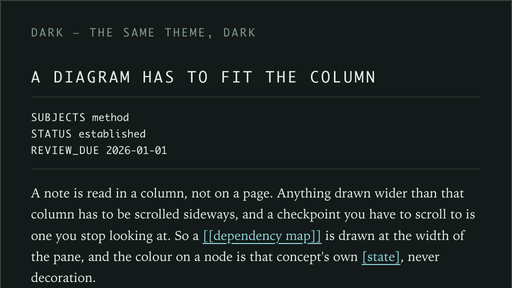
A warm paper theme for Obsidian, with a sage accent, a serif for what you read and a monospace for what you operate. It comes in a light and a dark variant, and it loads nothing from the internet: both type stacks name fonts that are already on your system.
What it does
The theme dresses Obsidian from one block of tokens at the top of theme.css: warm paper, ink and sage in the light variant, and the same object in green-black in the dark one. Both variants are defined in full, so the app never falls half-styled when it switches.
- Reading is serif. The writing surface is set in a serif stack at 1.62 line height, and the inline title keeps the serif as a statement. An embedded note is the next shade of paper with a lilac edge on the left.
- Furniture is monospace. Headings, tab titles, buttons, tags, table headings, the properties block, folder names, callout titles, the status bar and modal titles are set in a monospace stack, letterspaced, and uppercase where they are labels.
- A hairline separates, one weight means surface. A box around every element is what makes a page shout, so outlines are reserved for the single weight that means "this is a surface". Everything else is separated by space or by one coloured edge on the left.
- A card is paper, not a frame. Callouts are the next shade of the same paper, with a 3 px edge on the left and an offset shadow in the corner. The edge and the title are coloured by type: cyan for notes and info, sage for tips and successes, peach for questions and warnings, lilac for quotes and examples.
- Small things are square. Checkboxes are squares, filled sage when done. Tags are hairline chips, not pills. Buttons, inputs, menus and modals have no rounding. Images sit on a light canvas; SVG drawings get no background of the theme's, because a drawing paints its own surfaces.
- The app carries the same language. Tabs are an underline, the sidebar is a rail of small monospace labels, scrollbars are thin lines.
- Other plugins inherit the palette. Obsidian's own variables,
--background-primary,--text-normaland the rest, are set from the theme's tokens. There are also selectors for Bases tables and charts, for Dataview tables, and for Mermaid. Mermaid gets type and canvas only: node fills and strokes are left to each diagram's own definitions, so a diagram's colours keep meaning what the diagram says they mean.
Because the palette and the metrics are one token block, the whole theme can be recoloured in a single place.
Install
Mimir is not in the community directory yet. Submission is pending, so manual install is the path that works today.
Manual install:
- Download
theme.cssandmanifest.jsonfrom https://github.com/tommyhedgerow/obsidian-mimir-theme. - Put both files in
<Vault>/.obsidian/themes/Mimir/.
<Vault>/.obsidian/themes/Mimir/
  theme.css
  manifest.json
- Reload Obsidian, then choose Mimir in Settings → Appearance → Themes.
Once the listing is live, the theme can be installed from Settings → Appearance → Themes → Manage → Browse, by searching for "Mimir".
Disclosures
- Remote assets: none. The theme loads no webfonts and no remote images, and makes no network requests at all. Both type stacks name fonts that are already on the system, and each ends in a generic fallback,
seriformonospace. - Files: the theme is a single stylesheet. It reads and writes no files, and it does not reach outside the vault.
- Obsidian settings: it sets Obsidian's own CSS variables from its tokens, which is what a theme does. It changes no other setting.
- Accounts and payments: none.
- Ads: none.
- Telemetry: none.
Licence
MIT. See LICENSE.