
README file from
GithubKami Reader — Obsidian Theme
Optional immersive workspace layer
For a more continuous Folio Shell across New Tab, Reading, Editing, sidebars, Outline, Ribbon, and Reading Stage, optionally install Kami Reader Companion. Kami Reader works independently, and Companion also supports Obsidian's Default Theme.
Last updated: 2026-09-26
Inspired by tw93/kami. Not affiliated with or endorsed by tw93. All visual design tokens trace to the original kami project (MIT); this repo is an unofficial Obsidian adaptation.
An unofficial Obsidian Workspace adaptation inspired by tw93/kami. It translates kami's print-grade typographic system — warm parchment surface, ink-blue accent, serif-led headings, screen-readable body copy, warm-gray neutrals — onto the Obsidian editor without changing Obsidian's navigation model.
Status: Published on the Obsidian Theme Gallery. Public repo: https://github.com/KKenny0/obsidian-kami · Version:
0.3.1.
Current workspace improvements
Body text follows Obsidian font settings, and interactive controls follow the accent color. Whitespace adapts to pane width while the user's text width stays an upper limit. Narrow panes preserve reading space; wide tables and nested content scroll locally. With Companion, normal reading and Stage inherit user font, width, background, and accent choices.
The maintainer confirmed macOS acceptance on 2026-09-26. This release has an explicitly approved macOS-only acceptance exception; Windows and Linux are not validated. The current macOS examples below do not establish cross-platform acceptance.
Visual Language
Derived from the upstream Kami design
system. The complete Workspace shell is an unofficial Obsidian adaptation.
Dark mode intentionally retains --bold-weight: 600 for screen readability; it
is an exception to Kami's print-emphasis rule, not a claim of exact conformance.
| Token | Light | Dark | Role |
|---|---|---|---|
| Parchment / Deep Dark | #f5f4ed |
#141413 |
Primary note background |
| Ivory / Dark Ivory | #faf9f5 |
#1a1917 |
Cards, callouts, overlays |
| Shell Parchment | #f0eee4 |
#1d1c1a |
Sidebars, Ribbon, tab strip, status bar |
| Warm Sand | #e8e6dc |
#353330 |
Borders, dividers |
| Dark Surface / Warm Ivory | #30302e |
#e8e3d2 |
Body text |
| Ink Blue / Ink Light | #1B365D |
#2D5A8A |
Accent: headings, links, selection, CTA |
| Olive | #504e49 |
#b4b09e |
Quote / caption text |
| Warm Highlight | #f3e3a8 |
#5a4a1f |
==mark== highlight |
| Tag Tint | #E4ECF5 |
#E4ECF5 |
Tag background (solid, never rgba) |
All neutrals carry a yellow-brown warm undertone (no cold blue-grays) in both light and dark variants. Ink blue is used sparingly — the print-design ≤5% rule is relaxed for the editor context but the intent holds: accent only, never chrome.
Screenshots
Current macOS captures using synthetic example notes. Obsidian 1.13.7, Kami Reader 0.3.1 without Companion.
| Reading and layout | Interaction and detail |
|---|---|
Light reading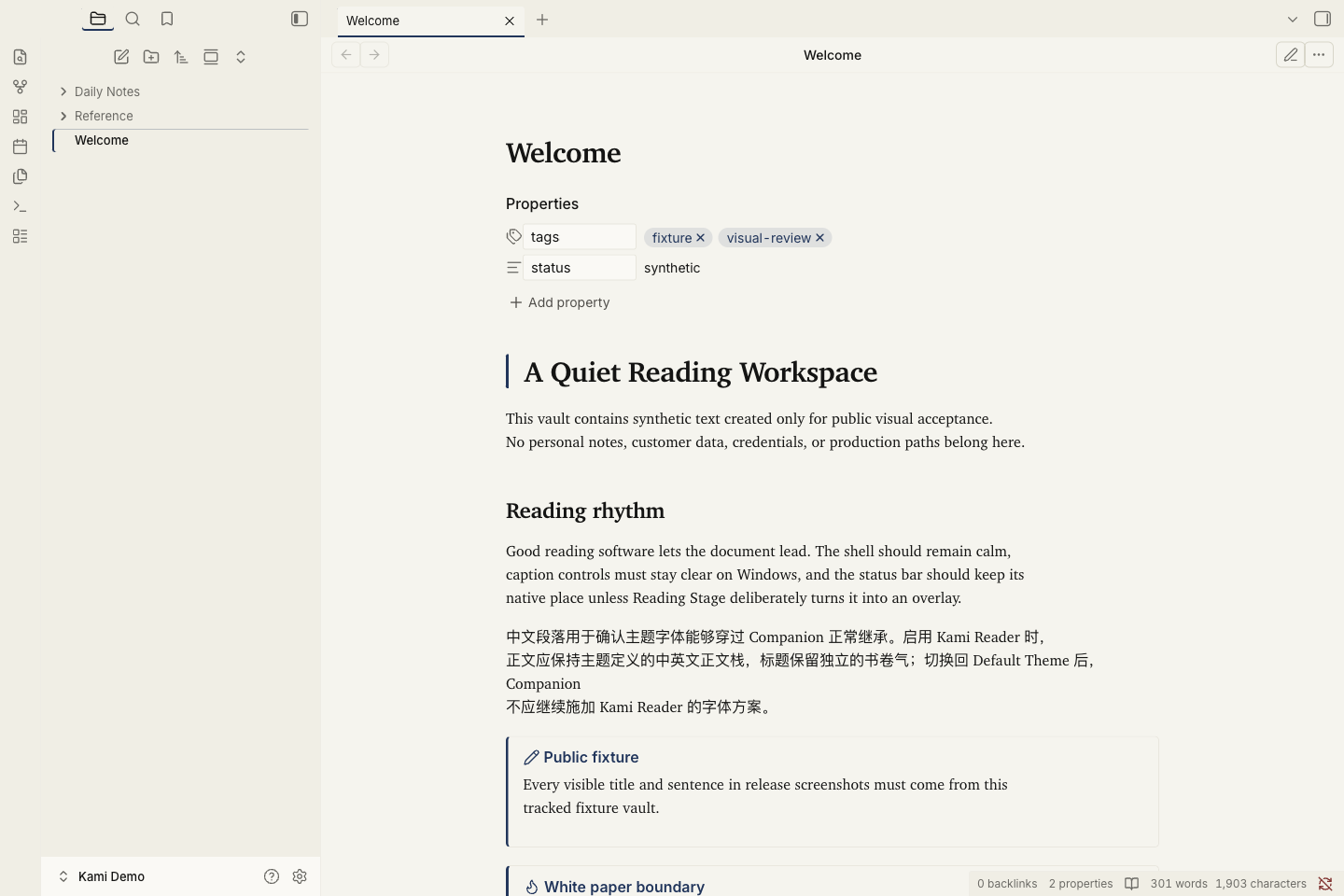 |
Dark reading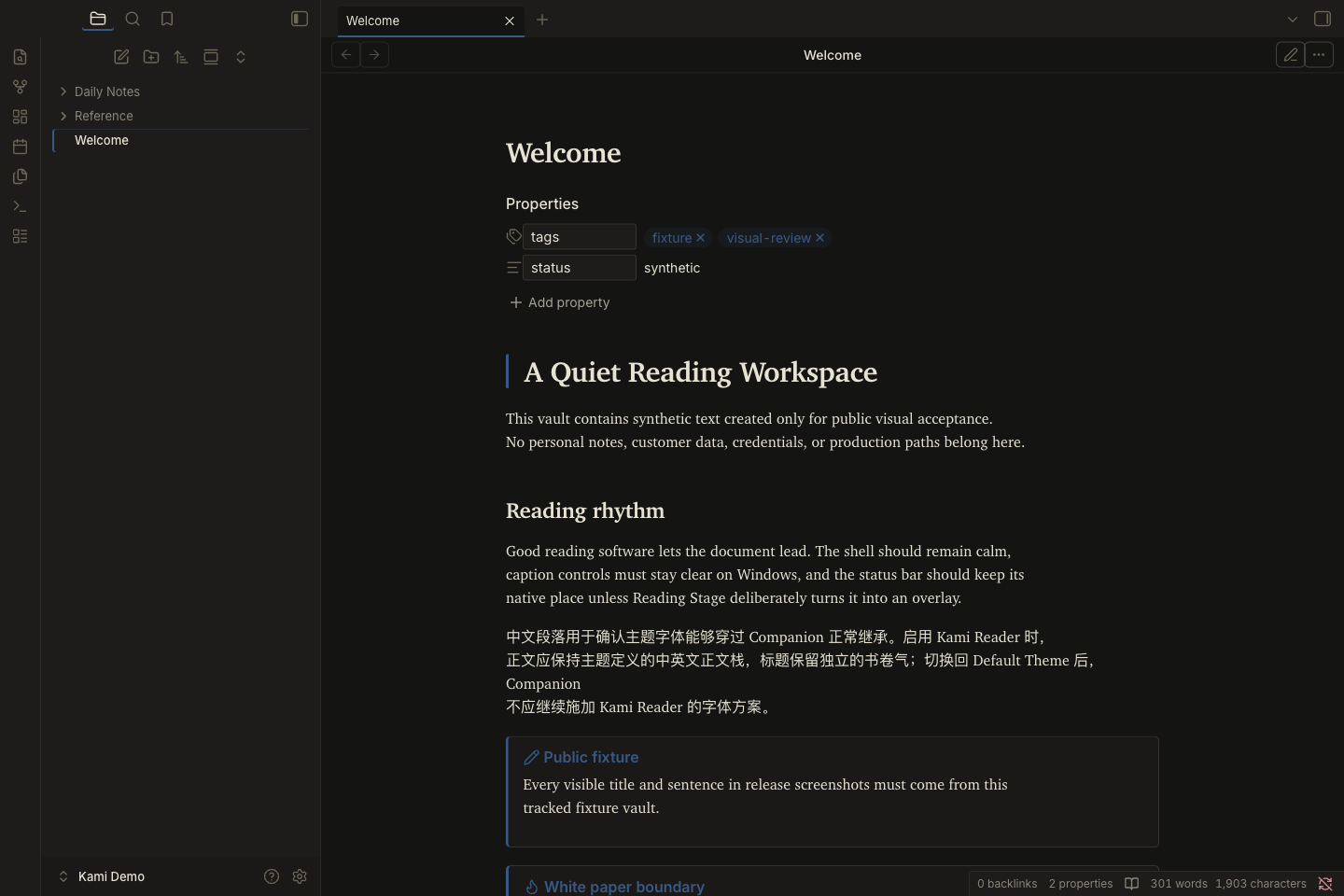 |
Live Preview editing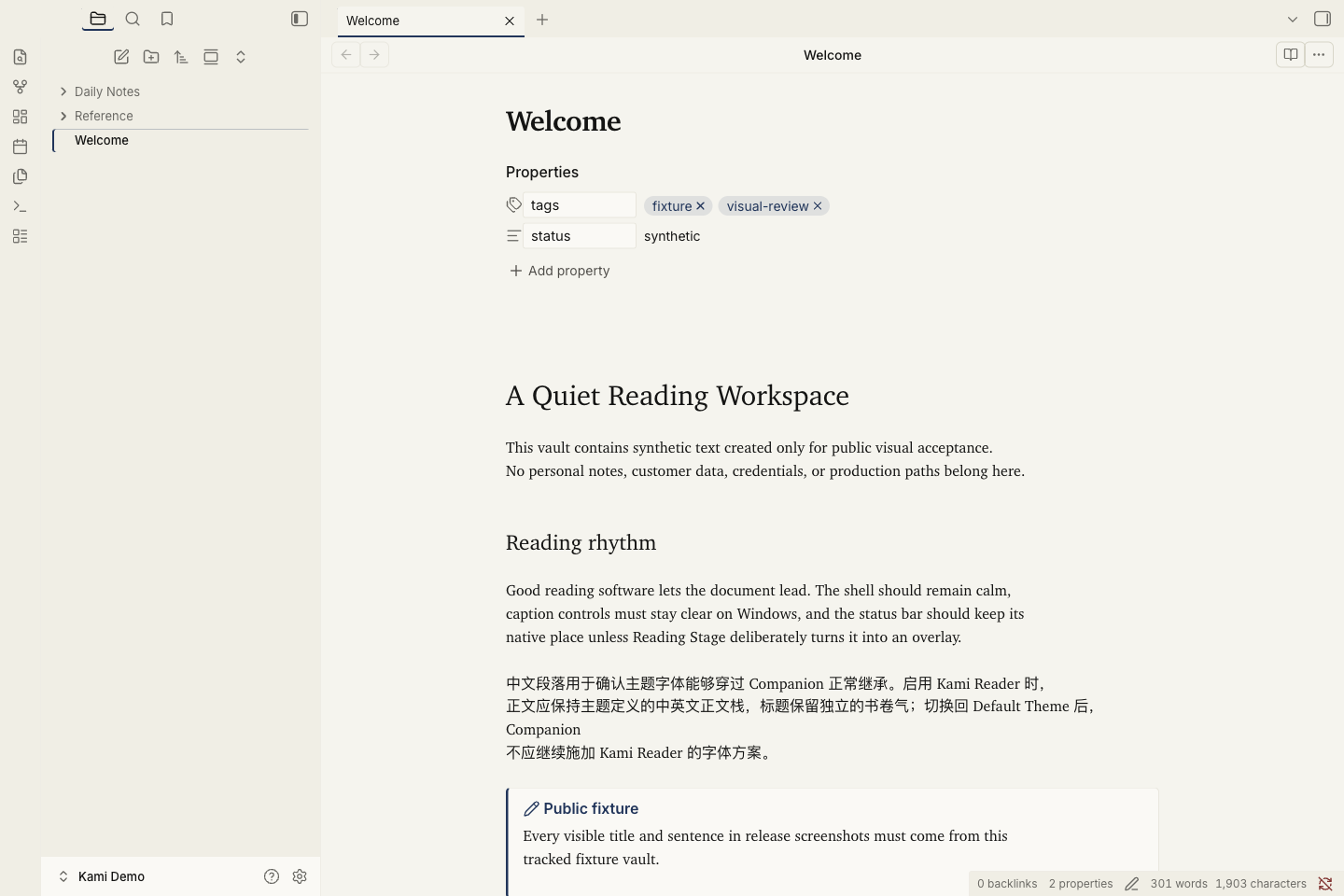 |
Callouts and tables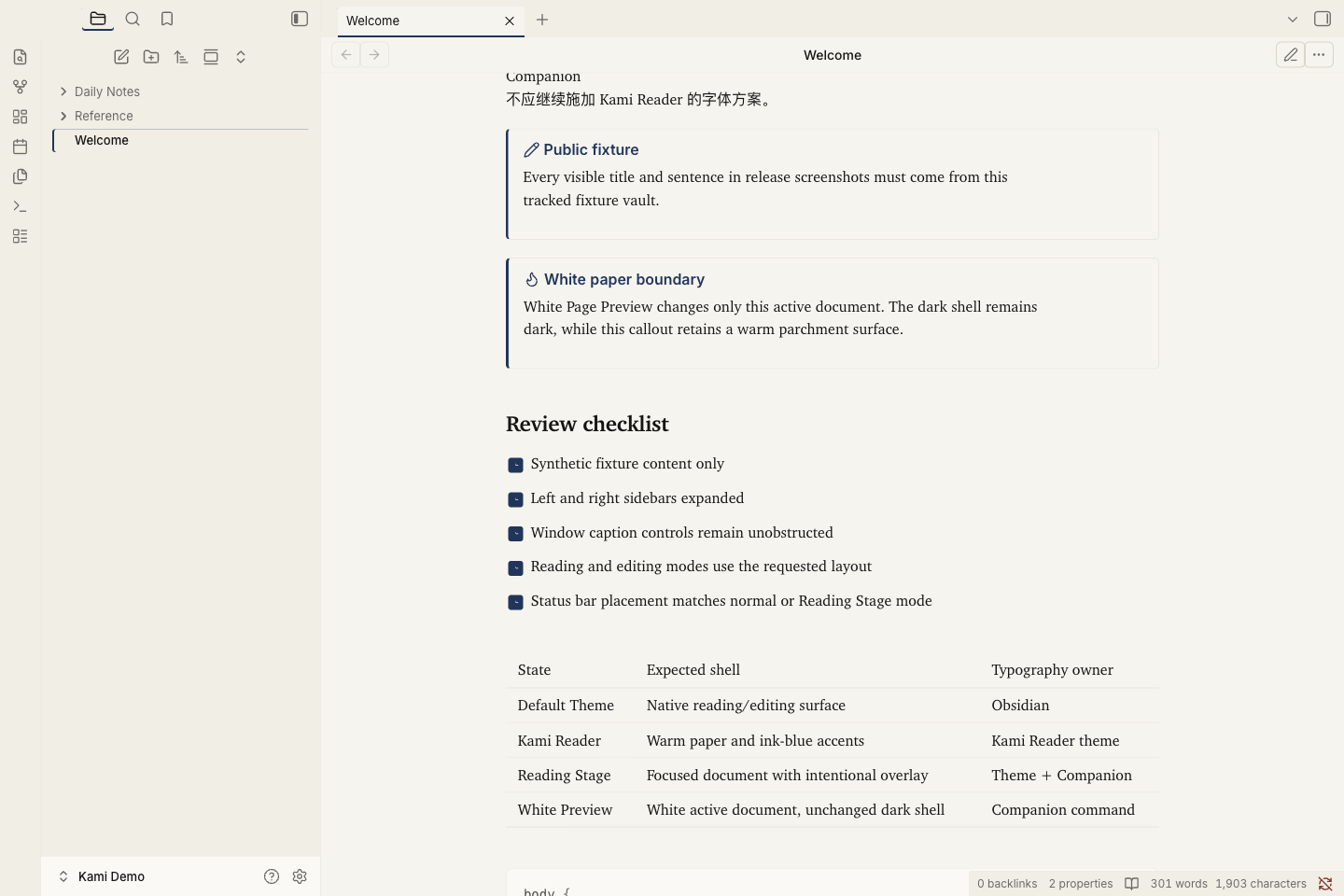 |
Capture record. These examples do not establish Windows acceptance.
Style Settings
This theme ships a Style Settings schema for the variables users are most likely to tune. No CSS editing is required.
After installing the Style Settings community plugin, go to Settings → Style Settings → Kami Reader to adjust:
- Body font family — controls body copy only; headings keep their separate editorial stack
- Body line-height — 1.55 default, range 1.3–1.9 (Live Preview needs Cmd+E toggle after change; Reading View updates instantly)
- Note max width — 700px default
- Bold emphasis strength — without a Style Settings override, 500 in Light and 600 in Dark by default; choose 500, 600, or 700 if your font setup needs a different calibration
- Accent color (light + dark) — single accent swap, instantly re-themes
- Primary background (light + dark) — tune parchment warmth
The schema intentionally exposes only 6 high-leverage variables. Everything else stays fixed in theme.css to honor kami's restraint principle: too many switches would dilute the design system.
- Snippet mode: schema embedded as
/* @settings ... */YAML at the top oftheme.css. Style Settings does not scan.obsidian/snippets/for standalone JSON files, so snippet installs need the schema inside the CSS. - Theme mode: schema in root
data-theme.json. Obsidian reads it when the theme is installed under.obsidian/themes/kami-reader/.
Keep both schema copies in sync when changing user-facing settings.
Typography
--font-text-theme: "Charter", "Georgia",
                   "Source Han Sans SC", "Noto Sans CJK SC",
                   "PingFang SC", "Microsoft YaHei", sans-serif;

--font-heading-theme: "Charter", "Georgia",
                      "TsangerJinKai02",
                      "LXGW WenKai Screen", "LXGW WenKai",
                      "Source Han Serif SC", "Noto Serif CJK SC", serif;
- Charter — English serif. macOS-native (
/System/Library/Fonts/Charter.ttc), no install needed. Falls back to Georgia on other platforms. This is the font kami itself uses for English. - Source Han Sans SC / system sans — the default CJK body stack, chosen for long Windows reading sessions.
- LXGW WenKai Screen — CJK heading face, OFL 1.1. It preserves the handwritten warmth of Kami without making every paragraph kaiti.
- JetBrains Mono — Code, OFL 1.1.
- Inter — UI / interface, OFL 1.1.
Optional font install
Only LXGW WenKai Screen needs manual install, and only for the optional heading texture. Body copy falls back to the platform CJK sans without extra setup.
- LXGW WenKai Screen — https://github.com/lxgw/LxgwWenKai-Screen/releases
(grab
LXGWWenKaiScreen-Regular.ttf+Bold.ttf) - JetBrains Mono (optional, code already falls back to SF Mono / Cascadia): https://www.jetbrains.com/lp/mono/
Installation
From Obsidian Theme Gallery (recommended)
- Obsidian → Settings → Appearance → click Manage next to Themes
- Browse → search "Kami Reader" → Install → Use
- (Optional) Install the Style Settings community plugin for the 6 tunable variables (font, line-height, width, bold emphasis, accent, background)
Gallery installs are unaffected by the macOS Sequoia sandbox issue described below. Obsidian writes the theme files itself, so App Store users can install Kami Reader cleanly from Browse Themes.
Manual install / developer iteration (macOS Sequoia sandbox workaround)
⚠️ Why this section exists. Mac App Store Obsidian runs in a sandbox. macOS Sequoia 15+ tags every file created by
cpfrom Terminal withcom.apple.provenance. The sandbox then refuses to load those files as theme resources — Obsidian silently skips the theme folder. This matters for developers iterating on theme.css who copy files into their own vault's.obsidian/themes/directory. End users installing via Gallery (the path above) are not affected.
The workaround for local iteration: ship kami as a CSS snippet instead of a
theme, and inject it via Obsidian's own Vault API from the DevTools console.
Files written by app.vault carry Obsidian provenance and load normally.
One-time setup
- Confirm Appearance → Themes is set to Default (no other theme should
be active; another theme's
body.<name>-themeclass will out-spec kami'sbody.theme-lightselector). - From this directory, generate the inject script:
./sync.sh - Open the generated
inject-kami-snippet.js,Cmd+Aselect all,Cmd+Ccopy. - In Obsidian:
Cmd+Option+I→ Console tab →Cmd+Vpaste → Enter. You should see✓ kami.css created (... chars). - Settings → Appearance → scroll to CSS Snippets → enable kami.
Iterating on the CSS
# Edit theme.css, then:
./sync.sh
# Re-copy inject-kami-snippet.js contents → paste into Obsidian Console.
# Then toggle the kami snippet off → on to force reload.
Hot-reload of modified snippets is not automatic — Obsidian reads snippet
files at startup. After re-injecting via app.vault.modify, toggle the snippet
off and on in Settings → Appearance → CSS Snippets to pull the new content.
Coverage
Current coverage includes a complete Workspace shell:
- ✅ Base color tokens (60+ variables, both light and dark palettes)
- ✅ Dark variant — Deep Dark
#141413+ Ink Light#2D5A8A, preserving the same yellow-brown undertone and single-accent restraint as light mode. - ✅ Reading View: headings, body, lists (native markers), tables, blockquote (2pt ink-blue rail + olive text, no bg), code, frontmatter, embeds
- ✅ Editing View (CodeMirror 6): syntax tokens, cursor, selection, active line, formatting marks
- ✅ Complete Workspace shell: titlebar, root and sidebar tabs, ribbon, left/right sidebars, pane dividers, file explorer/search, view header, and attached status bar
- ✅ Command palette, quick switcher, settings panel, modals, menus, toggles, checkboxes, and scrollbars
- ✅ Print / PDF export: white paper in both app themes, with warm parchment retained inside cards, code, frontmatter, embeds, callouts, and even table rows
- ✅ Reduced-motion preference respected
Not covered (deferred):
- Plugin-specific overrides (Dataview, Templater, Excalidraw) — verify as encountered
Publishing Notes
Kami Reader is published on the Obsidian Theme Gallery: https://community.obsidian.md/themes/kami-reader.
Obsidian pulls theme files from the GitHub release tag matching
manifest.json.version exactly, with no v prefix.
The theme was published through community.obsidian.md on 2026-06-20. That site
mirrors accepted themes to obsidianmd/obsidian-releases through Obsidian's
hourly mirror workflow.
The Theme Gallery downloader was also checked against the macOS Sequoia sandbox
issue: a fresh Gallery install wrote theme.css without com.apple.provenance,
so App Store users can install through Gallery cleanly. The snippet workaround
only matters for manual developer iteration.
community.obsidian.md runs automated lint on submission. Each warning required its own fix and a new release tag:
| Release | Lint warning | Fix |
|---|---|---|
0.1.0 |
No release matches manifest version | Created GitHub release tagged 0.1.0 (no v prefix) |
0.1.1 |
Repository has no recognized license | Restored pure MIT LICENSE (GitHub licensee strictly matches MIT template; attribution appended after standard text broke the match) |
0.1.1 |
css-scrollbar partially supported by Obsidian 1.4.5 |
Dropped CSS Scrollbars spec properties (scrollbar-width, scrollbar-color); kept webkit ::-webkit-scrollbar vendor extension |
0.1.2 |
Avoid !important at theme.css:788, 1105, 1106 |
CodeMirror selection uses 0,3,0 specificity compound selector; reduced-motion uses explicit selector list instead of * !important |
Design Decisions
- Forked from Obsidian Default, not Minimal. Minimal carries its own
design language; mixing parchment into it produces visual dissonance.
Minimal also uses
body.minimal-themeclass selectors (specificity 0,1,1) that beat kami's old:root(0,0,1). Default has no such class. - Variables on
body.theme-light/body.theme-dark, not:root. Obsidian's built-in app.css defines base vars under.theme-light/.theme-dark(specificity 0,1,0).:root(0,0,1) loses the cascade;body.theme-light(0,1,1) wins. - Separate body and heading contracts.
--font-text-themeremains the user-facing body control.--font-heading-themepreserves the editorial serif/kaiti voice for H1–H6 and inline titles without adding another setting. - Tag backgrounds use solid
#E4ECF5, never rgba. kami explicitly bans rgba tag backgrounds (WeasyPrint double-rect bug in PDF export). - Ring + whisper shadows, never hard drop shadows. kami spec; hard drop shadows look heavy in print and on screen.
- Native list markers across Reading and Live Preview. A Reading-only em-dash marker looked elegant but made editing and reading disagree; kami's restraint now comes from quiet marker color and tighter nested spacing.
- Blockquote: 2pt ink-blue rail + olive text, no background, no italic. Restraint over decoration.
- CJK sans body, kaiti/serif headings. Long paragraphs get a calmer screen texture while titles retain the calligraphic warmth that defines Kami.
- No synthetic bold weights. Kami forbids fake bold; headings use 500/600
actual weights only. Dark mode intentionally keeps
--bold-weight: 600for screen readability as an Obsidian-specific exception. - Shipped as snippet, not theme, in Phase 1. Workaround for macOS Sequoia sandbox; see Installation section.
Known Tradeoffs
- The parchment surface is warmer than most editor themes. If it feels too yellow for long sessions, tune Primary background in Style Settings.
- Headings remain more literary than body copy. Advanced users can override
--font-heading-themein a CSS snippet if they prefer a fully sans document. - Bold is calibrated per theme: without a Style Settings override, restrained
500in Light and more salient600in Dark. If your platform or font needs a different calibration, use Bold emphasis strength at500,600, or700.
File Layout
kami-obsidian/
├── manifest.json              # Theme metadata (name, version, minAppVersion)
├── theme.css                  # Source of truth for all kami styles + inline @settings YAML
├── data-theme.json            # Style Settings schema for theme-folder mode
├── sync.sh                    # Regenerates inject-kami-snippet.js from theme.css
├── inject-kami-snippet.js     # Generated by sync.sh — paste into Obsidian Console
├── screenshots/               # Release evidence set (see SCREENSHOTS.md)
├── LICENSE                    # MIT (pure text so GitHub licensee detects SPDX:MIT)
├── README.md                  # English docs (this file)
└── README.zh-CN.md            # 简体中文文档
inject-kami-snippet.js is a build artifact, not source. Regenerate via
./sync.sh after any theme.css change.
Releases
| Tag | Notes |
|---|---|
| 0.1.0 | Phase 1: visual system + dark variant + atomic components + Style Settings |
| 0.1.1 | Compat: drop CSS Scrollbars spec for Obsidian 1.4.5; restore pure MIT LICENSE |
| 0.1.2 | Lint compliance: remove !important from CodeMirror selection + reduced-motion |
| 0.1.3 | Polish: align nested list typography, prevent external-link icon overlap, and keep completed parent tasks from striking through child content |
| 0.1.4 | Lint compliance: remove broad completed-task selectors while keeping child task content readable |
| 0.1.5 | Performance: remove global text rendering override to improve long-note scrolling |
| 0.1.6 | Document reading polish: calibrate long-form typography, inline code, code blocks, tables, headings, and bold emphasis |
| 0.1.7 | Readability calibration: restore 700px reading width, 500 emphasis, and a calmer long-form rhythm |
| 0.1.8 | Style Settings: add a bold emphasis strength control for font/platform readability calibration |
| 0.1.9 | Reading View: restore native paragraph rhythm, calibrate dark bold emphasis, and warn when the full Kami snippet overlaps an active theme |
| 0.2.0 | Workspace shell: extend Kami's visual language across navigation, sidebars, panes, headers, status surfaces, and core overlays |
| 0.2.1 | Style Settings: fix the embedded YAML metadata so the Kami Reader section loads reliably on Windows |
0.3.0 (unreleased) |
Typography split, calmer shell hierarchy, accessible passive icons, and white-paper PDF export |
Release tags match manifest.json version exactly (no v prefix) — Obsidian
pulls theme files from the GitHub release tagged with the manifest version.
License
MIT — see LICENSE.
Visual design system source: tw93/kami (MIT). This theme is a derivative adaptation; all design token values trace to the original kami project.
Fonts referenced but not bundled:
- Charter (OFL, macOS-native)
- LXGW WenKai / LXGW WenKai Screen (OFL, https://github.com/lxgw/LxgwWenKai)
- JetBrains Mono (OFL)
- Inter (OFL)
Credits
- Visual style & design tokens: tw93/kami — MIT. This is an unofficial third-party adaptation; see the upstream maintainer's response.
- Fonts: Charter (OFL, macOS-native), LXGW WenKai (OFL), JetBrains Mono (OFL), Inter (OFL)