
README file from
GithubCrestfall
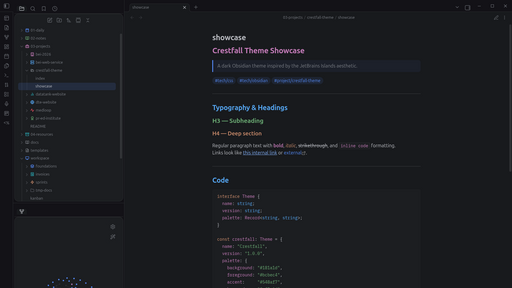
A dark Obsidian theme inspired by the JetBrains Islands aesthetic.
Features
- Deep dark canvas —
#181a1dbackground, near-zero visual noise - Warm syntax palette — orange keywords, blue functions, green strings, mauve types, cyan numbers
- Floating glass panels — rounded sidebar leaves and modals with directional light borders
- Custom checkboxes — 7 task states:
[x]done,[-]cancelled,[/]in-progress,[>]forwarded,[!]important,[?]question,[*]star - 15 callout variants — each type has a unique color from the Islands palette
- Styled tables & Dataview — rounded headers, hover rows, colored inline fields
- Kanban board — themed lanes with per-column accent borders, card hover effects
- Graph view — blue nodes, green tags, orange attachments
- IBM Plex Mono — loaded for all code blocks
- Properties panel — keys color-coded by type
Color Palette
| Role | Hex |
|---|---|
| Background | #181a1d |
| Foreground | #bcbec4 |
| Accent | #548af7 |
| Keywords | #cf8e6d |
| Functions | #56a8f5 |
| Strings | #6aab73 |
| Types | #c77dbb |
| Numbers | #2aacb8 |
| Comments | #7a7e85 |
Installation
Community themes (recommended)
- Open Settings → Appearance → Themes → Manage
- Search for Crestfall
- Click Install and use
Manual
- Download
theme.cssfrom this repository - Copy it to
.obsidian/themes/Crestfall/theme.cssinside your vault - Open Settings → Appearance and select Crestfall
Credits
Inspired by Dark Islands for VS Code by bwya77, which is itself inspired by the JetBrains Islands theme.
License
MIT