
README file from
GithubClaude Synapse
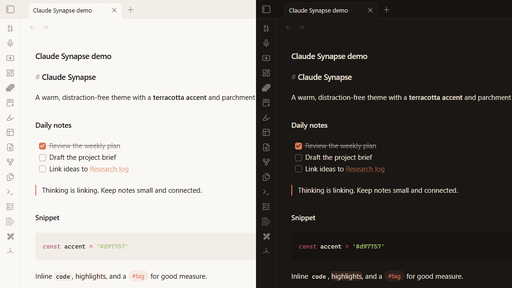
A warm, distraction-free Obsidian theme with a terracotta accent and parchment surfaces, in light and dark variants. It was designed alongside the Claude Synapse plugin but works in any vault.
Features
- Warm parchment light mode and warm charcoal dark mode
- Terracotta accent (
#d97757) across links, checkboxes, and interactive elements - DM Sans UI font when installed, with a system font fallback
- Compact heading scale
- Full-width editor and reading view
Installation
In Obsidian, open Settings → Appearance → Themes → Manage, search for Claude Synapse, then select Install and use.
Credits
The colour token structure (--bg1, --tx1, --ax1, and so on) follows the HSL system from Minimal by kepano and the Optimal theme.
License
MIT