
README file from
GithubBorozdov
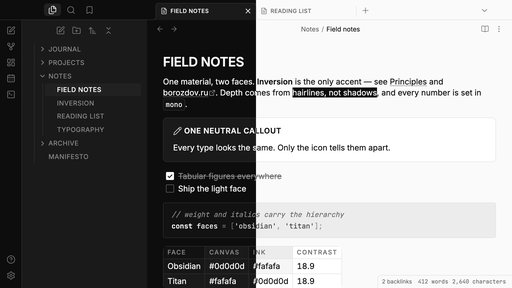
A monochrome theme for Obsidian. Pure grayscale in both faces — dark Obsidian and light Titan. Inversion is the only accent.
Principles
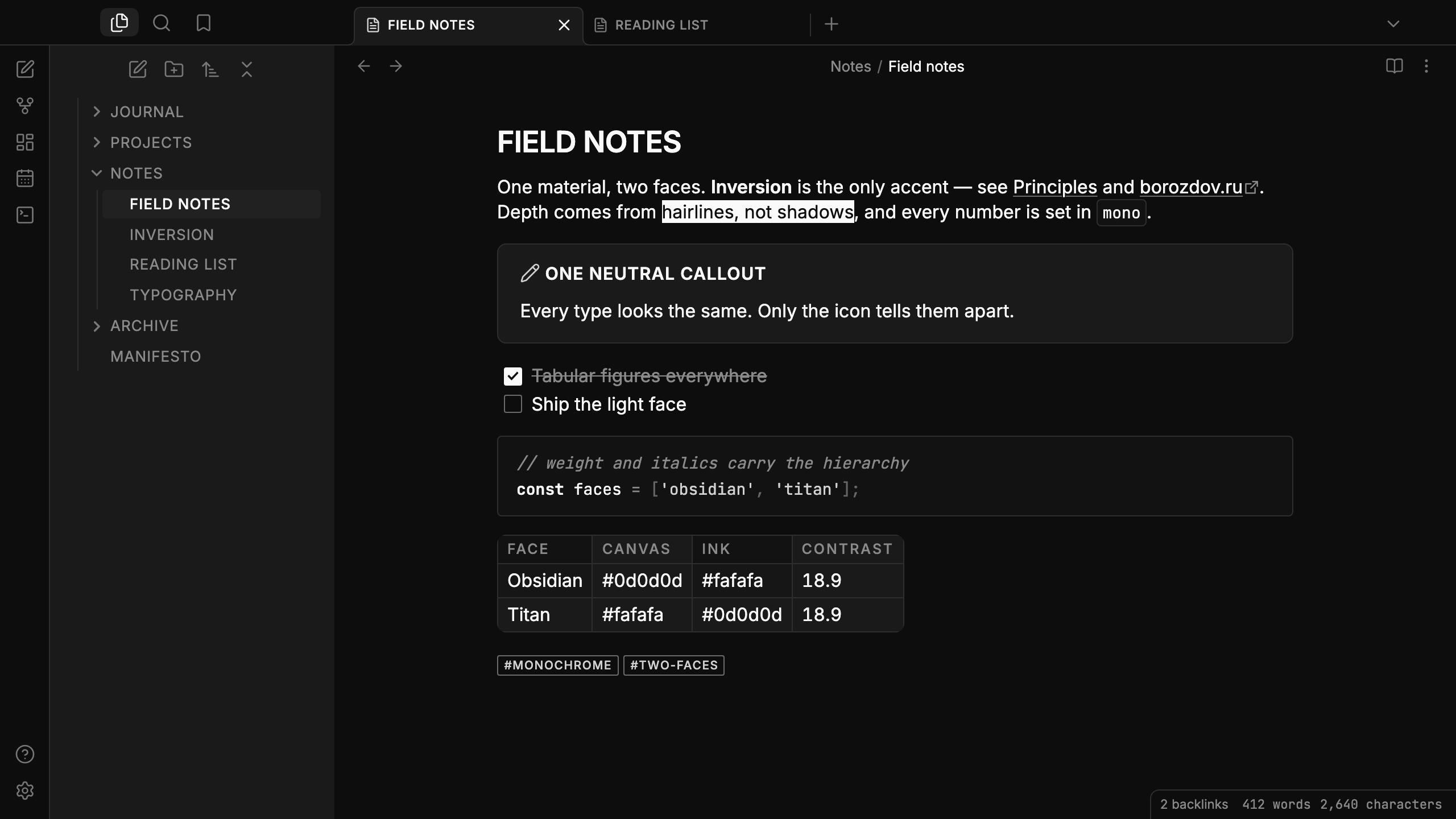
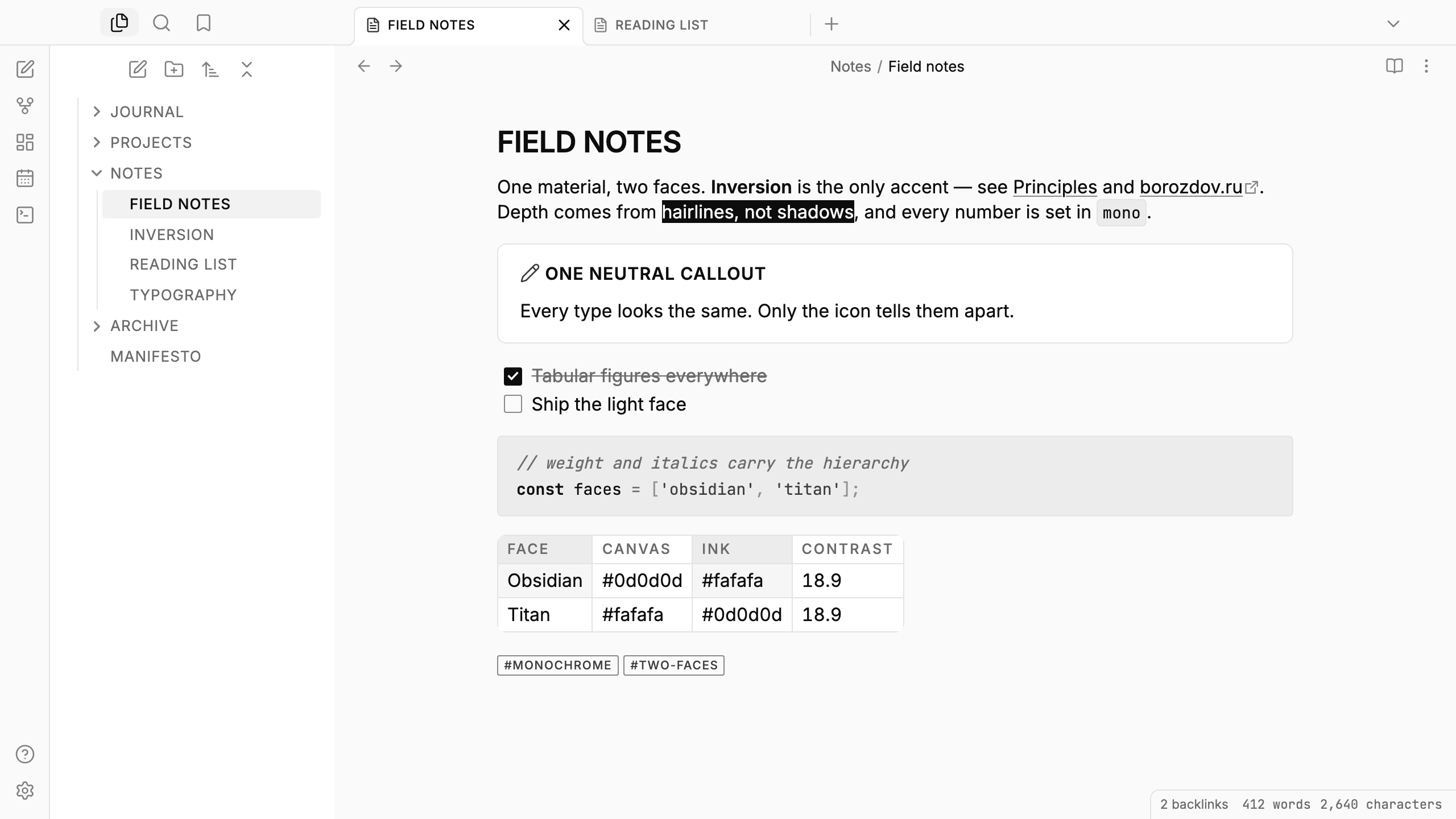
- One material, two faces. Obsidian (dark, primary) and Titan (light) are tuned independently for contrast — Titan is not an inverted Obsidian.
- Inversion is the only accent. No accent color, no gradients. To emphasize is to fill
with the opposite pole: checked tasks, enabled toggles,
==highlights==, tags on hover. - Lines, not shadows. Depth comes from 1px hairlines and flat surface steps.
- Uppercase is the voice. Headings, note titles, tabs and file names are set in capitals.
- Numbers are monospaced. Counters use JetBrains Mono with tabular figures.
Features
- Dark and light modes, following Settings → Appearance → Base color scheme
- Inter and JetBrains Mono built in, Latin and Cyrillic — no network requests
- Callouts in one neutral style with even padding; only the icon tells the types apart
- Grayscale syntax highlighting: weight and italics carry the hierarchy instead of hue; code blocks and inline code sit in a hairline frame
- Tables with a rounded frame and single 1px grid lines
- Embedded notes padded evenly inside their frame, clear of the open-link icon
- Rectangular toggles and sliders with square knobs — no pills
- Tags, task lists, blockquotes and links in the same hairline-and-inversion system; tags in Properties match the outlined tags in the note
- Quiet editing: no focus ring around the note, its title or form fields while you type; property names read as labels, not boxed fields; dropdowns use a single chevron
- The phone layout keeps the same rules: outlined tags, framed fields, a rectangular floating navigation bar with a hairline instead of a shadow
- No
!important: every rule can be overridden with a CSS snippet
Installation
From the community directory: Settings → Appearance → Themes → Manage, search for Borozdov, then Install and use.
By hand: download manifest.json and theme.css from the
latest release into
<vault>/.obsidian/themes/Borozdov/, then choose Borozdov under Settings → Appearance →
Themes.
Keeping names in their own case
File names, tabs and note titles are uppercased by the theme. To keep them as typed, add this as a CSS snippet (Settings → Appearance → CSS snippets):
.nav-file-title-content,
.nav-folder-title-content,
.workspace-tab-header-inner-title,
.inline-title {
  text-transform: none;
  letter-spacing: normal;
}
Fonts
Inter (© The Inter Project Authors) and JetBrains Mono (© The JetBrains Mono Project
Authors) are embedded in theme.css as base64 WOFF2 under the SIL Open Font License 1.1 —
see fonts/OFL.txt. To keep the theme small they carry only what it uses:
Latin and Cyrillic, weights 400–600, no automatic ligatures — code reads exactly as typed.
License
MIT — see LICENSE.
По-русски. Монохромная тема для Obsidian в стиле BOROZDOV: два лика — тёмный ОБСИДИАН и светлый ТИТАН, инверсия как единственный акцент, линии вместо теней, заголовки прописными, цифры моноширинные. Спокойный ввод: без рамок фокуса вокруг заметки и полей, названия свойств без коробок, теги прямоугольные. Устанавливается из каталога: Настройки → Оформление → Темы → Настроить → Borozdov → Установить и применить.