
README file from
GithubNótt & Dagr — Obsidian Theme
Paired dark and light themes for Obsidian, part of the Asgard EHS ecosystem. Nótt (Norse for Night) is the dark variant; Dagr (Norse for Day, son of Nótt) is the light variant. Both share the same role architecture, so a keyword is the same kind of thing in either mode — only the surface-adapted color shifts.
| Nótt (dark) | Dagr (light) |
|---|---|
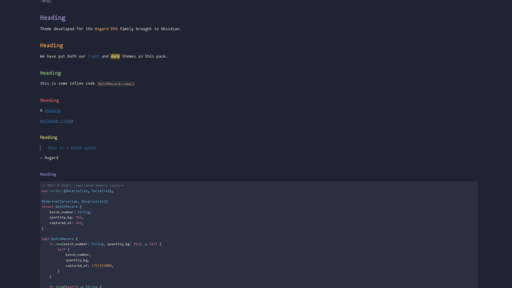 |
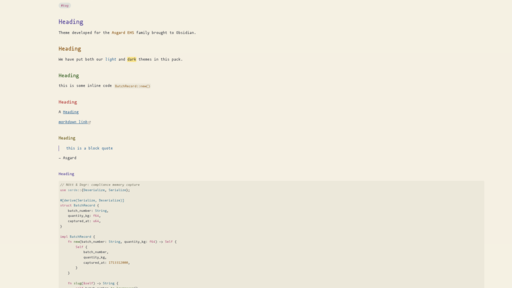 |
Design intent
- Nótt — aurora over a night sky. Cool petrol-slate ground with desaturated accents tuned for editor backgrounds.
- Dagr — morning light on parchment. Warm cream ground with deepened, earthier counterparts of the same accent roles.
- Cross-theme parity. Same semantic mapping in both modes. If
selfis Purple in Nótt, it is Purple in Dagr.
Installation
Community themes (once published)
- Open Obsidian Settings → Appearance → Themes → Manage
- Search for Nott Dagr
- Click Install and use
Manual install
- Download
manifest.jsonandtheme.cssfrom the latest release - Place them in your vault under
.obsidian/themes/Nott Dagr/ - In Obsidian: Settings → Appearance → Themes → select Nott Dagr
To switch between modes, toggle Settings → Appearance → Base color scheme between Dark (→ Nótt) and Light (→ Dagr).
Palette
Nótt (dark)
| Role | Hex | Used for |
|---|---|---|
| Background | #1A1F2E |
Editor surface |
| Foreground | #E6E4DA |
Default text |
| Comment | #757C90 |
Comments, disabled code |
| Red | #E35F5B |
Errors, deletions |
| Orange | #E8A25C |
Numbers, constants, inline code |
| Yellow | #E6DC82 |
Strings, highlights |
| Green | #8DC776 |
Functions, methods |
| Cyan | #6EB8D6 |
Classes, types, links |
| Purple | #A692D6 |
self / this, headings (H1) |
| Pink | #DE80A4 |
Keywords, tags, anchors |
Dagr (light)
| Role | Hex | Used for |
|---|---|---|
| Background | #F5F1E4 |
Editor surface |
| Foreground | #1F2330 |
Default text |
| Comment | #6B6A58 |
Comments, disabled code |
| Red | #B53D3A |
Errors, deletions |
| Orange | #8F5C18 |
Numbers, constants, inline code |
| Yellow | #6E601A |
Strings |
| Green | #3A6525 |
Functions, methods |
| Cyan | #2B6A8A |
Classes, types, links |
| Purple | #5B4A9E |
self / this, headings (H1) |
| Pink | #A84272 |
Keywords, tags, anchors |
The full color specification (palettes, ANSI mappings, UI surfaces, syntax classification rules, accessibility notes) is maintained in the canonical Asgard EHS theme spec.
Development
Edits to theme.css are picked up by Obsidian after a reload (toggle the theme
or Settings → Appearance → ↻ next to the theme dropdown).
To work on the theme against a vault, symlink the repo into
.obsidian/themes/Nott Dagr/:
ln -s /path/to/nott_dagr_obsidian /path/to/vault/.obsidian/themes/"Nott Dagr"
Attribution
The role architecture, token classification, and specification structure follow conventions established by the Dracula Theme specification by Zeno Rocha and Lucas de França. The Dracula spec is a functional framework for describing syntax-highlighting themes; this theme reuses that framework.
All color values, theme names (Nótt, Dagr), design decisions, and accompanying assets are original to the Asgard EHS project and are not derived from Dracula's palette.
License
Apache License 2.0 — see LICENSE.
Part of the Asgard EHS ecosystem.