
README file from
GithubMonospace Dark for Obsidian
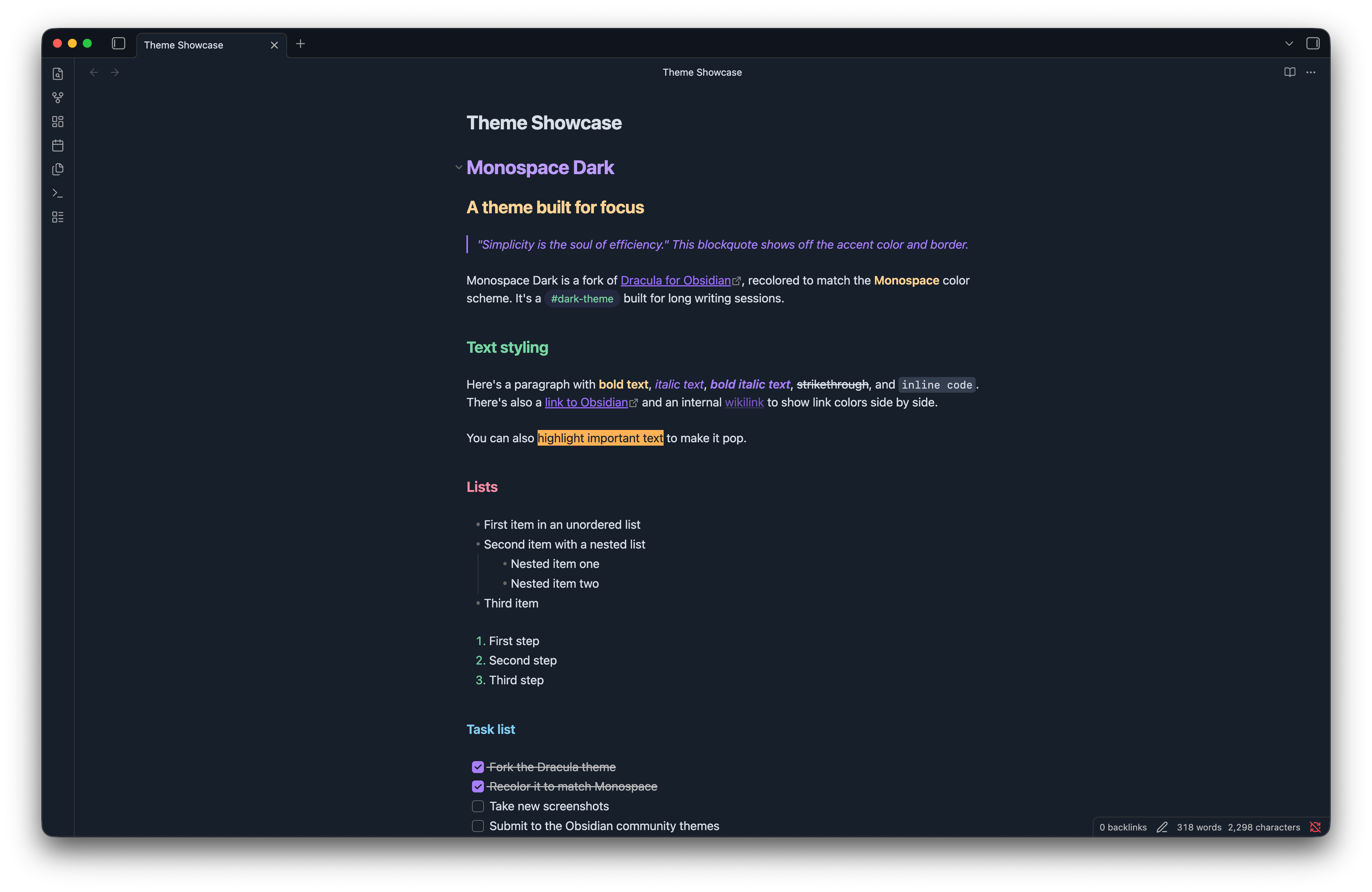
A dark theme for Obsidian, recolored to use the Monospace Dark color scheme.
Features
- Full recolor of Dracula for Obsidian to the Monospace Dark palette — headings, links, code, callouts, tables, tags, and lists.
- Syntax highlighting tuned to match the Monospace VSCode theme.
- White-background PDF export. Obsidian normally bakes the dark theme background into exported PDFs. This theme includes a print stylesheet that swaps the export to a clean white page with dark, readable text and remapped accent colors, so notes print economically without switching themes first.
Install
Install using Obsidian
Search for Monospace Dark under Options -> Appearance -> Themes -> Manage in Obsidian's Community themes.
Install using Git
git clone https://github.com/PearcePunisher/monospace-obsidian.git
Install manually
Download using the GitHub .zip download option and unzip it, then follow the manual activation steps in INSTALL.md.
Credits
This theme is a fork of Dracula for Obsidian, recolored to match Monospace, a VSCode theme by Keksi. Many thanks to the Dracula team for the original theme structure and to Keksi for the color scheme.
Maintainer
Contributing
If you'd like to contribute to this theme, please read the contributing guidelines.