
README file from
GithubMonokai Pro Octagon for Obsidian
An Obsidian dark theme based on the Octagon variant of Monokai Pro.
Monokai Pro Octagon brings a deep blue-gray interface and vivid syntax colors to Obsidian. Choose a palette accent, colorize headings, or switch between squared and rounded corners with the optional Style Settings plugin.
Screenshots
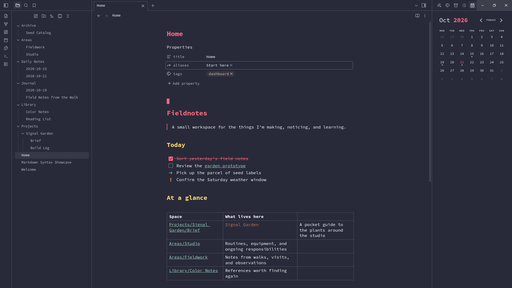
Dashboard
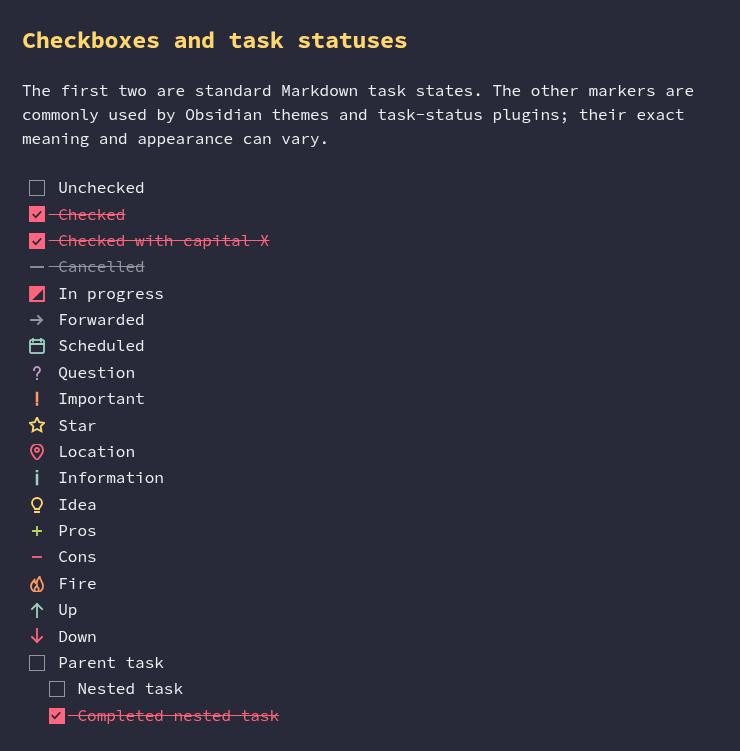
Task statuses
Palette
| Role | Color |
|---|---|
| Background | #282a3a |
| Foreground | #eaf2f1 |
| Red | #ff657a |
| Green | #bad761 |
| Yellow | #ffd76d |
| Orange | #ff9b5e |
| Purple | #c39ac9 |
| Teal | #9cd1bb |
| Selection | #535763 |
| Cursor | #b2b9bd |
Install
Community themes
Once the theme is available in Obsidian's Community themes, open Settings → Appearance → Themes → Manage, search for Monokai Pro Octagon, and select Install. Then select it as your active theme.
Manual installation
Create .obsidian/themes/Monokai Pro Octagon/ in your vault and copy theme.css and manifest.json into it. In Obsidian, open Settings → Appearance and select Monokai Pro Octagon as the active theme.
Customize
Customization is optional. Install and enable the Style Settings community plugin, then open Settings → Style Settings → Monokai Pro Octagon to configure:
- Accent color
- Heading colors: enable colored headings and choose a palette color for H1–H6
- Blockquote border color
- Numbered and bulleted list marker colors
- Checkbox color
- Internal, external, and unresolved link colors
- Tag color and appearance (soft or text); rounded tags follow the Rounded corners setting
- Rounded corners (squared by default)
Internal and external links are underlined only while hovered and retain their color on hover.
Please report theme issues in this repository's GitHub Issues tab. Include your Obsidian version, operating system, relevant plugins, and steps to reproduce. Plugin interfaces may change independently of the theme.
Development
The Sass source is split by responsibility under scss/; scss/main.scss compiles to the root-level theme.css used by Obsidian and releases.
The repository includes a Nix flake that provides Node.js and npm. With Nix installed and flakes enabled:
nix develop .
npm ci
npm run build
npm run lint
Use npm run watch to rebuild theme.css while editing. Reload the theme in Obsidian to preview changes. Linting also runs in GitHub Actions.
Releasing
Update manifest.json and versions.json for a release, then push a tag matching the manifest version. The existing GitHub Actions workflow creates a draft release with manifest.json and theme.css attached. See the Obsidian theme release guide.
Credits and license
The palette is based on Monokai Pro, specifically its Octagon variant. This theme maps those colors to Obsidian's interface and syntax highlighting, with additional surface shades derived from the base background.
The repository's LICENSE applies to the theme source. Palette assets and names may be subject to separate upstream terms; check those terms before redistributing the palette independently.