
README file from
GithubOne Dark Pro for Obsidian
An Obsidian app theme that brings the One Dark Pro family of dark palettes to notes, Markdown previews, code blocks, sidebars, tabs, Canvas, graph view, and common editor surfaces.
This theme is inspired by and adapts palette decisions from Binaryify/OneDark-Pro, which is licensed under MIT. The upstream notice is preserved in THIRD_PARTY_NOTICES.md.
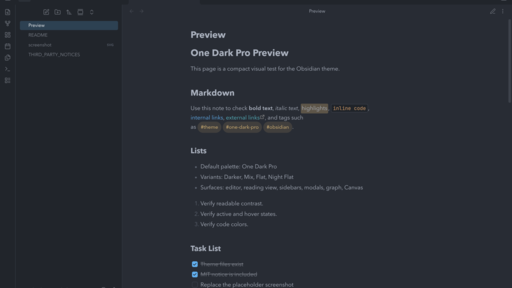
Palettes
The default palette is One Dark Pro. If the Style Settings plugin is installed, the theme also exposes these palette classes:
- One Dark Pro
- One Dark Pro Darker
- One Dark Pro Mix
- One Dark Pro Flat
- One Dark Pro Night Flat
Obsidian's community theme format installs one manifest.json and one
theme.css per selectable theme. To make all One Dark Pro variants selectable
without Style Settings, this repository also provides a local build script that
creates five separate theme folders.
Installation
From Obsidian Community Themes
After the theme is accepted into the community directory:
- Open Obsidian settings.
- Go to Appearance.
- Select Manage next to Themes.
- Search for One Dark Pro.
- Install and use the theme.
Manual installation
- Create a folder named
One Dark Proin your vault's.obsidian/themes/directory. - Copy
manifest.jsonandtheme.cssinto that folder. - Restart Obsidian.
- Select One Dark Pro from Settings > Appearance > Themes.
Manual multi-theme installation
- Run
sh scripts/build-theme-variants.sh. - Copy the folders in
themes/into your vault's.obsidian/themes/directory. - Restart Obsidian.
- Select any of these themes from Settings > Appearance > Themes:
- One Dark Pro
- One Dark Pro Darker
- One Dark Pro Mix
- One Dark Pro Flat
- One Dark Pro Night Flat
Release checklist
Before submitting to the Obsidian community directory:
- Commit
manifest.json,theme.css,README.md,LICENSE, and a real512 x 288screenshot. - Create a GitHub release whose tag matches
manifest.json'sversion. - Upload
manifest.jsonandtheme.cssas release assets. - Submit the repository URL at https://community.obsidian.md.
License
MIT. See LICENSE and THIRD_PARTY_NOTICES.md.