
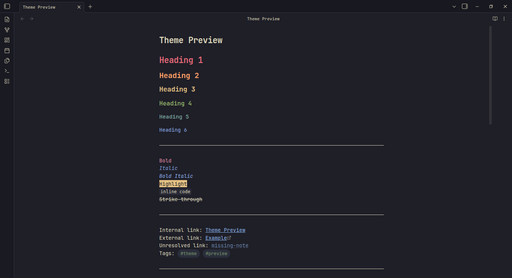
README file from
GithubKanagawa Hokusai — Obsidian Theme
A faithful port of rebelot/kanagawa.nvim for Obsidian. Three variants — Wave (dark), Dragon (dark alt), Lotus (light).
Variants
| Variant | Description |
|---|---|
| Wave (default dark) | Deep ocean tones, warm dark, high contrast |
| Dragon | Late-night muted, warm brown-black, low contrast |
| Lotus | Warm parchment-like light mode |
Switch between Wave and Dragon in dark mode via the Style Settings plugin (Community → Style Settings).
Installation
From Obsidian (recommended once published)
- Open Settings → Appearance → Themes
- Click "Manage" and search for "Kanagawa Hokusai"
- Install and activate
Manual / Development
- Clone or download this repo
- Copy the folder to
{vault}/.obsidian/themes/Kanagawa Hokusai/ - Enable the theme in Settings → Appearance
Features
- 3 full variants — Wave, Dragon, Lotus — each with complete palette coverage
- Style Settings integration — switch dark variants, configure fonts
- Faithful to source — color mappings follow kanagawa.nvim's semantic schema
Credits
- rebelot — the original kanagawa.nvim theme
License
MIT