ICOR for Life - INKLINE

by myicor
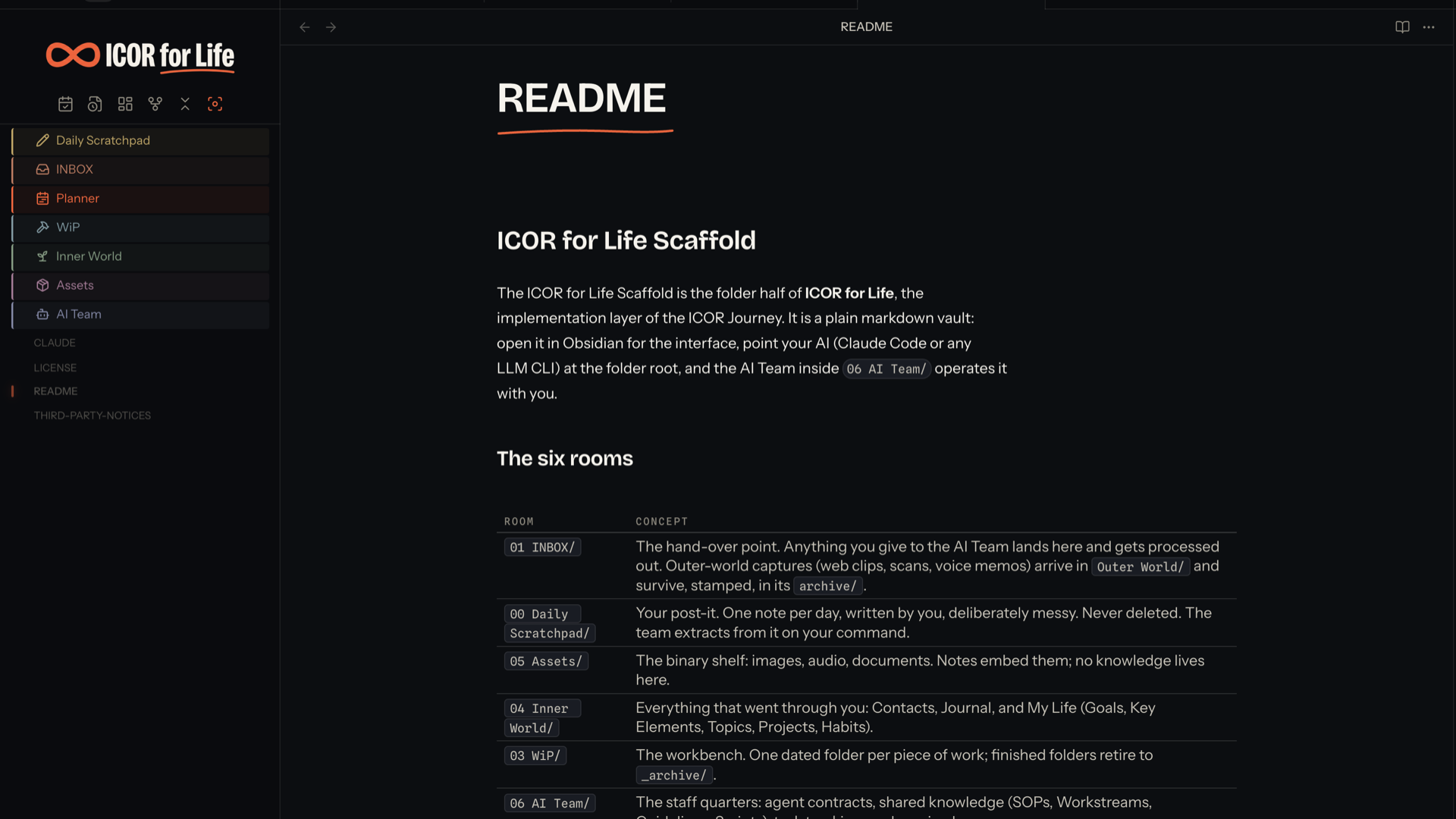
Screenshot of the ICOR for Life - INKLINE Obsidian theme
5
4
3
2
1

Description

This theme supports Dark Mode
This theme supports Light Mode

README file from

Github

ICOR for Life - INKLINE

An Obsidian theme with two rooms: an ink room (dark) and a paper room (light). One marker orange, drawn hairlines, and a teacher's handwriting in the margin.

Most themes add color; INKLINE takes it away. Almost everything on the page is ink on paper, one orange is reserved for the few places that need your attention, and your highlights and comments render the way they would in a well-marked book: marker wash and handwriting. The result is a vault that reads like pages, not like an interface.

INKLINE screenshot

Beta release. This theme works and is in daily use in a real vault, but you will find rough edges. If something looks off, open an issue on this repo and it gets fixed fast.

What you get

  • Two full modes. Ink (dark) and Paper (light), designed as one system, not an inversion. Both are derived from the myICOR application design tokens; every color in both modes rides the same token grammar.
  • The handwritten layer. Blockquotes, [!note] / [!tip] / [!quote] callouts and %%comments%% render in a handwriting face, like a teacher writing in your margin. ==highlights== are one marker wash, no glow.
  • Mermaid diagrams in ink. Flowcharts and sequence diagrams are styled as part of the system: your reading typeface inside the nodes, drawn strokes, edge labels and arrowheads in theme colors, and correct color in dark mode. Obsidian's core dark mode renders mermaid by inverting the whole SVG, which turns a careful diagram into a photo negative; INKLINE switches that off and colors the diagram properly in both rooms.
  • Embedded fonts, zero requests. Four typefaces ship inside the CSS as base64 woff2, each under the SIL Open Font License 1.1 and named in THIRD-PARTY-NOTICES.md. The theme makes no network requests at all.
  • A token grammar for plugins. Every --ink-* token falls back to Obsidian defaults, and first-party ICOR plugins style themselves with the same tokens, so their dashboards match the theme in both modes.
  • Room icons for numbered folders. A root folder whose name starts 00 through 06 loses the number in the sidebar and gains an inked icon in its own hue. Built for the ICOR for Life vault, harmless anywhere else: a vault without those folders matches nothing and looks untouched.
  • A banner over the folder tree, which links to myicor.com when the myICOR Connect plugin is installed.

Settings

Everything above is on out of the box. To change any of it, install the Style Settings community plugin; the theme then appears under Settings, Style Settings with five switches. The plugin is optional and the theme is complete without it.

Switch Default What it does
Turn off the handwritten layer off Blockquotes, note/tip/quote callouts and %%comments%% render in the body face instead of handwriting.
Hide the ICOR for Life banner off Removes the banner above the folder tree.
Turn off room icons and colors off Root folders named 00 to 06 keep their prefixes and Obsidian's default folder look.
Reduce Obsidian's own controls off Hides the vault-switcher row, and New note, New folder and Change sort order from the file-tree toolbar.
Hide the left ribbon off Hides Obsidian's thin left ribbon.

The last two are off because they take a control away from Obsidian, and a theme should not do that to a vault it was just installed into. The ICOR for Life Obsidian Edition ships them on, because there every one of those routes exists somewhere else.

Install

Requires Obsidian 1.5.0 or newer.

  • From Obsidian: Settings, Appearance, Themes, Manage, search "myICOR INKLINE", install, use.
  • Manually: copy theme.css and manifest.json from the latest release into .obsidian/themes/ICOR for Life - INKLINE/, then select the theme under Settings, Appearance.

For plugin authors: the rooms contract

Room icons and colours are data-driven. The theme draws whatever four custom properties and one attribute say, and applies its own ICOR defaults only to folder rows nobody else has claimed:

Set on .nav-folder-title Meaning
data-icor-kind="room" block, no arrow, prefix hidden, label from --room-label
data-icor-kind="family" coloured name and a small glyph
data-icor-kind="none" leave this row to Obsidian, even if it is a 00-06 room
--room-color the colour in the ink room
--room-color-paper optional; the colour in the paper room, falls back to --room-color
--room-icon url(...) used as a mask
--room-label optional; rooms only; the text shown in place of the real name

Inline styles beat the theme's defaults by the ordinary cascade, so a plugin that sets these on a row owns that row. Nothing needs !important. The contract is measured in test/rooms.test.mjs. ICOR for Life - Interface is the first-party plugin that writes it.

Building

theme.css is generated. Edit the files under src/ and run:

npm run build     # regenerate theme.css from src/
npm test          # fails if theme.css and src/ have drifted, then runs the gates

Each file under src/ may declare /* @guard <selector> */ on its first line, and the build puts that guard on every selector in the file. So a guarded file is written as plain CSS: nobody types the guard, nobody forgets it on one rule, and nobody gets it half-right on another.

The gates run in a real engine rather than over the CSS text, because the failure they exist to catch is a switch that moves and changes nothing.

ICOR for Life Obsidian Edition

ICOR for Life - INKLINE is the visual system of the ICOR for Life Obsidian Edition: ICOR (Input, Control, Output, Refine), the productivity methodology by Paperless Movement / myICOR, implemented as a ready-to-use Obsidian vault. The Edition's dashboards are built on INKLINE's tokens, so the theme is not an accessory here; it is the layer the other parts draw themselves with. Best to be used in combination with:

  • ICOR for Life - Planner, the weekly planning board: Todoist, ClickUp, starred email and Google Calendar synced into the vault, planned by drag and drop. Its cards, lanes and tray are styled with INKLINE tokens.
  • ICOR for Life - Focus, the gravity map of your vault: what you touched today sits close, older work ripples outward. Drawn with the same token grammar, in both rooms.
  • ICOR for Life - Diagrams, a fullscreen viewer with zoom and pan for the mermaid diagrams this theme styles, so a diagram keeps the ink look at every zoom level.
  • ICOR for Life - Connect, your app.myicor.com courses, progress and knowledge base inside the vault. Its dashboards ship with zero palette of their own and take every color from the theme.
  • ICOR for Life - Chat, your AI team in a tab beside your notes. Its cards, tool rows and decision blocks are drawn with this theme's tokens, and a shipped gate measures them against it in all four rooms.

The theme styles whatever you run it with, first-party or not: the tokens fall back to Obsidian's defaults, so your own plugin choices keep working.

The complete, preconfigured experience (theme, all plugins, the seven-room vault structure and the AI team) ships free as the ICOR for Life vault: https://myicor.com. The method behind it is taught in the ICOR Journey there.

License

Creative Commons Attribution-NonCommercial-NoDerivatives 4.0 International (CC BY-NC-ND 4.0); see LICENSE. The embedded fonts remain under their own SIL Open Font License 1.1, detailed in THIRD-PARTY-NOTICES.md. Free to install and use; not for resale or re-publication.