
README file from
GithubHermes Crystal
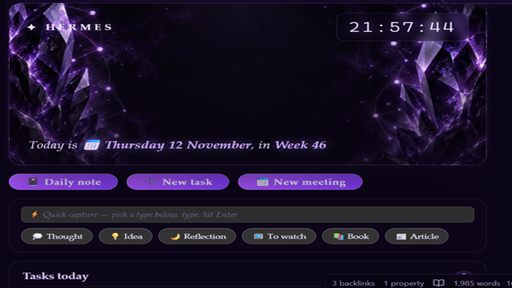
Amethyst crystal-glass theme for Obsidian. Deep violet nebula background, glassmorphism panes, serif gradient headings, and glowing purple accents.
Features
- Crystal nebula background — fully embedded in the CSS (no external files), with a slow "breathing" glow animation (disabled automatically when your OS requests reduced motion)
- Glassmorphism workspace — frosted panes for editor, sidebars, tabs, modals, menus, and status bar
- Serif gradient headings — Palatino-family headings with a light-to-violet gradient and soft glow (H1 in reading and live preview)
- Crystal checkboxes — rounded, glowing diamond-style task checkboxes
- Styled callouts, tables, tags, code, embeds, blockquotes with rounded crystal styling
- Mobile aware — dedicated
is-mobilebackground variant for iPhone portrait - Plugin support — tuned styles for Kanban, Dataview, Tasks, and obsidian-git
Hermes Dashboard
The theme includes a matching stylesheet set for a custom dashboard note (hero clock, quick capture, task list, calendar, stats). If you use the dashboard note, enable it via cssclass:
---
cssclasses: [hermes-dashboard]
---
The dashboard works without it too — the rest of the theme applies to every note automatically.
Install
- Open Settings → Appearance → Themes → Manage
- Click Browse and search for Hermes Crystal
- Click Install, then Use
Manual install: copy theme.css and manifest.json into .obsidian/themes/Hermes Crystal/ in your vault.
Recommended accent
Works out of the box with the default accent. For a perfect match set the accent color to #b18cff.