
README file from
Githubfoggy-sage-glass
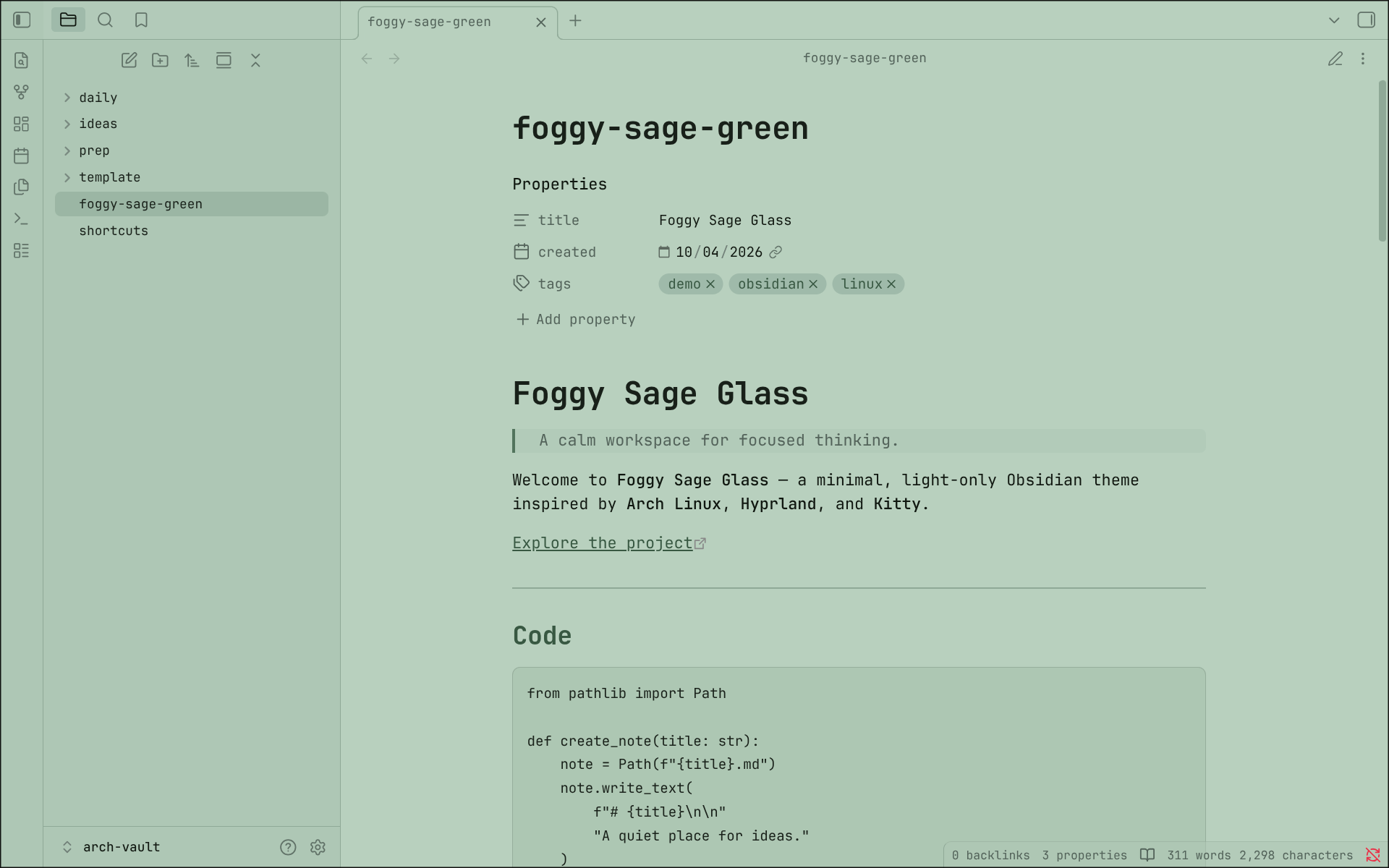
A calm sage-green glass theme with a minimalist Arch Linux aesthetic.
Description
Foggy Sage Glass is a minimal, light-only Obsidian theme built around a soft sage-green palette, dark typography, and translucent glass-inspired surfaces.
The theme is designed for a clean and calm writing environment while maintaining my minimalist Arch Linux aesthetic.
Features
- 🌿 Soft sage-green glass aesthetic
- ⌨️ JetBrains Mono typography
- 🖥️ Minimal Arch Linux-inspired design
Installation
From Obsidian Community Themes
- Open Obsidian.
- Open Settings.
- Go to Appearance.
- Under Themes, select Manage.
- Search for
Foggy Sage Glass. - Select Install and Use.
Manual Installation
-
Download
theme.cssandmanifest.jsonfrom the latest release. -
Create a folder named:
Foggy Sage Glass -
Place both files inside:
.obsidian/themes/Foggy Sage Glass/ -
Open Obsidian.
-
Go to Settings → Appearance.
-
Select Foggy Sage Glass.
License
MIT © Vishal V
Credits
Inspired by my personal Kitty terminal configuration: dotfiles
Kitty — Foggy Sage Glass
Built for Obsidian.