
README file from
GithubDishonored - Dunwall

A dark, painted look for Obsidian, inspired by the city of Dunwall in Dishonored.
The theme sets the look. The Dishonored - Dunwall plugin adds the camp screen and its features. Install both to get the full theme.
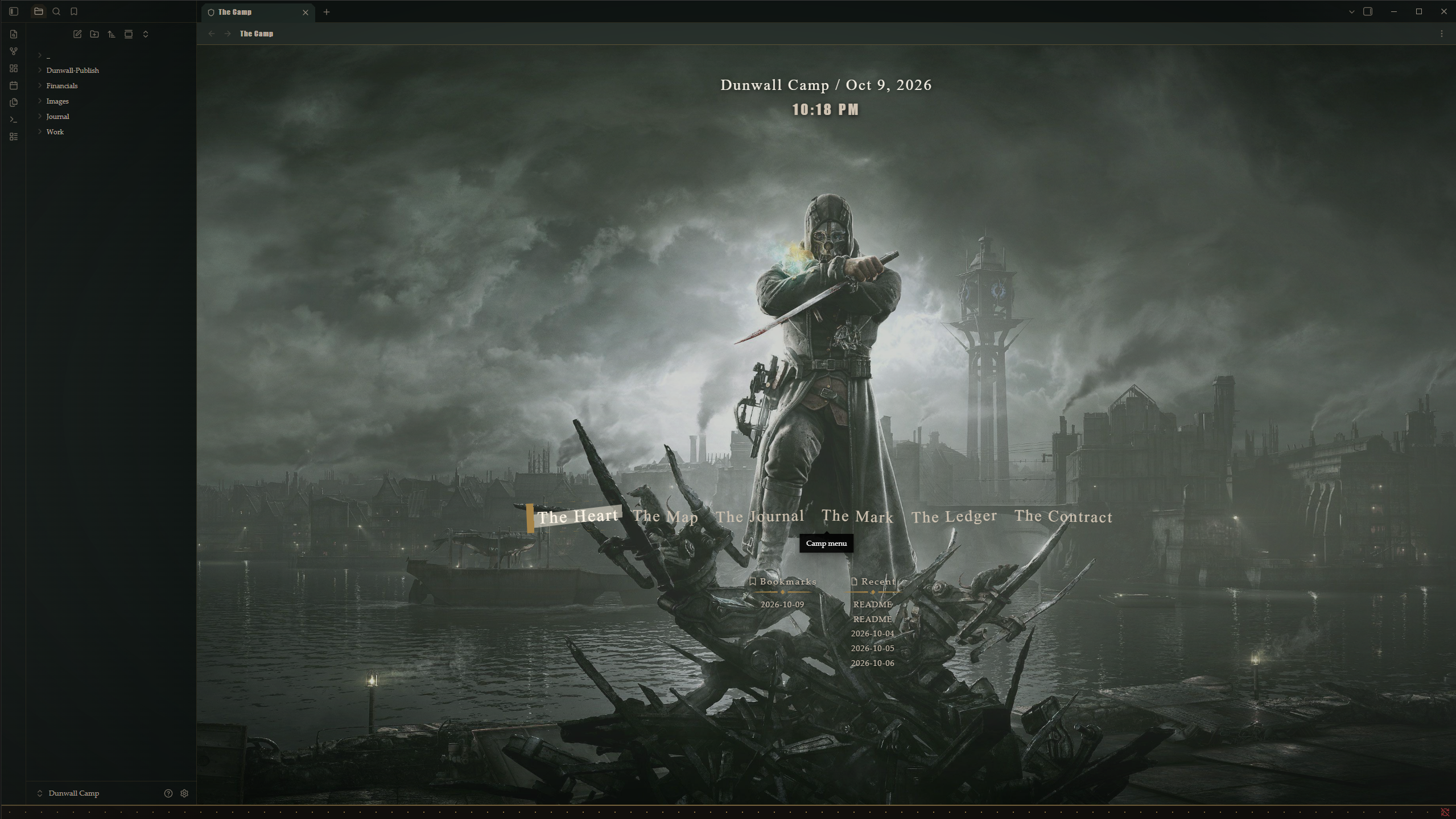
[!TIP] Wallpaper The screenshot uses this wallpaper: https://wallpapercave.com/w/wp1833191 The file is not included here to avoid copyright issues. Download it from the link and set it as your painting (see Painting below).
Install
- Install and enable Style Settings from Community plugins.
- Install and enable the Dishonored - Dunwall plugin. The camp screen needs it.
- Go to Settings, then Appearance, and set the CSS theme to Dishonored - Dunwall.
Theme only or with the plugin
| Feature | Theme only | Theme and plugin |
|---|---|---|
| Colors, fonts, editor, file explorer, tabs, menus | Yes | Yes |
| Camp screen with clock and date | No | Yes |
| Six camp buttons (show, label, what they open) | Shown in settings, no effect | Yes |
| Recent notes and bookmarks lists | No | Yes |
| Painting picture (camp and notes) | No | Yes |
| Painting folder and file picker with autocomplete | No | Yes |
| Smoke fog, speed, still air | No | Yes |
Settings
The theme options live in Style Settings. Open it and find Dishonored - Dunwall.
- Colors: body text, second and third level headings, links, and the dark background.
- Painting: the picture behind the camp screen, its folder and file name, how solid it looks, and the faint picture behind notes.
- Camp buttons: show or hide each word, change its label, and choose what it opens.
- Smoke: how thick the fog is and how fast it moves.
- Still air: when on, the smoke stays still.
Painting
The theme ships without a picture. Until you add one, the camp and notes use the plain dark background.
To add your own picture:
- Put the image in your vault. For example, create a folder called Wallpapers.
- In Style Settings, set Painting folder to Wallpapers. Leave it blank for the vault root.
- Set Painting file to the file name, such as night.jpg.
Notes
The camp screen needs the Dishonored - Dunwall plugin. The theme on its own styles the editor, the file explorer, the tabs, and the menus.
License and fonts
The code is licensed under the MIT License. See LICENSE.
The fonts, Vidaloka and Fjalla One, are embedded in theme.css and licensed under the SIL Open Font License. The license texts are in the fonts folder.
[!WARNING] Disclaimer This is an unofficial, fan-made hobby project. The author made it because they love the game. It is not affiliated with or endorsed by the game's owners.