
README file from
GithubCity Pop
一套为 Obsidian 打造的 80 年代 City Pop 复古主题,包含三套精调配色:两张浅色(唱片封套 / 泳池午后)与一张暗色(日落网格),将黑胶唱片、泳池午后与霓虹夜色的视觉谱系搬进笔记。
A retro City Pop theme for Obsidian with three carefully tuned color schemes — two light variants (Record Sleeve / Poolside Afternoon) and one dark (Sunset Grid), bringing the vinyl record, poolside afternoon and neon night aesthetics into your notes.
截图 / Screenshots
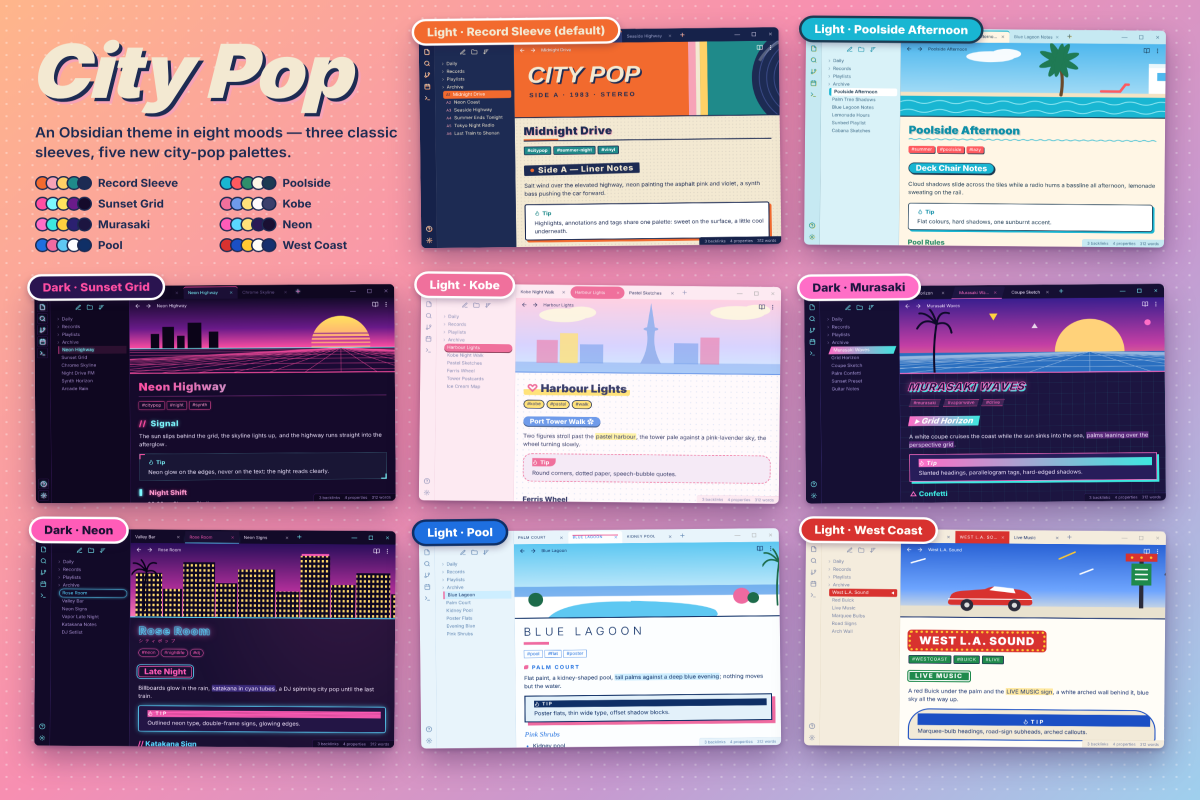
配色方案 / Color Schemes
| 方案 | 模式 | 背景 | 文字 | 强调色 |
|---|---|---|---|---|
| C · 唱片封套(默认) | 浅色 | #f3e9d2 米黄纸底 |
#1d2b53 藏蓝 |
#f26a2e 活力橙 · #1f8a8a 青绿 |
| A · 泳池午后 | 浅色 | #fff6e5 奶油白 |
#1c3a52 海军蓝 |
#0e8fa8 海青 · #ff5a5f 珊瑚红 |
| B · 日落网格 | 暗色 | #150a2b 深紫夜 |
#efe6ff 浅紫白 |
#ff4fa3 霓虹粉 · #7df9ff 霓虹青 |
Scheme C · Record Sleeve (default light): warm cream paper, navy ink, orange & teal accents. Scheme A · Poolside Afternoon (light): soft cream & pool blue, coral accents. Scheme B · Sunset Grid (dark): deep purple night with neon pink & cyan.
特色 / Features
- 三套配色一键切换:通过 Style Settings 插件在浅色双方案间切换,暗色方案随 Obsidian 模式自动生效
- 专属唱片横幅:每套方案配一幅手绘 SVG 横幅(黑胶唱片 / 泳池场景 / retrowave 日落),显示在笔记顶部,可在 Style Settings 中隐藏
- 曲目编号文件列表:侧栏文件树带序号编号,像唱片背面曲目单
- 80 年代印刷细节:标题装饰符号(● ▶ // ▍)、轻微倾斜的 H2、硬阴影按钮与标签;暗色方案切换为霓虹发光
- 霓虹 Callout:暗色模式下 callout 带四角折角与霓虹描边,浅色下为纸张质感白卡
Switch between light variants via the Style Settings plugin; the dark scheme applies automatically. Each scheme ships a hand-drawn SVG banner (vinyl / poolside / retrowave sunset) shown atop notes and can be hidden. Sidebar file list carries track-style numbering. 80s print details: decorated headings, slightly tilted H2, hard-shadow buttons & tags — all turning neon glow in dark mode. Neon cornered callouts in dark mode.
插件推荐 / Recommended Plugin
- SwiftSwitch — 在标签页上快速切换主题与配色方案
SwiftSwitch — quickly switch themes and color schemes right from the tab bar
安装 / Install
社区主题商店:设置 → 外观 → 主题 → 管理 → 浏览 → 搜索 "City Pop" → 安装并启用。
手动安装:下载 theme.css 与 manifest.json,放入仓库的 .obsidian/themes/City Pop/ 文件夹,然后在外观设置中启用。
Community themes: Settings → Appearance → Themes → Manage → Browse → search "City Pop" → Install & Enable. Manual: download
theme.cssandmanifest.jsoninto.obsidian/themes/City Pop/inside your vault, then enable it in Appearance settings.